
Deputy: Employee Scheduling
July 26, 2024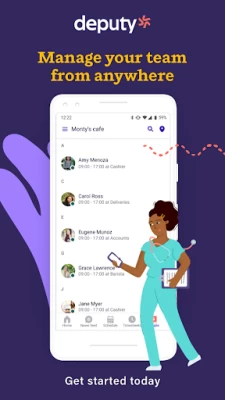
More About Deputy: Employee Scheduling
HOW DEPUTY HELPS BUSINESSES
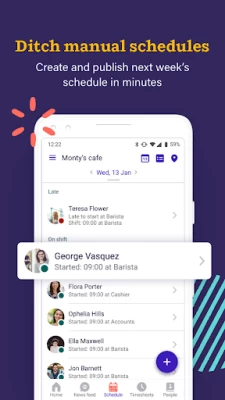
◆ Easily create balanced, cost-effective schedules in minutes from any device.
◆ Publish personalised shift information to your team via push notification, email, and SMS.
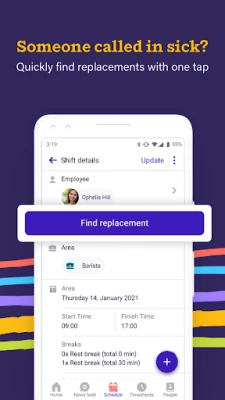
◆ Fill open shifts easily by pushing alerts to your team and letting them pick up available shifts.
◆ Approve leave from your mobile easily so you're never caught off guard.
◆ Quickly approve employee shift swaps and shift changes in seconds straight from a mobile device.
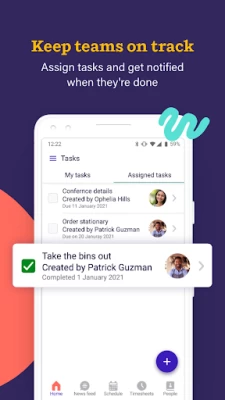
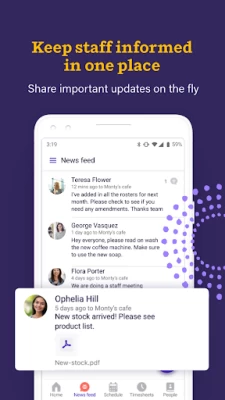
◆ Manage team communications easily in one place: broadcast announcements, assign tasks to specific individuals / shifts, and get confirmation that your team has seen it.
◆ Get greater insight and control of your business, and keep yourself compliant with inbuilt fair workweek compliance.
◆ Connect with your existing apps to give you end-to-end visibility. Deputy syncs with over 300+ of the world's most used solutions such as ADP, Square, QuickBooks, Xero, Gusto, NetSuite, Revel, LightSpeed and many more!
HOW DEPUTY HELPS EMPLOYEES
◆ Get your work schedule on your device as soon as it’s published.
◆ View all your upcoming shifts in one place and receive alerts on days when you’re due to work.
◆ Manage your availability and time off easily, see what’s approved, and make it simple for your manager to know when you are and aren’t available.
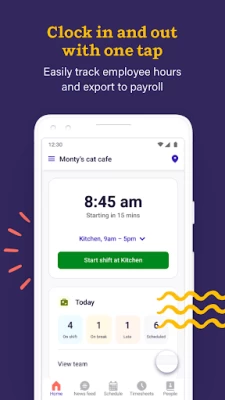
◆ Clock in and out of work quickly from the app.
◆ See important company updates, manage your tasks and communicate with your team from your mobile device.
TRY DEPUTY TODAY
Setting up your business? Sign up for a free trial today.
No setup fee. Pick the plan to suit your business: monthly, annually or flexi.
Always know that you have the right people rostered with our Shift Planner: Deputy makes it easy to create fully costed schedules in minutes, then notify staff when they’re working. Deputy will even automatically remind employees of their shifts on the morning that they are due to work.
Manage employees’ leave requests or unavailability from a central location, then integrate with your online schedules so there’s no risk of scheduling someone who is not available.
Need to be smart about staffing levels? Deputy integrates with your POS and payroll information to make sure you’re scheduling efficiently, and pulls in real-time weather information so you know if you need extra shifts or not!
Clocking in to work is made simple with our time clock software, including GPS validation, to quickly track time and attendance (or optionally from a tablet Kiosk, using our inbuilt facial detection technology).
Finalizing your timesheets and exporting to payroll can be done with one click from your mobile device.
Joining an existing team? It's free - just log in.
ABOUT DEPUTY APP
Our staff scheduling app is updated regularly to make sure we’re always providing the best and most flexible features to the businesses we work with.
Any feedback? Need help?Visit https://help.deputy.com
Terms of Use: https://www.deputy.com/subscription-agreement
Latest Version
24.29.0
July 26, 2024
Deputy.com
Finance
Android
2,037,516
Free
com.deputy.android
Report a Problem
User Reviews

R. Traverse
1 year ago
Constant pointless updates mean every single time I try to see my schedule I have to come update it. Clocking in and out simply doesn't work, I have to manually input every single shift after it's over.

Jesse Guiles
1 year ago
doesn't always acknowledge clockout. shift only shows half the day of work even though we clearly clocked out as instructed. make sure your employees are checking the app for errors. very unreliable. I do like that it gives you the time your on break though.

Stephanie Thompson
1 year ago
Having trouble with the news feed. It will randomly make even more than a dozen news updates not visible or accessible even though I am an admin for my company. I just posted a news update and now even I can't see it. Sometimes that information is critical and not seeing it or getting the updates can actually lose money for our staff.

Crystal Nair
1 year ago
I have used this app for 2 yrs no problems. I don't know if the app did an update but now it doesn't give me the option the start or stop my shift. I had to use the website and now it takes forever to upload the time sheet. It only gives me the option to start my shift or see time sheet if I uninstall and then reinstall, but as soon as I go check the news feed for instance I can't see the shift start or my time sheet again and its only happening with the app. I have not problems on the website.

Tanya Bourne
1 year ago
Changing my rating.... should be minus four. Garbage on Android that's unacceptable! Seriously affects employees scheduling and finances. For the past 6mo Fix the issues please! Notifications do not prompt with all turned on. Delay after claiming shifts to return to list.

P m
1 year ago
Sometimes when clocking in to start my shift it will automatically start with a meal break. Not great when first shift sometimes extends to a long length of time, going into app to start your meal break only to find you've actually been on a break the whole time and not actually clocked in a single second of work time...... In a nutshell, You just worked for free and won't get paid for the time you have done already.

Destiny Edwards
1 year ago
This app took me a while to get used to, it's not as straightforward as you think it is, but once you fiddle around a bit with it, it's a very useful app for businesses. The seamless, trusthworthy, and reliable system is essential for employees and businesses. Taking shifts, tracking hours and shifts, and getting paid is super easy. Highly reccomend.

A Google user
6 years ago
i work from home and we started using this earlier this year to keep track of hours. pretty handy and fairly easy to use, especially since you can also clock in and out from their website if you've logged in since some people may still not have a smartphone, good call on their part. one thing I do agree on with some other reviews is that it would be awesome if there was an option to add an alarm feature/function to alert you at some point before your shift starts to give you a heads up.
A Google user
6 years ago
I would never recommend this. I am dealing with messages going missing then getting in trouble at work because of no notifications or messages yet everyone else in the group got them. Navigation is a pain when half the time I click to go somewhere, it thinks I am trying to change my email. Also need to put it where both unavailable and leave both raise flags in scheduling unless it's just my manager not caring about the one thing I had planned. Samsung 9+

Christian Jolly
3 years ago
Review is for the app only (Deputy as a scheduling solution is excellent) App is limited compared with iOS version. Functionality such as closing out time sheets, viewing and approving leave, managing availability, and searching the news feed is relatively difficult or impossible. Clocking in and out is just fine. In the case of the newsfeed, there is no ability to search posts. And the news feed is already one of the weakest points of Deputy, with no groups, @ or # tags or organization.
A Google user
7 years ago
This app continues to give me an issue. Before I go into it, I will say I have uninstalled and reinstalled the app more than twice, and I've tried it on my older and now also newer phone. Samsung Galaxy. I need this app to work correctly for MY JOB however it is insanely SLOW. Whenever I click ANYTHING it freezes up, screen turns black and then finally about 5 to ten minutes later it will load the page that I clicked for to either browse for a shift or simply reply to someone on the newsfeed. This is a very big inconvenience where as I need this to work correctly for my work. And I cannot continue to spend hours of my day trying to navigate through the app just to land a shift. There is no way I am the only one experiencing this problem.. Any help??
A Google user
6 years ago
Ridiculously poor customer service. The online version is good, and ios was decent, but had problems getting the Android app hooked up & running correctly. 3 emails and more than a month later & they haven't even bothered to respond. If they were actively trying to be as unhelpful as possible, they probably couldn't do any better than they are now.

Janneth Carrillo Serna
4 years ago
I enjoy this App because it's easier to see your schedule and to clock in and out of work and for breaks! Asking for a day off is also a plus and switching shifts with someone! Before we would be waiting in line taking turns to write down our time we started work and at the end of the shift also breaks, it was a pain! I recommend this App it's awesome!!!
A Google user
6 years ago
App works well and seems to have a lot of great features, but it was useless to me. I couldn't send invites to my team through the mobile app, and it took forever to try and create schedules. It's easier to just drag and drop into a spreadsheet or Google calendar. There didn't seem to be any easy way to use this app without paying for the desktop version. Which is bad enough, but it also makes you pay for the mobile app on top of that. Solid app but not small business friendly.

Crystal Graham
3 years ago
Overall a decent app. Only issue is the constant glitches. I've had past issues of not receiving notifications. Others in our company have had issues that are only corrected with Uninstall and reinstall. My current issue is not being able to message individual employees. Only able to message employee groups. When looking in the people list, I can see all employees (I think) but their ability to be contacted is gone and it says they have not accepted the invite.
A Google user
6 years ago
I find the app very useful! my only downfall is that I never get notifications on it anymore like shift changes and such, I did for the longest time, and they randomly just stopped. When I get text notifications about the schedule it always messages me 2 weeks after the shifts that I've already worked. I've tried updating the app. uninstalling it, then restarting my phone and downloading it... I cant find a solution other than checking the app everyday.
A Google user
5 years ago
Love the functionality of the app, gave it 4 stars because there are still some bugs. But most effecting me and my co-workers, for some reason when I go to add a message to the news feed I can only select the entire staff and not individual employees. This issue comes and goes so I know it's possible but the list of people to send a message to is not populating. Thanks, if fixed will change to 5 stars, keep up the good work, it makes my every work day better.

Kuzo
4 years ago
[Edit] Issue has been resolved, and the app works beautifully. Thanks, Deputy, for a great product and great customer service. [Original] It's a decent app. The only issue I have with it is, when uploading an image to be posted, I get the "Cannot find file" error. This doesn't happen when uploading pictures taken through the app. Other than that it's almost seamless. Fix this issue and I'd give it 5 stars.

Lily Caldwell
2 years ago
Would rate 5, but the mobile version does not work as well for me since the last update. It used to run so smoothly, and I have enjoyed using it for the last two years. But now, neither my shift notes nor unpublished shifts on my desktop sync to mobile, and vise versa. I also can't select any employees to work a shift. These issues make the mobile version almost useless to me. I do like how the app keeps track of your break☕️ Will change back to 5 stars when issue is resolved for Android.

alejandra piccione
1 year ago
We are supposed to be able to roll back the time when clocking out at the end of our shift(if we forgot to clock out). Well lately, when I roll back the clock and hit (save) it doesn't save and shows the actual time, not the adjusted time. I have contacted my company(payroll) about this timesheet issue. Since we've been using Deputy for the last few years, the problem comes and goes. I'm hoping this issue gets fixed. I was told to update any new version of the app, but I don't see where.









