

Google Password Manager
November 11, 2025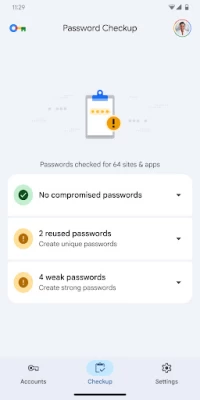
More About Google Password Manager
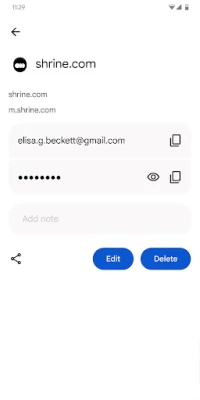
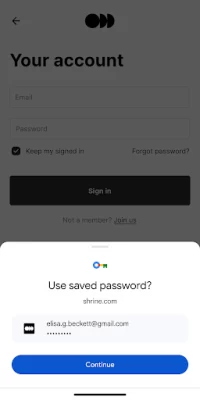
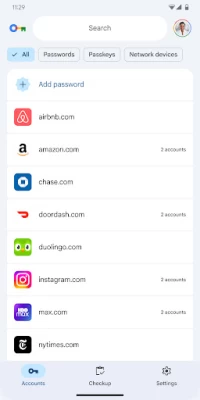
Passwords made effortless:
Sign in to sites and apps on any device, without needing to remember or reuse passwords. Google Password Manager is built into Chrome (on all platforms) and Android.
Latest Version
2025.05.09.799476580.00-release
November 11, 2025
Google LLC
Tools
Android
1
Free
com.google.android.apps.credentialmanager
Report a Problem
User Reviews

M. Mickey Payne
1 month ago
I always had password manager, which is great if you had a few head injuries and can't remember your password. But some dang Google app removed it during the last update! just found out asI am now livid!

April
1 month ago
I had to reinstall this app just to leave a review because well I used to have this app with a bunch of passwords on it but yeah somehow it uninstalled itself and so all those passwords are gone now. thanks again Google yet another thing that you've screwed up

Brian Wright
1 month ago
New Material UI is the most unattractive yet, recent developer-hostile Google policy changes are closing the Android ecosystem, getting account support is impossible, free alternatives are known to be secure (but with Google it's, "trust us, bro," and I could live without this bloatware.

martin Stevens
1 month ago
There is no way to add a passkey which doesn't save back properly. if there is please help me and I will change this to a 5 star. It's a roblox account with just a passkey but hasn't saved under logins thanks.

Matthew Tapping
1 month ago
Almost a 5, would be good if it included a manual random password generator, and if it respected the list of apps not to work on... NatWest being the annoying example for me.

Matthew Daniel
2 months ago
what a raging piece of junk. it launches with a blank list, there's no way to add items to it, and thus it's impossible to see if it manages anything other than just passwords (as do the major players in this space). Woe unto anyone that bets their digital identity management to these clowns

Timothy Joseph Lomibao
2 months ago
Finally you made it into a literal app!!! I've been using this from chrome for months now, i just added it on my home screen as a shortcut. Now that this is an app now, it's cleaner and i can make a transparent widget to open this. More secure for me!!!!

Robert Griffin
3 months ago
Very nice app but I do have two feature requests 1. add a generate new password for all entries - especially useful when you get caught in a data leak 2. add a "merge records" much like the address book feature

Simon Howroyd
3 months ago
Desperately needs press and hold to multi select so I can bulk delete. No basic sorting options like ascending/descending alphabetically. Very similar to the Authenticator app in missing basic functionality for lists.

馨翠玲诗(كترينيس)
1 month ago
Here, you can edit your passwords to make access faster instead of typing everything manually. It’s also more secure that way, especially when you’re in public places since it gives you easy access without the hassle.

arcane
3 months ago
I’ve been looking for this app for years, and I finally found it. Can you add an extra layer of security, like a separate PIN or fingerprint that isn’t tied to the device lock? Since the app holds confidential information, relying only on the device’s lock feels risky, if someone gets into my phone, they could steal my entire online life. It would also be great if you could add customizable password folders. For example, one folder for social media passwords, another for wallet passwords

Chris R
2 months ago
Installation broke Samsung pass passkey storage I believe maybe it tried to use the same encryption container, but once I installed this app all of my biometric passkey from Samsung wallet stopped working. Lost access to a ton of important accounts and have had to spend days getting them all reset.

Davor Radman
3 months ago
This is just a shortcut, and nothing more. We could add the shortcut from within Password manager for years already. It does not solve any problem anyone had, as this can still not be used as a password manager in other browsers.

Marvin Banawa
2 months ago
basically password storage, no more no less... i just hope they will update this into a more advance password manager, something like bitwarden or apple wallet, a password manager that has more features like able to organize/group login info, password and otp. I think google can also integrate authenticator and password manager into 1 app.

mark summerton
3 weeks ago
I moved from iPhone to pixel 10 and generally like it however the passwords are frustrating as hell. I often have to redo my password as they are not saved/found on my phone. on some websites I have to scroll through the calendar to input my dob and find I save these passwords but where are they saved? they are not saved on my phone (under passwords!) there seems to be so many bugs of naffness compared to iPhone, not as smart or slick which is a real shame as I loathe apple as a company

James Byerly
1 month ago
Keeps saying "no passwords for X" when I just clicked save for that password. I have to manually open the app and copy/paste passwords into apps and websites. It also randomly refuses to offer the option to generate strong passwords. Not very reliable

KobraMeister
2 months ago
Frozen, can't do anything, open the app and that's it, click around and nothing functions. It's still a non functional pile of garbage and I still can't access my passwords and I have bad memory issues, so this is literally the only way I can remember them without keeping a binder or a massive wall of sticky notes around.

B L DUNCAN
2 months ago
l mean it's ok for now but since there is now a stand alone app, there definitely needs to be more & updated security features, as well as encrypted, those are the most important things of a really good password manager. If those things can happen, then this could definitely be my default password manager. Please Continue to update & improve for better security features...

Konstantinos Stavropoulos
1 month ago
it does not rate within the 1% of password managing software. I find that I have lost my passwords for whatever reason and I've had to reset it and then reinstall all the passwords in this app. I would prefer a far more advanced app that gives you very detailed information and is able to add far more than just a password and a user name but customer IDs etc. other than that, it's an okay app

Jason Brooker
2 months ago
⭐️⭐️⭐️⭐️⭐️ A simple, reliable champion! I switched from Bitwarden because it just wasn't working half the time. Google Password Manager is seamless, fast, and does what it's supposed to do every single time. It's so integrated with my Android phone and Chrome that I don't even have to think about it. If you want a password manager that simply works, this is the one! 💯👏🔒









