
Lock Screen OS Style
November 16, 2025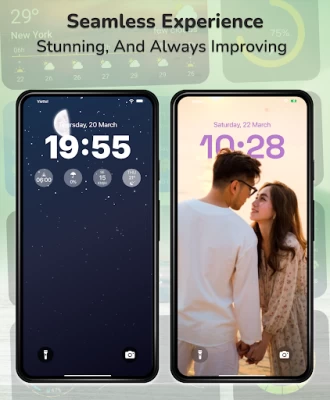
More About Lock Screen OS Style
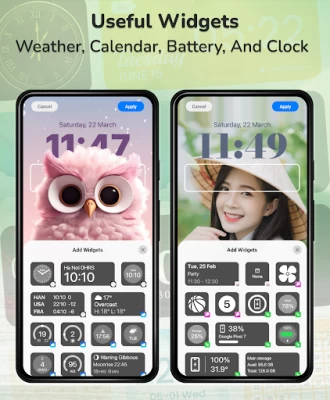
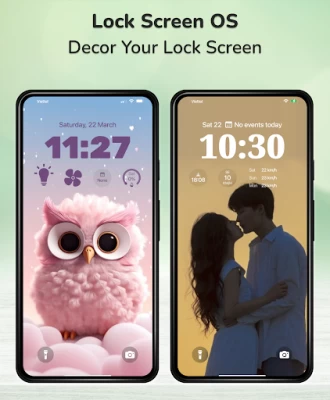
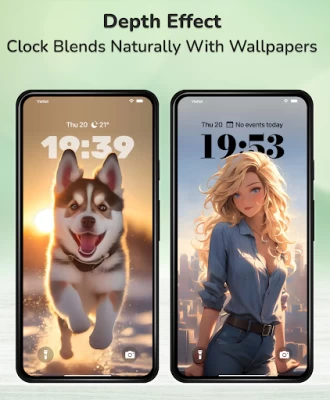
Lock Screen OS provides you with all-new ways to personalize your Lock Screen. Show off your favorite photos with Depth Effect mode, customize font styles, and display a suite of widgets for at-a-glance information.
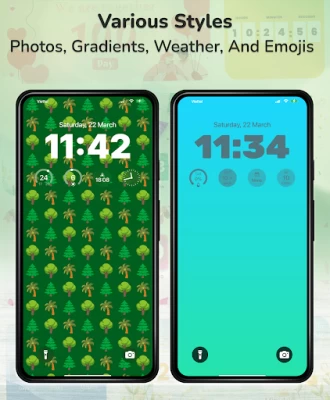
🔻Custom lock screen OS with: Color, emoji, OS wallpaper signature, weather, gradient color... Lock screen OS will surprise you every time you open your phone with a wallpaper applied with Depth Effect mode and change the phone wallpaper instantly with just 1 touch.
🔻OS lock screen for Android impresses with its features OS lock screen widgets. You will be surprised by OS lock screen widget we offer. Lock screen widget theme OS allows you to select the information you want to quickly view right on the lock screen like Calendar, battery, weather, date, alarm,....and experience the latest upgrade of the OS operating system.
🔻Lock screen OS allows you to choose the font for the clock. You can customize the thickness of the clock font and different display languages.. Lock screen 18 has 3 options to show notification: Expanded list view, stacked view, or hidden view.
🔻 Create multiple Lock Screens
You can now create different Lock Screens, each with a unique backdrop and style, and easily switch between them. Browse a gallery of wallpapers with suggested photos and themed collections for inspiration.
🔻 Notifications
View notifications on the Lock Screen in an expanded list view, stacked view, or hidden view.
🔻 Music
View and control music right on your lock screen.
To make Lock Screen OS working most perfect. You must grant some special permissions like to:
- CAMERA: Open camera in your phone when screen is locked.
- NOTIFICATION ACCESS: Show notification when screen is locked.
- READ/WRITE_EXTERNAL_STORAGE: Support wallpaper set from your storage and our server save image.
- DRAW OVER SCREEN: Show Lock Screen in over all application
- ACCESSIBILITY PERMISSION: To enable Lock Screen OS, please allow Accessibility services. The service is only used to allow this app to draw on the phone's home screen and status bar. The application commits not to collect or share any user information about this accessibility right.
Step setting in the first install can help Lock Screen OS applications work better.
Step 1 : Grant all permission requirements.
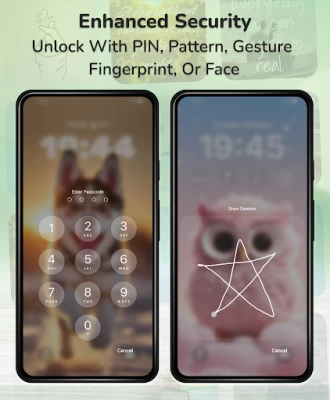
Step 2 : Setup pass code > click on Pass code option > create new or change pass code.
Step 3 : Disable system notification > Click on Disable system lock option > Please note that , selected system lock is "None".
Step 4 : If you need to hide content and show system notification > Please select Notification option and turn on switch if needed.
You can quickly view with youtube video at : https://youtube.com/shorts/7MugCajnWB8
Lock Screen OS is a perfect application and helps you have wonderful Android applications with beautiful interface.
Disclaimers
All product names, logos, brands, trademarks and registered trademarks, which are not owned by us, are property of their respective owners
All company, product and service names used in this app are for identification purposes only. Use of these names, trademarks and brands does not imply endorsement.
This app is owned by us. We are not affiliated, associated, authorized, endorsed by, or in any way officially connected with any 3rd party apps or companies.
All of your opinions can help us make more applications and improve others in the future, if you need help using features or have some suggestions, Please contact us via: mayoh.mkt@gmail.com.
Latest Version
1.6
November 16, 2025
HkN Studio
Tools
Android
70,421
Free
com.lockscreen.ilock.os
Report a Problem
User Reviews

Hassan Abbas
7 months ago
I was happy today because i install your launcher

ms rajputana travels
4 months ago
one star for your hardwork to build this useles app

Alkemy Benjamyn
5 months ago
The app is good but its stops after sometime

Habiba Bebo
7 months ago
The clock is not set

Aman Princes
7 months ago
Lock screen style by aman

Ummy Kimaro
3 months ago
why is it half on lockscreen?? it's showing half

Declan Ihie
3 months ago
need to upgrade ,it hangs phone

Francis Lucas Zambrano
7 months ago
i dont like it,I LOVE IT!!!!! after this updated, its already functional! nothing to say, just PERFICTION. but if only u guys can add landscape mode that would be better.

Joshrel Layese
6 months ago
ohhh myyyy soooo gooodddd. I really love this app all because of the way you can resize clock fonts and the depth effect. I love thissssss please keep improving it🫶🏻🫶🏻🫶🏻🫶🏻

Reymar Señora
7 months ago
I'll gave this app 5 star! It is has a good features like IOS, but can I ask a favor? Can you put a single time number? not numeric one, thnx!

Olivia Harmon
7 months ago
It is the best Lock screen app I have ever had, it doesn't have many ads, I haven't had any yet. and it's not a long process. I'm definitely using this app again and sharing this app with relatives.

Thaplosbu Mashego
4 months ago
Nice i like it fixed bugs it makes screen become slowly im intresting for this application upgrade them

Joseph Wangsaputra
1 month ago
this app is extremely good if you want an apple lockscreen, but i suggest giving an option to hide lock icon or make the icons smaller since iphones above 14 Pro Max doesnt have the lock icon. Very good app tho😌

Sesandi
3 months ago
well pretty enoying to type in two and don't have ringtones but everything else is amazing

kasami marvin
1 month ago
U should also add the word "swipe up to unlock" to make it look more better

Dhruv Prajapati
7 months ago
It's exceptionally very great in ai depth effect and wallpaper filers. But it has some minor issues like it doesn't close after unlocking with physical fingerprint and swipe to unlock feature also not work for at least 2-3 times. It should send us to the og password section just after swipe up (automate one more swipe or something)

shzhxg sh
3 months ago
This app is really the one I’ve been looking for, but it has two major issues: 1. When I have an incoming call, ringing alarm or another overlays,the screen doesn’t hide. plz provide an option to hide screen 2. The screen works, but the clock seems frozen. When I turn the screen on, the time appears stuck, and it doesn’t update until I touch or swipe down the screen. I have another suggestions,too if you let me to email you and see my suggestions and fix all things,i ll give you 5 stars

Rabik Ismayil
1 month ago
best lockscreen I like to...but, notifications not ios style liquid glass & blur style..? everything ok 👍 pls update... incoming call screen not showing lock screen...

zenn. naur
1 month ago
so far the most accurate ios lockscreen yet, I just hope they add a dark mode.. would literally beg for it

Spincky Mae Taclobos
1 month ago
I definitely love this app, but I have a concern. It says in your app that you can unlock it with fingerprint or face recog but it has no setting to turn it on. Whyyyy? Hope this developer can read my concern and can create this one. Thanks.









