

Termius - SSH and SFTP client
September 05, 2024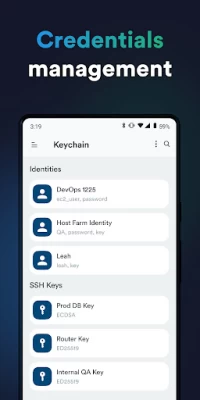
More About Termius - SSH and SFTP client
· Connect from your mobile and desktop device with SSH, Mosh, Telnet, Port Forwarding, and SFTP.
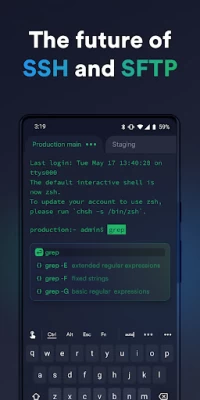
· Get a desktop-grade terminal experience with a virtual keyboard covering all the special keys required, or connect your Bluetooth keyboard.
Use gestures or shake the device while in the terminal to emulate stroking of Tab, arrows, PgUp/Down, Home, and End, etc.
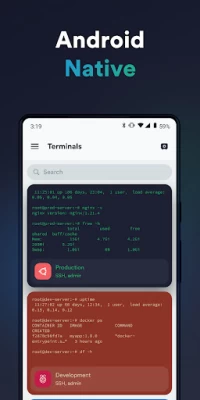
· Work in several sessions simultaneously with a multi-tab interface and split-view support.
· Customize your terminal themes and fonts for each connection.
· Save your favorite and frequently used commands and shell scripts to execute them with a tap instead of typing.
· Quickly access the unified history of your terminal commands.
· Get the support of ECDSA and ed25519 keys as well as a chacha20-poly1305 cipher.
Ad-free.
With the Termius Pro plan, you can also:
· Access your connection settings and credentials from all your devices anytime with an encrypted cloud vault.
· No limitations on the number of devices to sync.
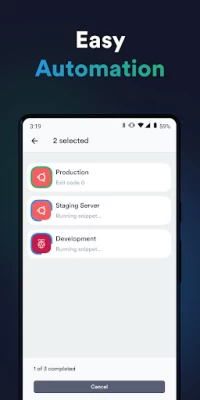
· Run your saved commands on multiple sessions or servers or instantly get them autocompleted in the terminal.
· Connect to your hardware via Serial Cable.
· Authenticate using hardware FIDO2 keys.
· Connect through Proxy and jump servers.
· Set custom environment variables.
Integrate with AWS and DigitalOcean.
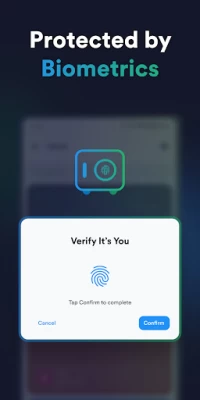
· Protect your credentials with Touch ID or Face ID and your account with two-factor authentication.
· Keep your keys on your machine with SSH agent forwarding.
Termius reinvents the command line experience. We strive to make remote access for admins and engineers a more productive and enjoyable experience.
Latest Version
6.3.7
September 05, 2024
Termius Corporation
Finance
Android
2,426,654
Free
com.server.auditor.ssh.client
Report a Problem
User Reviews

Avas Poprushu
2 years ago
Update 2. The fix doesn't work. Transferred 1gb to my phone to the local storage then deleted. System shows that 1 gb of user data this application has. Update: User BEWARE! A single transfer of a file from a host to your local storage will take local space till you wipe all data for this app. This app isn't able (or specifically programmed to cache) to delete files from local storage. It saves whatever you copy indefinitely!

Gregory Potter
3 years ago
This is, by far, the best terminal app I've found for Android, and it's cross-platform compatible (be it MacOS, Win10, or one of the many flavors of linux) with a sync feature. A purchase well worth every penny! Been 6 months since I started using, and it's been a time-saver like no other android app. Tech support answers questions fast and thoroughly, and transitioning my work across devices is seemless. Keep up the good work.

A Google user
7 years ago
This app works great with my physical keyboard. I love that you can remap the volume buttons. I had an issue with my choice of color theme not saving, and their support team got back to me just a few hours later saying that they would be fixing it in a future release. Awesome, friendly customer service :) Keep up the great work!
A Google user
6 years ago
I love the app, hands down best terminal emulator/ssh client for mobile. But I'm really upset to find the premium features are now subscription only and at quite a cost. I remember the premium version being a one time payment. I had come to the decision that I wanted to pay for the extended features, but I will not pay that much. I'm now tempted to look elsewhere for an app that provides those features at a reasonable cost.

Jeffrey Lund
2 years ago
I've tried pretty much every ssh client in the play store and in my opinion this is the best. It's both beautiful and functional. Every other ssh client has some minor annoyance. My one wish is that you could fullscreen the terminal to maximize use of the small mobile screen size (mostly for when I have a Bluetooth keyboard and don't need the extras gobbling up space).

Andrew Thompson
3 years ago
There have been more times that this app has saved my butt than I can count over the past 4+ years of using it. It's sleek, convenient, feature-rich, and reliable. I probably SSH into my home servers with my phone more than I do with my laptop because it's just so easy to use. My only issue is that it's closed-source and cloud dependent. The subscription model is ok, the app works fine without it. The extra features are nice, but switching back to free tier isn't too bad either.
A Google user
6 years ago
An absolutely incredible app for an SSH client. I use it for emergencies when I need to work remotely, and this app performs perfectly. Other apps have crashed when they've had to display too much information at once, and they've been difficult to configure which keys were easily accessible just above the keyboard. This app has no such problems. You can easily configure which keys appear above the keyboard, it has a compact and handy swipe method for inputting arrow commands, and no crashes.
A Google user
6 years ago
This looks like a top notch tool with a well designed interface. Unfortunately, they don't seem to have an option to adjust the font size which makes it COMPLETELY useless inside an environment like Samsung DEX which is how I'm using it. Unless you're using a touch screen with the ability to pinch-zoom you will not be able to read anything. I hope they add a font size feature to the settings in the future.

David Merillat
1 year ago
Needed a replacement for another SSH client app that became buggy. I was pleasantly surprised that Termius not only worked flawlessly, but it also has a bunch of quality-of-life features that couldn't be more intuitive and easy to use. Also, there are no ads. I've actually gone looking for the in-app purchase just to show the devs some support, but I couldn't find it. Perhaps it's related to the cloud sync feature, which I don't want to use (and don't have to).
A Google user
6 years ago
It's a nice app & does many things well; however 3 issues. When using from DeX, it does not keep state well. #1 Whenever I unplug the terminal sessions r gone. I would like to be able to receive a call & come back exactly where I left off. I think if you start sessions from phone it keeps, but there is a bug that make it capricious. #2 There is no way to set ur custom shortcut keys to switch between tabs. #3 I would love to get split windows w/ ability to jump via shortcut. This would make it perfect (desired but not deal breaker) Otherwise, it's really functional. Pls fix #1 that's a real deal breaker!
A Google user
5 years ago
Fantastic app! I just wish premium didn't cost $10/mo. If I were using it in my day job, perhaps it would be worth it, but just using it to ssh into some boxes in my homelab from time to time, it isn't worth it. It would be awesome if we could just pay a one time fee for Android only and promise not to use it for monetary gain, then if we did, we could subscribe to the $10/mo version.

Eric Johnson
4 years ago
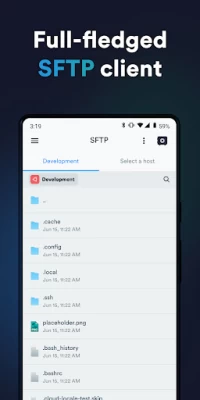
This is BY FAR the best mobile SSH client I've found. Best of all, there are NO ADS within the free version of the app! SSH File Transfer is available as a paid feature (a bit too pricey for me), but it allows full-featured remote terminal support, including a very elegant way of managing Keys and Passwords. Terminal sessions remain active in the background until you explicitly close them from either the notification or within the app.

Evelyn Kokemoor
4 years ago
While I had this app installed, my phone became so slow it was unusable - I could barely type or even reboot the phone (which didn't even help). Now that I've uninstalled the app, everything is back to normal. It's a real shame since the app interface is convenient and snappy and I liked using it. Having a control key on the keyboard was much appreciated. Disabling my phone was not.

Sk8kman
3 years ago
Very good SSH client. has all the essential tools you need. including arrow keys, ctrl, alt, etc... And you can set it to automatically log into a server with one tap. The only (very minor) issue I've had with this is if you detach from a screen, you won't see any previous commands or lines from when you entered a screen.

Zack
5 years ago
Works as it should. Very helpful. I would like to see some additional features, like built-in ability to ping a server. It would also be helpful to be able to create profiles which would activate a particular set of saved commands (a host, port forwarding settings, etc.) with 1 click, rather than having to activate each manually.

Jon Daley
4 years ago
09/2016: Good ssh client, the export function is slick. Update: new phone. I had forgotten about the export feature. Very nice timesaver. Update 03/2021: didn't get a response via email or the beta program. Version 5.2.4 appears to have a bug when entering passwords for su or sudo, the passwords don't get sent properly, so I can't su to another user. Hopefully, the application isn't stealing it and saving it somewhere...

venykrid
1 year ago
Unless you restrict battery usage it will heat up your phone/high CPU usage and it causes significant battery drain from background, just be aware. Some improvements or better defaults to mitigate this are needed. Generally though it's a very solid ssh client and has some really nice features like auto complete

Chinarut R
1 year ago
with cross-platform support on Android & iPadOS, hands down a winner. it does a great job managing my keychain & multiple host connections. the only thing I've asked the developers to implement is a keychain that allows a host to have different keys depending on client - this is critical when biometrics differ - on my Pixel it is a thumbprint & on my iPadPro it is FaceID. A pro subscription makes it worse - it will sync your keys & cause the like-named hosts to clobber. Hope they fix this soon!

Alan Silverstein
1 year ago
Excellent for the free price, I just wish it understood Swype and voice recognition. I don't use it as much as I could because it's tedious trying to type across the connection to my Linux box. Also it makes it too easy to accidentally remember the password, which I don't want to do, I have to remember not to hit the wrong button that is bolded. And it's a little hard to figure out how to turn the password back off later.

Sarah Day
1 year ago
I use Termius on my PC for SSH connections. All of the connection details are synced between devices, including keys, so if I need to connect to a server from my phone, it's just a couple of taps. Having all of my connections available on my phone with a fully functional shell has been a life saver. If PagerDuty goes off, 99% of the time I can take care of the issue without having to go anywhere.









