
Adobe Acrobat Sign
July 18, 2024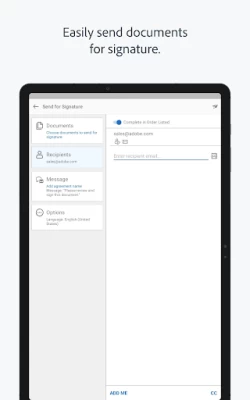
More About Adobe Acrobat Sign
• Adobe Acrobat Sign Solutions
• Adobe PDF Pack
• Adobe Acrobat DC
• Adobe Creative Cloud Complete
This app is a mobile companion for the Adobe Acrobat Sign e-signature service. With it, you can e-sign documents and forms, send them to others for e-signature, track your documents and get signatures instantly with in-person signing.
Adobe Acrobat Sign is the electronic signature solution you can trust, from the global leader in secure digital documents for over 25 years. Adobe Acrobat Sign is used by businesses of all sizes — including Fortune 1000 companies, healthcare organizations and financial institutions — to accelerate critical business processes in Sales, HR, Legal and Operations.
SIGN DOCUMENTS ON THE GO
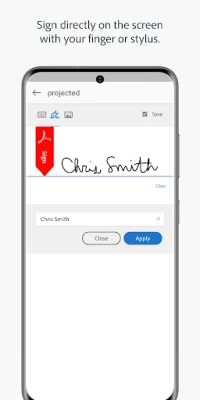
• Open and e-sign documents instantly.
• Sign directly on the screen with your finger or stylus.
• Sign or click to approve a document sent by others.
• Delegate signing to another person or reject a signing request.
• Save partially filled forms to complete at a more convenient time.
GET E-SIGNATURES FROM OTHERS
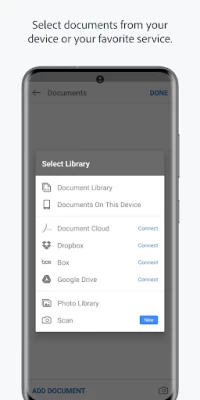
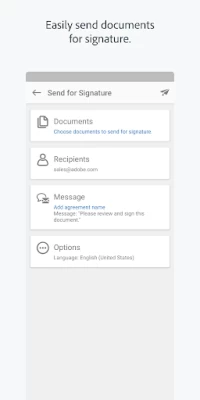
• Send documents for signature from your online document library, your device or email attachments.
• Work with documents from Google Drive, Box, Dropbox or Adobe Document Cloud.
• Use your Android to get e-signatures in person when meeting a client.
• Choose a language for the signer’s experience.
STORE AND MANAGE YOUR DOCUMENTS
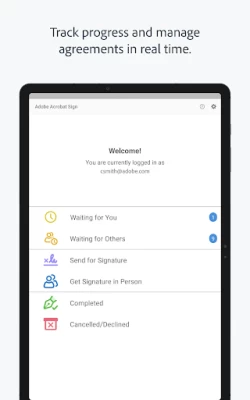
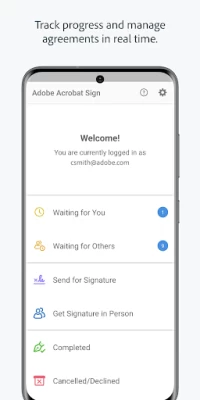
• Track progress and manage agreements with real-time status updates.
• Send reminders to recipients who haven't signed yet.
• View agreements stored in your online account.
• All parties get a certified copy of the signed document automatically by email.
LEGALLY BINDING AND SECURE
• Adobe Acrobat Sign is compliant with e-signature laws around the world, including the U.S. ESIGN Act and the European Union eIDAS Regulation.
• Signed documents are encrypted and saved as Certified PDFs. Recipients can validate document authenticity.
• Each transaction includes a complete audit trail detailing events and actions.
• Adobe Acrobat Sign meets stringent security compliance standards and is certified compliant with ISO 27001, SOC 2 Type 2, HIPAA and PCI DSS v3.0 used by the Payment Card Industry.
• Adobe Acrobat Sign provides protection for both the sender and the signer during the signing process with identity verification options, an audit trail, a tamper-evident seal and more.
SCAN DOCUMENTS
• Turn any paper document into a PDF, then send for fast e-signing.
• Scan multiple document pages into a single PDF and reorder them as desired.
• Easily attach, send, and sign scanned PDFs.
• Enhance your camera images with boundary detection, perspective correction, and text sharpness.
• Requires Android 5+.
Terms & Conditions: Your use of this application is governed by the Adobe General Terms of Use
http://www.adobe.com/go/terms_en and the Adobe Privacy Policy http://www.adobe.com/go/privacy_policy_en
Do Not Sell or Share My Personal Information: https://www.adobe.com/go/ca-rights-linkfree
Latest Version
5.0.1
July 18, 2024
Adobe
Finance
Android
1,411,472
Free
com.adobe.echosign
Report a Problem
User Reviews

locs1212
5 years ago
No save options, once you forget to add a signature to send out,, you have to start all over from scratch. So cumbersome. This app is so crappy you should not pay for it with a subscription fee.

Donna Roach Mooneyham
3 years ago
Easy, clear, and in a timely manner. A plus in my book. Not so challenging for my dyslexia or short attention span ... Went to the task at hand, signed and returned, all from this one app. None of this , Leave here, then go and, now go back, and it's gone or timed out .. I am glad for a layman's application in our digital world. I TIP MY HAT ... 10 ON A 5 STAR RATING❤️❤️❤️

Cascadia Insurance
1 year ago
You've overlooked the obvious... I can't find any way to sign a PDF on my device. I tried to "Send for signature" to me, and it tells me I can't send a signature to only myself. Is there no "Sign now" function on Acrobat Sign?

Kierrynie Todd
2 years ago
I cannot log into the app to request e-sign. It was better when you could just select the tool inside Adobe Acrobat instead is having to download a whole different app just to get signatures. Constantly getting Error 403: disallowed_useragent when I try to login from the app, but can't use it on a website. Terrible.

Ryan W (Platonic, Unc0nnected)
5 years ago
Mostly useless, can't play signature fields or text Fields like in the website or really do anything else except for had one signature in an arbitrary spot on a document. This isn't rocket science It Is 2020 and it's not hard to have these features oh, there is no excuse for a large company like this to drop the ball and might explain why people move in droves to the competition.

Hariz Hazwan
1 year ago
This is annoying. The app told me to sign in using my Google account. But when I signed in, it says Google access were blocked. When I tried to resign in, it shows no other methods than using Google sign in. Then what's the use of sign in if there's only ONE BLOCKED METHOD?

D Smith
4 years ago
Emailed this to Adobe: Good morning. I can confirm that the Android Adobe Sign app prevents users from signing in via Google Authentication. It says to let the app developers know that they're not adhering to Google's standards for 'embedded webview' and to try and open the login from a browser. Signing into the Adobe Sign site in a browser doesn't help and I can't find a way to make the browser open a link that the app can recognize and act on. What I mean is that I also tried opening a document in the browser and getting it to open the app. There is a button on the browser site to 'install the app', but it only brings up Adobe Reader in Google Play. All of this means that I cannot sign into the app. Please let me know what can be done. ----------------------------------------------------------------------------------- I'm willing to change my review if they get this fixed. I get that they have to keep up the most minute changes from multiple companies like Google.

A Google user
5 years ago
Can't log in with google. It took me forever to figure out how to log in with Google (just enter email and when you click on password box, it automatically goes to next page). Everytime I try to continue with Google, it tells me there was an error. Useless app if I can't sign in.

Shane Fatzinger
3 years ago
TERRIBLE app. Use Docusign instead. Adobe can't even get emails out reliably for document signatures. I send things to my clients, and it ends in their junk folder, or they don't see it at all. NEVER have this problem with Docusign. Do not use this if you need anything important signed. It works great if you have a document that doesn't need a signature, because then you wouldn't be using this app in the first place.

Jack Cooper
4 years ago
This app prevented me from entering a signature and finalising my employment. For whatever reason, there was only a phone option for entering a signature, to which adobe would send me blank texts, instead of the required link for creating a signature. This was attempted over multiple devices with the same result.
A Google user
7 years ago
Selecting upload documents does nothing. Fill and sign literally opens a web page asking me to drag and drop a document from my computer. I think when Adobe created this app, somewhere in the process they forgot they they were creating a mobile app. Complete garbage. Also, why do you need my phone number and date of birth again?

Bernardo Bueno Hoeschl
2 years ago
This app is horrible. It is slow and creating documents to send for signature is near impossible with its horrible layout. It would he great for managing things on the go, considering how simple the things it does are. But its horrible. I can barely use it to check if a document has already been signed due to how slow it is.
A Google user
5 years ago
This is dreadful. It doesn't recognise my Gmail account. So I set up another account just for the phone (separate password). After launch I enter user email and password. The screen LOOKS like the app is loading but then asks for password again. It LOOKS LIKE it carries on loading but when the app opens it says "invalid User" YOU JUST CAN'T USE IT. I'll wait for a couple of days to se if Adobe respond, but If not it'll be uninstalled. Today is 30 March 2020

ALEC HIRANG (Alexander Kirk)
4 years ago
02/12/21: Still no fix 8 months later tsk tsk. UNABLE TO SIGN IN; I use Google OAuth to access my Adobe account. Upon opening Adobe Sign, the button for Google login is missing. I deleted the separate user/password from my Adobe account once Adobe allowed OAuth sign-in. This is such a useful service from Adobe, and a large reason why I continue to pay for the subscription. Looking forward to the fix!
A Google user
6 years ago
I was duped into paying for the app. It was very buggy with the free version so I thought of trying the free trial version. After filling out the form, when you get to change the country, you'll have to fill them out again and the free trial version option was totally gone! I ended up paying what I thought was the trial version. The app worked fine on the full version. But be careful in getting the "free" trial version especially when you're not from the US

Joey Gochnour (nutrfitnesspro)
5 years ago
It doesnt pull current versions of your document cloud into the app, so you can't ask for signatures from the phone using their own software cloud. It should refresh your selection of documents based on what is in the cloud now, not what I had 3 years ago. It asked me to sign in twice and still didn't get a current iteration of what is in my Adobe Document Cloud. The whole Adobe sign thing is slow and clunky compared to other signing services.
A Google user
5 years ago
This app isn't serving it's full purpose. I can send the e-sign, but I cannot indicate where they need to sign like I would if it were submitted via desktop. What's the point of having mobile access if usability isn't consistent across the board? It makes no sense ESPECIALLY since you have to pay to even have the ability to have unlimited utilization of the feature. So far, when I send using the mobile app, I don't get the complete info I request and they sign just anywhere on the document. 👎🏾

Herman Ko
3 years ago
Absolute Garbage. This is probably one of the most useless apps I've had to use. I have a subscription service and rely on technology to make my life easy. As a business owner I cannot stress the importance of having a streamlined service. I do not understand how a multi billion dollar corporation cannot figure out their app line up. This app has not improved at all since I've last used it. Instead of having 8 different apps for every service you offer, how about streamlining it into one?
A Google user
5 years ago
Ok... I'm editing my review. First I gave it 2 stars because I thought it was missing features but they're just hidden in menu layers. I added a star because although it's not intuitive the functionality is there. Adobe - you need to make this more user friendly, add the ability to access your creative cloud documents and simplify the field assignment process. Why cant I create templates on mobile? Also... come at it from the perspective of complete mobile functionality. I shouldn't need a pc.

B
4 years ago
Worked perfectly for me. I have the new s21. I just sent out a document, I had a hard time figuring out how to extend fillable boxes longer than an inch. Also ui could be a little more intuitive will doing fill boxes. The box kept going back and forth from one side of the page and the other, too sensitive with side switch. Other than that, it worked, and I like the menu, very clean.









