

Bluevine
August 24, 2024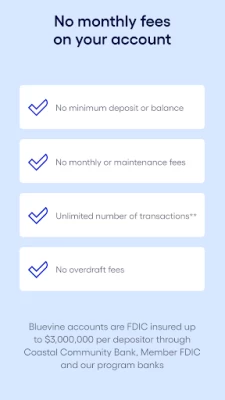
More About Bluevine
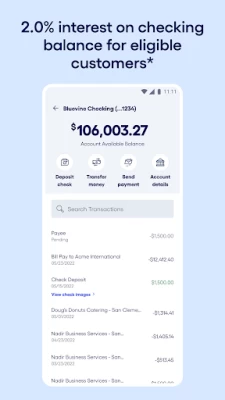
Eligible customers can earn 2.0% interest on balances up to and including $250,000,* making Bluevine Business Checking one of the nation’s highest-yield business checking accounts.
NO MONTHLY FEES
Make all the deposits or payments you need with no limit on your number of transactions.** Plus, you can save with no monthly or overdraft fees and no minimum opening deposit or balance requirements.
BUDGET BETTER WITH MULTIPLE ACCOUNTS
You can now manage up to 5 sub-accounts so you can easily budget for taxes, payroll, and more. Each sub-account comes with a designated account number so you have more control over your finances.***
BANK FROM ANYWHERE
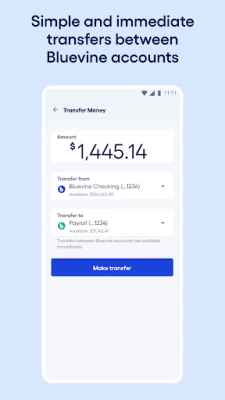
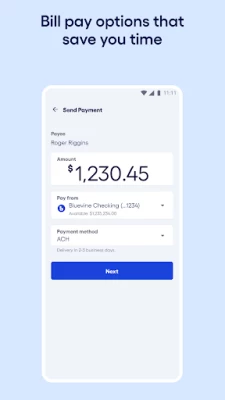
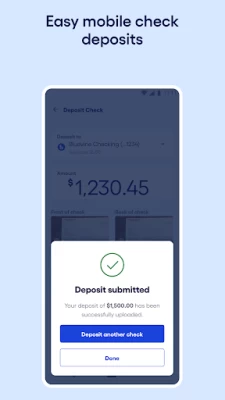
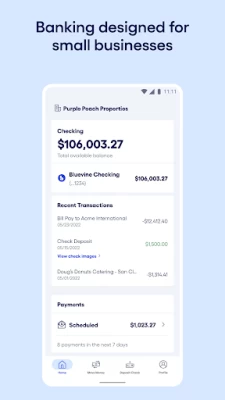
Deposit checks, transfer funds, and pay bills from your mobile device. You can also deposit or withdraw funds at 37,000+ in-network MoneyPass locations nationwide.****
ADVANCED SECURITY
Bank with confidence and peace of mind. Bluevine accounts are FDIC
insured up to $3,000,000 per depositor through Coastal Community Bank, Member FDIC and our program banks. We protect your Bluevine account with industry-leading security protocols. For example, you can instantly lock your debit card if you lose or misplace it.
For more information, visit https://www.bluevine.com/ccbx-checking-agreement/
Bluevine in the News:
“Bluevine has demonstrated a track record of success with their multiple financing products and set themselves apart with their vision of a complete platform of innovative banking products for small businesses.” -TechCrunch
“No one that we know is building or has built a bank designed and built specifically for small businesses. And that is what we’re doing.” -Banking Dive
LEGAL DISCLOSURES
Bluevine is a financial technology company, not a bank. Banking services are provided by Coastal Community Bank, Member FDIC. Bluevine accounts are FDIC insured up to $250,000 per depositor through Coastal Community Bank, Member FDIC. The Bluevine Business Debit Mastercard® is issued by Coastal Community Bank, Member FDIC pursuant to a license from Mastercard International Incorporated and may be used everywhere Mastercard is accepted.
Mastercard is a registered trademark, and the circles design is a trademark of Mastercard International Incorporated.
Bluevine Privacy Policy: https://www.bluevine.com/privacy-policy/
Coastal Community Bank Privacy Policy: https://www.coastalbank.com/privacy-notice.html
*Customers will earn 2.0% interest on total balances up to and including $250,000 only if they meet the monthly debit transaction or deposit requirements described in section M of the Account Agreement (https://www.bluevine.com/ccbx-checking-agreement/). No interest earned on balances over $250,000. Any interest accrued and payable for an Account or Sub-Account will be paid to your main Account.
**No limit on the number of transactions. However, checking accounts are subject to the monthly deposit and withdrawal amount limits of the user agreement: https://www.bluevine.com/ccbx-checking-agreement/.
***Sub-accounts can only be opened on the desktop or mobile browser version of the Bluevine Dashboard experience. Customers will receive a Bluevine Business Debit Mastercard only for use with the main Bluevine Business Checking Account.
****Bluevine charges a $2.50 fee for ATM transactions outside of the MoneyPass® network. Additional third-party ATM fees may vary by ATM operator.
Latest Version
10.24.0
August 24, 2024
BlueVine Inc.
Finance
Android
128,490
Free
org.bluevine.depositapp
Report a Problem
User Reviews

Amanda McCumber
2 years ago
The app won't log me in more than once without reinstall. The website works great on my PC, but be if I can't make mobile deposits I will have to switch banks very soon. I called customer support and they just took note of it and never got back. If I delete the app and reinstall, it works only for one login. Then the next time it stops working again. I hate having to uninstall and reinstall the app every time I want to deposit a check.

Brian Fiederlein
2 years ago
Hands down the best app for LLC banking purely online. After a miserable experience with a competitor app my switch to Bluevine was so easy and my user experience has been light-years better than their competitor. I wish I didn't wait as long as I did to switch and I won't ever look back. Simply put, Bluevine is the premier online bank for LLCs. All other apps wish they could be half as good. Bravo!

Kevin
4 years ago
I've had the app for 1 week. It's buggy and freezes and can be frustrating, BUT it works! And the company itself is great so far! I think the app issues are worth it tbh. I mean, yeah, if they got the app running smoothly, I'd give it 5 stars and tell everyone I know about it! For now, it works, and it's a daily lesson in patience.

Red Conrad
4 years ago
Granted my account is still new, but I've yet to experience any problems. Support was extremely helpful getting everything up and running, and are working with me with a minor issue on the web interface. Funds are moving timely, notifications come promptly. Not sure why the ratings are so low. As far as people bitching about wait times with support, have you considered they're probably growing a customer base faster than they can find and hire additional support staff? Will update if needed.

Michael Kramer
3 years ago
Update: Bluevine called me right away after I posted my problem below. I emailed screenshots of the issue and within 1.5 weeks the camera problem with the app was fixed. This is the first time ever that a vendor fixed an app problem based on my feedback. Original Post: App used to work great. But latest app release cannot take pictures of checks for mobile deposit. In auto mode it asks for darker background (I tried several black backgrounds with and without flash). In manual mode there is no camera release button so there is no way to take a photo (tapping the screen does not work). Reinstalled app to fix problem. No luck.

Mitchell Deoudes
4 years ago
They updated the app, and now it's "not available for your device". And of course, the app page doesn't list the minimum Android version, so there's no way of telling why it's not available. The bank itself is sort of a nightmare, too. Missing basic features of other banks, like recurring minimum transactions, etc. Also, they stopped accepting domestic wires suddenly, and didn't inform me. And I've emailed customer service many times, never once received a reply.

Ryan O'Donnell
2 years ago
We didn't have a great experience starting out with Bluevine (it locked us out early on), but things have been improving in our interactions. Hopefully, it continues to improve. Innovation is what I like about fintechs. Thus far, the app is simple but useful. Wish it had a way to lock via an app PIN. We plan on transitioning to using Bluevine as our primary account.

Linda Langhoff
3 years ago
It was wonderful until you decided my phone (Samsung Galaxy S8 edge) isn't up to speed for your wonderful app. If I have to spend hundreds of dollars on a new phone at your whim, it's just not worth it. Along with the amazing waste of money, it's a waste of resources. Way to go GREEN! BTW, no other baking system (completely online or brick and mortar) seems to have a problem with my phone. Maybe it's your coding that needs to be looked at...

Patrick Larkin
3 years ago
The app used to work just fine for me (Samsung Galaxy S10). This latest release (8.1) will not let me log into the app. My password has special characters (& @ etc.) but when I try to put those characters into the field, it tells me I have made an invalid entry. AND, with no alternative login options currently in the app, I can't get access through the app. Additionally, with the app being the ONLY way to deposit checks remotely I'm stuck with a useless app and bank account.

Josh Torrey
2 years ago
AVOID!! Horrible experience. I go through the whole sign up process fine, get approved, but when I go to transfer in my start up funds, they put the account on hold, unable to resolve it ... tying up my funds for a week, and then I'm told they will mail me a check in two weeks rather than return the funds. Unbelievable. AVOID!!

Thomas Bergeron
4 years ago
Underwhelmed and disappointed. You would think that a very simple app with limited features would get the interface and UX right. Sadly, some core functions like the mobile check deposit suffer from bad glitches that make it difficult to use. Popups also don't remain consistent in sizing and they either get so small it's hard to see, or they get so large that half the screen is off your phone. Very poor app coding. This app needs some serious work.

Mo York
4 years ago
App is awful and customer support is worthless. Impossible to take both sides of a check for deposit automatically since the back frame is always 90 deg off regardless of how you rotate the phone. Obviously the developer of the app isn't a BlueVine customer. Just wish that I could give negative stars. Can't make deposits so what good is a checking account. Update: I've contacted both BlueVine and the app developer by email, no response. Phone number has no customer service. Find another bank!!!!

Joanna Heckert
2 years ago
App was working, but now when I open it, I only get a black screen on my Android. Cannot deposit check. Updated: Very swift customer service response updating the app to work with Android 13 OS. Did the usual uninstall and reinstall along with rebooting phone and initially had no success. About 12 hours later, I opened app with no trouble and got check deposited. Grateful for the speedy, polite, and helpful customer service. Thank you!

Britt Ashton Kinslow
4 years ago
After >6 months of successful use, the account still had a mandatory 4 day hold period after check was accepted. These were bill pay checks, printed from chase. The last one they wouldn't accept outright, initially telling me it was blocked for security reasons and they "couldn't say anything more" - multiple calls and elevations later they said it was likely an imaging issue on their side. They refused to do anything about it and I had to request my client to reprint a bill pay check. Dont use

Nicholas Brown
4 years ago
I have a Galaxy Note 10 and every time I look at transactions and hit the Back arrow, the app completely closes. This happens in some other areas of the app as well. I'm willing to change my rating if this behavior is resolved. Other than that, I was able to quickly switch my business checking from Azlo (going out of business) to Blue Vine without issue so far.

Luis Moreno
5 years ago
I never deposited money here because I was skeptical about them, and I was right. They could never fix a computer glitch in which my address was missing the apartment number. Because of this I couldn't even order checks. Instead of fixing the issue they removed the option for me to order checks and instead told to buy them from some link website they sent me. Very professional. My account is closed now. You guys are not getting a second shot.

Esther Johnsen
4 years ago
This app has serious issues. First of all oh, it does not work with the phone's screen settings. If you are a person who requires a larger font, the app will not allow you to see the buttons you need to complete transactions. Secondly, the app is extremely buggy. Many times login fails for no reason. Other times the app just crashes for no reason. And most of the time after making a deposit, I get an email several hours later saying the deposit was unsuccessful. There is no explanation.

Alec Thomas
2 years ago
The check deposit feature is really hard to get a capture. Have to use it all the time so it's really frustrating. At least give us the option to turn off the auto flash every time you go to take a picture of a check. It comes on by default, honestly just causes problems because it keeps saying "too bright", so I have to turn it off every time I make a capture. Lots of other banking apps have a much easier time capturing pictures of the check. Fix that, and I have no problems with the app.

Hector Tario Jr
1 year ago
Terrible experience. They blocked my account when I tried to reset my phone number. I was unable to access my funds. and then they wanted proof of identification from my driver license, phone bill and utility bill in PDF form. When I send the PDF form they said it wasn't good enough. I ended up closing my account and that was 2weeks ago and have yet to receive a check with the funds that were in the account. FRAUDS BEWARE

Stephan Scicluna
1 year ago
I have had major issues with mobile check deposit and when contacting there support was told try again and if that doesn't work get the check reissued and then try again. Saying there was absolutely nothing wrong with their app. I've also had issues with bill pay sending a check and creating an international wire. I am now looking for other banking options.









