
Calendar+ Schedule Planner
December 24, 2025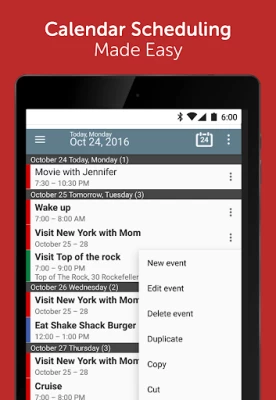


More About Calendar+ Schedule Planner
⸻
🔑 Key Features at a Glance
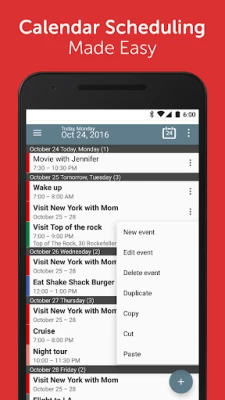
• All-in-One Calendar App: Combine multiple calendars, from work to personal, and manage them from a single interface.
• Custom Calendar Priority: Set the display priority of each calendar so you see what matters most first.
• Copy and Move Events: Effortlessly duplicate or move events across calendars for better organization and planning.
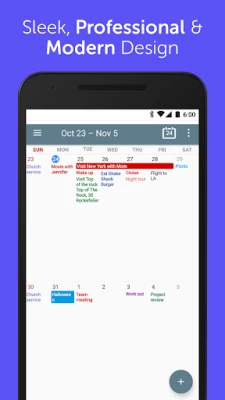
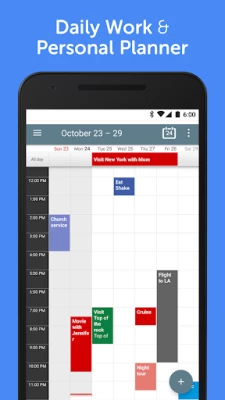
• Multiple Viewing Modes: Switch between day, week, month, year, agenda, and custom views depending on your needs.
• Customizable Range: Set your calendar to show 2-day, 4-day, or multi-week views for improved clarity.
• Home Screen Widgets: Access your schedule at a glance with beautifully designed calendar widgets. Choose from various widget sizes and over 50 visual themes.
• Instant Calendar Sync: Real-time synchronization with Google, Outlook, Exchange, and more to keep your events consistent.
• Personalized Reminders & Notifications: Get alerts tailored to each event so you never miss an important meeting or occasion.
• Quick Event Creation: Add, edit, and search for events easily with natural language input and advanced filters.
• Dark Mode & Custom Themes: Make your calendar suit your style and reduce eye strain.
⸻
📌 Why Choose Calendar+?
Unlike basic calendar apps, Calendar+ provides professional-grade tools that make managing your schedule both efficient and enjoyable. It’s ideal for entrepreneurs, freelancers, office workers, students, and anyone who needs a calendar that works as hard as they do.
You can view multiple calendars in one place, highlight specific ones with custom colors or display priority, and tailor event views to your liking. Whether you’re planning a team meeting, personal workout schedule, or family dinner, Calendar+ helps you stay on top of everything.
Our flexible event copy and move feature makes it simple to duplicate or transfer appointments between calendars — perfect for users managing multiple accounts or projects.
⸻
🌟 Unlock Premium Features
Upgrade to Calendar+ Premium and experience even more:
• Remove ads for a distraction-free experience
• Unlock premium widget themes and designs
• Customize event appearance and layout in more detail
• Set advanced snooze times for reminders
⸻
Calendar+ is more than just a schedule viewer — it’s your daily planner, event manager, agenda tracker, and productivity hub.
Download Calendar+ today and start organizing your life with the smartest calendar on Android.
Latest Version
1.10.08
December 24, 2025
Joshua & Company Inc.
IT Tools
Android
3,470,958
Free
com.joshy21.vera.free.calendarplus
Report a Problem
User Reviews

S C
3 years ago
Events no longer sync to this calendar. It's not a Google problem because they appear fine across devices on Google Calendar, but repeating events that previously appeared with no problem, no longer appear. I've tried re-adding the events to my Google calendar but they still won't appear on this app. Isolated events appear fine. As there's been no app update since May 2021 I'm wondering if the app has been abandoned.

A Google user
6 years ago
Used this app for years. Within the last few months I've had many issues with it not being able to sync. The next issue that happened very recently was that when it gave me an appointment notification, it would never stop notifying until I restarted my phone. I emailed support but never received a response.

Cayden Kennedy
4 years ago
I love this calendar app. Its honestly really good. I love that you can color code it and personalize it some. Also Its really easy to add events or activities. And its really simple to use overall. Yes there is the occasional add or pop up but its not very frequent and you can get out of them right away! I havent had ANY issues with this app!

Loving Jesus
3 years ago
My stuff keeps disappearing. I was just changing the colors on my business appointments and when I refreshed it they all just disappeared. I've tried everything I possibly can and I'm somewhat computer savvy but they're gone. I can't use a calendar that just wipes out my stuff.

Wall-e
3 years ago
Not being able to assign colour categories is a strange omission for an app called calendar "plus". Astonishing. Also can't add events straight from the agenda pop-up? What on earth is going on? A long press option to go straight to details editor would be more productive for my use.

Cyn Im
2 years ago
I've been using this app for a couple of years, it really helps making my day of living in good order but I find the data of calendar only holds for about one year! I am frustrated to see all my entries have been cleared, how could I keep them all in the long run?

Brady Simmons
1 year ago
I have always liked this calendar app, but more recently it stopped notifying me near the time that I would set a task. For example, I might set a task for 11:00 a.m. but I wouldn't get the notification until later on in the day or something. If this isn't fixed, I probably going to find a different calendar app to use

De In
4 years ago
7/2020: Love being able to set my events that are repeated on a monthly basis. Custom option allows you to repeat the event any amount of days or weeks. Convenient, easy to edit, synced with your other devices, and VERY customizable for how YOU want the calendar to display your events. More widget options than other calendar apps. ⭐Update: 1/21/21 I'm still using your Calendar+ & have no desire to replace it. I'd love an update for more color options. Bright colors for dark (black) screen!??
A Google user
6 years ago
I really wanted to like this app, so i put up with it's quirks because i couldn't find anything better. Luckily i stumbled across aCalendar, so I'm deleting Calendar+. The good: Calendar+ is highly customizable. You get a lot of features in the free version that most other calendar apps charge for. It has a lot of good colors. And it has a nice polished finish. The bad: Calendar+ has at least a handful of bugs that the developers don't seem to have any interest in fixing. And now im out of sp

Peach Miller
5 years ago
I live by this calendar! I love the colors, ease of use, reliability, and it syncs with my other calendars flawlessly. My schedule changes CONSTANTLY, and this calendar app lets me make changes on the fly quickly. The ONLY feature I wish it had was a search function. I paid for the upgrade, so ads are not an issue for me.

Al Arment
2 years ago
I am SOOOO ready to get rid of this app... when I first downloaded it, it was awesome, but lately they've been "tweaking" this site almost 3 or 4 times a month and it's beginning to get on my nerves because you don't have any options but to "accept" it, or delete the app... I'm getting to the point where I'm getting ready to delete the app and find a different one

Organic Human
5 years ago
Not What I use to have. After a reinstall to a new cell phone All the great features that I paid for were gone. This calendar app, you to announce reminders of my appointments outload. This very important feature of mine no longer works. What the heck did I pay for it for? Anyone have any tips??? 🙁 Okay, new phone, my most precious app, calendar + after transferring at the BELL Store is empty?

Dorothea Ens
11 months ago
Thanks for this amazing widget, couldn't find it anywhere else. However, I just paid 5€ for premium, but when I tap a day, it recognises that it is being tapped, but it doesn't do anything. Please fix this, then I'll give more stars. Furthermore, would it be possible to show what the entry says on the widget, even if it's 30 minutes? It is no problem if the letters extend over the edges of the entry. Because right now I can see that a 30 minute entry is there, but the text would be most useful.

Phil Rausch
3 weeks ago
I've tried a number of calendar apps, and I chose this one because it does what is supposed to do. provide the data back to me on the day that I needed.
A Google user
6 years ago
I had this app on my old phone (free version) and it was great. I could put all different occasions/events in their own easily identifiable colours etc and always got my reminders on time ... however since downloading it to my new phone everything is blue text only and the notifications dont work. My half hour reminder might come 2 days later instead... No use whatsoever... Really disappointed in it now...

Megan Loveridge
5 years ago
Full screen ads with no skip function - come on guys!!! I downloaded it to use as a scheduling app/calendar for my business. The ads completely take over the screen, and your time, every time you try to schedule an appointment. I shake my head at how the app developer thinks this is ok. "Hey, let's throw in compulsory ads that stop the user from being able to use the app. Everyone will be signing up to the paid version in no time!" Yeah, no, you're dreaming Mr app developer. Uninstalled.

Indira Lievano
2 weeks ago
Better than I thought! it has great widgets, a lot of settings and good sync between calendars

jstnxprsn
4 years ago
I use this app to run my life, and have always had mostly positive things to say about it, when I would recommend it to my friends. No longer, though. The ads have now become increasingly obnoxious. The pop up at the worst times, often when I'm trying to enter or confirm critical information. Some won't close until a little counter finishes it's count. Others are hard to spot the close button (X) It's terrible and I may start looking for an alternative. They sure don't sell products like that.
A Google user
6 years ago
Terrible. As soon as I opened this app it had preset an email/account to set as default. Which is my business email. There was no menu to change this. I can't mix business stuff with my personal schedule. I thought maybe through a premium version. But there is also no place that explains what is included with premium. Just a bottom that takes you to Google check out. Terrible app.

Michaela Baswell Bennett
4 years ago
I've been using this app for years. I love all its features, but especially its reminder options and color coding options. It's a great, user friendly app. The new pop-up ads get a little annoying sometimes, but that's just the nature of the digital world these days. App developers have to get paid somehow, so I'm alright with a few ads here and there in exchange for an otherwise free app.









