
Disk & Storage Analyzer [PRO]
December 03, 2025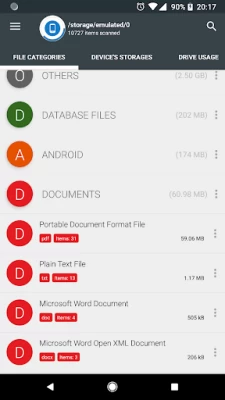
More About Disk & Storage Analyzer [PRO]
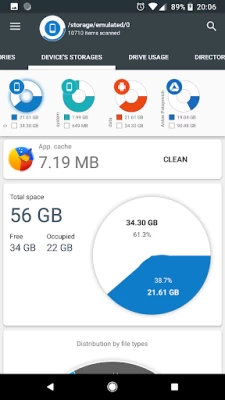
Application reads from the device storage list of files and file-specific data (name, path, size, last modified date, file preview) in order to build device statistics and display it in a form of report and file usage diagram (pie chart, sunburst chart).
Accessing cloud drives
Application allows users to connect cloud drives (Google Drive, Dropbox, Yandex.Disk). When the appropriate drive is connected Application reads a list of files and file-specific data (name, path, size, last modified date, file preview) in order to build cloud drive statistics and display it in a form of report and file usage diagram.
Accessing device Installed applications
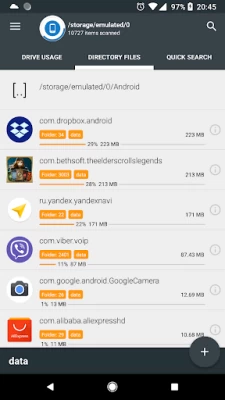
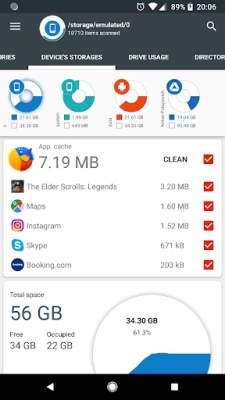
Application reads a list of installed applications and application-specific data (package name, app icon, code size, data size, cache size, last used date) in order to provide applications list, sorted by app size and cache. In addition Application allows to clean cache and delete selected apps.
The Application does not require any user registration. The Application does not require the user to provide any personal information.
Files usage Visualization
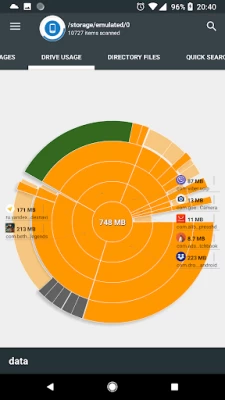
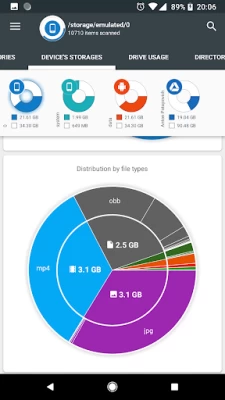
Folders and Files are represented as a Sunburst chart and sorted by their size.
Сentral chart sector is a current directory. Its represented by a circle. The rest of the sector is the subfolders and files. Click on the sector to go deeper. Application draws nested levels with a head of previously selected sector.
Global Search
Device and cloud storage files are indexed at startup. Founded files are displayed on the Quick Search page after entering a search query.
Quick Search activity shows the result of search or a content of a chosen category.
Long clicking on the file shows context menu with a open, delete or share file.
Long click on the category or extension will put contained files to the Quick Search page.
File Categories
All files in internal and external storage, SD card or USB device are presented in a structured way:
By category (documents, videos, music, etc.)
By file size (large, large, medium, etc.).
By file date (today and yesterday, earlier this week, last week, earlier this month and etc)
Required permissions
In order to perform described functionality Application uses permission:
QUERY_ALL_PACKAGES - allows query of any normal app on the device, regardless of manifest declarations.
GET_PACKAGE_SIZE - allows an application to find out the space used by any package.
CLEAR_APP_CACHE - allows an application to clear the caches of all installed applications on the device.
REQUEST_DELETE_PACKAGES - allows an application to request deleting packages.
PACKAGE_USAGE_STATS - allows an application to collect component usage statistics.
In order to acquire all device files Application requests permissions below:
MANAGE_EXTERNAL_STORAGE - Allows an application a broad access to external storage in scoped storage.
WRITE_EXTERNAL_STORAGE - Allows an application to write to external storage.
In order to get available Google account Application uses:
GET_ACCOUNTS - allows access to the list of accounts in the Accounts Service.
In order to perform network request for described functionality Application uses:
INTERNET - allows applications to open network sockets.
ACCESS_NETWORK_STATE - allows applications to access information about networks.
# Application is still in development, so there may be unexpected force closes. Better FEEDBACK than low rating. Thank you!
Latest Version
4.1.7.48.pro.release
December 03, 2025
Mobile Infographics Tools
IT Tools
Android
37,912
$2.99
com.mobile_infographics_tools.mydrive_ext
Report a Problem
User Reviews

David James
3 weeks ago
This is such a great app. Really well designed so very easy to use.

Ratri Rumyati
3 years ago
How can I delete "other/cache" files, which the amount is more than 60.000 files? If I select all, it was always stuck, and finally the application would close by it self. Please help.

Christopher Smith
1 week ago
it needs to scan with every little app change making it useless

M X
3 years ago
The Feb 2022 Update SUCKS. The app has been gutted. It barely resembles the prior version. Almost of the usefulness & utility of the app is gone. ALL of the value is gone. Most settings were removed. Any ability to customize the app was removed. All of my settings & customizations were lost.

Sc Lim
3 years ago
After the latest update, can't analyzing the file categories, biggest file file type in my internal storage just keep on circling, uninstall and restore, still the same. Before the new look update, everything ok.

A Google user
6 years ago
I have used the Pro Vers of this app with several Android O. S. ver for years. Currently, I am using the latest ver available in the Google Play Store, 4.1.0.9 Oct 25, 2018, on a Samsung Galaxy S7 Edge which is running Android 8. I would be happy to change my Rating of the app from 4 to 5 Stars if it had more File Management Operations such as Move, Copy, Rename files, display of a file's Create/Mod Date & Times and Properties, and Sorting of lists of files.

Attila Ambrozai
4 months ago
No longer works... File Categories, Drive Usage, File Manager tabs are all empty, despite I gave it all the rights it asked for. There's an endless "hourglassing" going on to...

Shane Hurley
1 year ago
Works but slow 10min scanning and a trick to the slow 10min scanning. Seems it hangs scanning so I have to halfway minimize the app then blow it back up say every 2-3 minutes to have it scanning properly again. I needed a background mah drain chk app running to see that 300-400mah drain it was doing little so I would then halfway minimize it, go back to full screen and see 500-700mah draining meaning it was scanning properly again. Had 2 also manually give it permissions 1st like all files/usage

Koyashima
1 week ago
app now slow don't load up Biggest file categories

Alan J
5 years ago
Just didn't like the interface, confusing operation, not sure how to interpret or why was useful what it was showing.. Just not for me I guess. Used to love "diskusage" but it doesn't support Android 10.... Need better graphic representation of files.

Abs M
4 years ago
1. Autorotate can't be disabled. It's really frustrating. 2. It says 45GB/54GB occupied (9Gb free), but can only detect & analyse the 18.93GB. I have no idea where there rest ~26GB are lost. It doesn't really help! Unless I missing something…

Andrew Allcock
1 year ago
Within the first few hours of use, I was able to easily identify space consuming data and apps. From 67% down to 49% of 128GB used with just a few actions. This is a very useful tool and provides clear information that allows sensible and safe deletion.

The Baron
4 years ago
Absolutely useless, it's just flashy graphics and doesn't actually do anything. I don't understand some of the previous reviews as i'm also a Software engineer of 30+ years. Tried to get a refund, but this software is not covered by Google Play refund policy. Save your money. Uninstalled and deleted, don't get ripped off like me.

Vance Gosselin
3 months ago
How does this app work? It doesn't appear to be working. All I get is a circle that keeps spinning.

Stephen Collins
7 months ago
Fantastic App on my Samsung Tab S4 Android v10! BUT... Moto Edge Phone Android v11- App set with all permissions granted, but not allowed access to data file(s). It's a bummer, when other apps in same category work fine. Is there a fix/trick to get it to work. Love your app above all others!

Nils Valentin
1 year ago
An amazing tool ( no fuss) to help you locate those data that just literally sits there and eats up storage. Cache data, double files etc. things that can clock up GB of storage. Use this before your phone slows down or you run out of storage. It's good practice to regularly do some warehousing !
A Google user
5 years ago
Completely brilliant. Allows quick drill-down to find massive files and folders, as well as clearly laid out overview mode. Can delete from inside the app. Comes with nice widgets too (one for each drive that you want to see on home screen). A labour of love and it shows.

Resat Erel
5 years ago
I'm an IT Pro, used many disk and storage analysers, but this one far the best amongst all; it took only a few days to decide to go Pro and deserves it's price to the last penny. Strongly suggesting to go Pro, it's not even a price of a cup of coffee and it will help the software designer to keep up the good work.

Thomas Costa
3 years ago
The old version was better. Showed system info. This was great as my phone is creating garbage files designated "other". Use to be able to find them on the phone SD card and system drive. Not anymore I guess. Basically the free version and pay version are pretty much the same. Don't waste your money.

A RRM
3 months ago
The app development is obsolete. It was ceased on December 2, 2023. Although is advertised to be compatible with any version of Android OS equal or higher than 5.0, the app does not run properly with the new Android 15 OS. I purchased the Pro version of the app, which hence I consider it a fraudulent sale. The app collects what it seems large amount of data usage without disclosing specific purposes. Privacy policy is unreachable. Text files sent to developer cannot be reached, seen, or stopped









