DottedSign - eSign & Fill Docs
August 26, 2024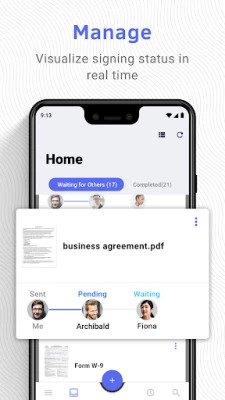
More About DottedSign - eSign & Fill Docs
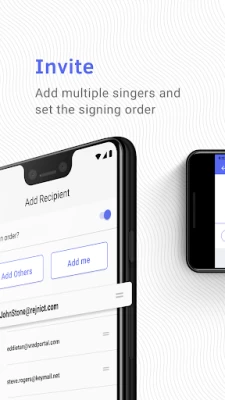
GET SIGNATURE FROM MULTIPLE SIGNERS
.Invite signers by adding them straight from your contact list or entering their emails (Google Contact supported)
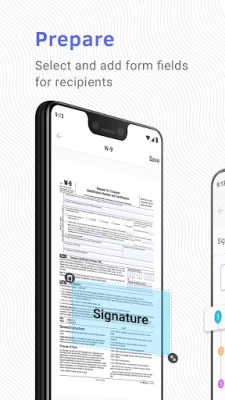
.Remote signing - Assign fields to signers in a designated order, including signatures, initials, stamps, texts, and dates
.Color-coded fields to navigate your signers where to fill in
SIGN DOCUMENTS YOURSELF & PERSONALIZE YOUR SIGNATURES
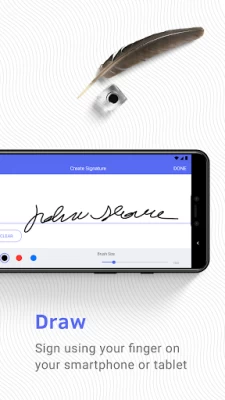
.Create signatures with free-hand drawing
.Make stamps by using your camera or photos
.Pre-fill your personal information and drag and drop it to the document
.Add signatures, initials, texts, images, hyperlinks, and dates to documents
.Adjust the font size and text alignment to your liking
.Remove or crop backgrounds for signature stamps
.Sign with seal – Signer can choose to sign with the company seals authorized by the Admin
.Group multiple checkboxes or radio buttons together to create multiple options.
MANAGE SIGNATURE TASKS
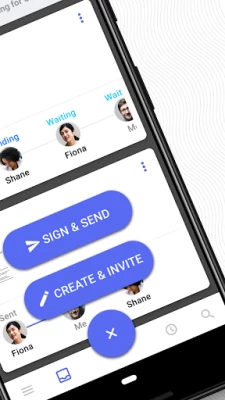
.Visual progress bar - Monitor signature tasks by intuitively checking all signers’ status
.Timeline of Personal Activities - Display and record activities of all your personal tasks
.Search tool - Find your documents easily by searching with names of people or documents
.Custom message - Leave messages to all recipients
.Auto reminder & expiry date setting - Automatically send reminders to notify anyone who has not signed documents yet
.Change signer – Replace a signer of a sent document with another one; signer can send change requests to the sender
.Decline signing – Sender can manage signer’s permission to decline the request in case the document requires further amendment
.Void the task – Signer can stop the signing process in the middle of the workflow before the document is signed by all parties.
.Delete completed and canceled signing tasks that are no longer needed, or move them to archive
IMPORT AND SHARE DOCUMENTS WITH EASE
.Get documents from camera, photos, the iOS file app, email attachments and the web
.Import documents from cloud services, including OneDrive, Kdan Cloud, Google Drive and Dropbox
.Share the document via a file link to open the file directly on the web browser
SECURITY AND LEGALITY
.Digital audit trails - Record every change made to the document for evidence
.Protected signing process - Ensure confidentiality of paperless signing, encrypted by TLS/SSL, AES-256 and RSA-2048.
.Email secure password to identify signer identity
.Digital certificates issued by the AATL authorized CA safeguard signers' identity authentication and signature validation.
What’s offered free in DottedSign? You can…
.Sign unlimited documents by yourself
.Assign up to 3 signers in a signature task
.Create signature tasks and send up to 3 tasks per month
Upgrade to DottedSign Pro to get advanced features:
.Create signature tasks and assign fields to unlimited signers
.Send unlimited tasks to signers
.Lock your app to prevent unauthorized use with passcode
.SMS secure password to identify signer identity
.Reusable templates save your time creating tasks
.Request attachments from signers
Expand your business flexibility with Admin Console, team permission control and organization branding– all in DottedSign Business. Visit our website and get free trials.
Terms of Service: https://www.dottedsign.com/terms_of_service
Privacy Policy: https://www.dottedsign.com/privacy_policy
NEED HELP? Visit https://support.dottedsign.com/ or contact us at support@info-dottedsign.com.
Latest Version
3.4.1
August 26, 2024
Kdan Mobile Software Ltd.
Finance
Android
435,455
Free
com.kdanmobile.android.signhere
Report a Problem
User Reviews

Asavela Siyema
5 years ago
I am not quite sure what went wrong with this App🤷♀️ it has just stopped working, it signs and keeps loading when u get to save and share a document.

Lizzie
5 years ago
Whenever I tried to open a document this app was opening instead even when I had no intention of using the app. I have deleted it so I can read my own documents again without this app going into them uninvited. Will not use again.

A Google user
5 years ago
Utter shite don't bother. Can't even get past the sign up stage without error messages popping up all over the place, session time outs etc. Bollocks.

Jess H
3 years ago
It was tedious and even though it's saved when I would open up the document it's still at happy blue text boxes around all of the inserted information.
A Google user
5 years ago
To me it was difficult to utilize. Could never get the signed attached file that I needed. Had to uninstall. Installed a different e signature app that was a lot simpler.
A Google user
5 years ago
This is a very helpful app! Easy to use, free, can adjust the font size to fit document signature line and I was able to download the file my to phone to keep for record sake.

Heavenly Massage & Services
1 year ago
Not user friendly at all can't use the app can't even pass the verification process
A Google user
5 years ago
This app saved me. I needed to sign a few documents to work the next morning and I bought a printer scanner and at the last minute it messed up on me so I downloaded this app and I was able to sign everything and save it and email everything without a problem. So thank you

Kevin Kabongo
1 year ago
Freezes and bugbs out when adding text.

Fnu hasanuddin
4 years ago
Very, very, very good app. This app make my work smoothly and fast. Easy to edit docs and to fill in sign or texts like (name or dates). I am very recommended to install this app in your phone. I hope the owner this app will increase the function of this app more advance in order to compete with other same apps.

Zyr Zamir (Zee Zee)
4 years ago
Great job. Me and my clients can sign documents with a few clicks and contact less. Only can load up a file if the original copy saved as a pdf format only. Copy gets emailed to you automatically for record.

Zachary Pustelnik
3 years ago
Easy to use, fast and simple. One think that I would add is the ability to send the document through an sms/text message from a computer. I know this option is available from a phone app, but to add it to the PC version of your software would be great.

Armand Swanepoel
5 years ago
I like this app.. But there is just one problem. After I completed the document and send it back to the sender I cannot view the document. I had to uninstall the app in order for me to view the document. I will istall it again and play around with it for a while to see if I can figure it out. Or can support please apply to my review and tell me how it's done please?

Tanya J.
5 years ago
This app makes me want to commit a violent act against my phone. It's very difficult signing on a telephone screen. So, whenever I'm halfway done, the app freezes. I've attempted several times, only to always have a frozen screen. Uninstalling!

Jariyah Hashim
4 years ago
App is very helpful. Some room for improvement though; deleting signed document (own document) can be made easier. At present, deletion by individual file; can't be done in group. For those without the apps, apparently the reader may hv problem to open the file.

g444 li
1 year ago
Was Good, Til it wasn't. Used it for about a year, but since the last update it always times out or it says "request cannot be executed" or something along those lines. As a small company that relies on e-signatures, any business owner can avoid headaches by not installing this application
A Google user
5 years ago
I simply wanted to be able to have my signature saved digitally so i could sign docs without having to print them off. I managed to create an account, save a digital signature: all simple. Then I try to sign a doc saved on Google docs. Bearing in mind I downloaded the app from the Google play store it's a bit ridiculous that although i can see the doc i can't actually open it to sign it! I go to help and can't get any. I'm in a hurry so to me the app has been a totally useless waste of time.

Sonia Macphee
5 years ago
Absolutely terrible!! I'd rate it no stars if there was an option. I spent over an hour completing two forms only to find that when they have reached the recipient, they are in no way signed or filled. So deceitful that it shows on my device one way and to others is distorted, messy and completely redundant! Thanks.

vincent chacko
5 years ago
Stay away Cos of the bugs in the softwa. I was able to request for the signatures and once the signing process is done the file couldn't be opened in pdf. The other issues was that randomly the fillable spots disappeared. While talking to the support they said that the problem was caused because of some issue in the system which needs fixing with some big updates which may come next year. So I would recommend to try the app next year in the free trial mode before you commit to the subscription.

Hassan Al-Sharif
1 year ago
The last update is awful 😖 When you finish signing yourself, it used to have 2 options the 1st one says save and share, and the 2nd one only saves. Now we have only save and if you need to share it which i usually need after signing you have to go to the completed tasks to choose the one you just finish and some time it takes sometime to appear then you have to download it then share which result in wasting a lot of time to do so.









