

Envoy
September 16, 2024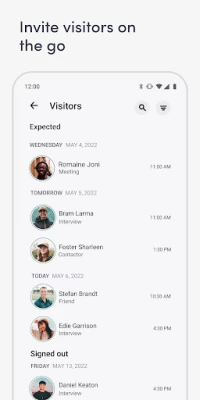
More About Envoy
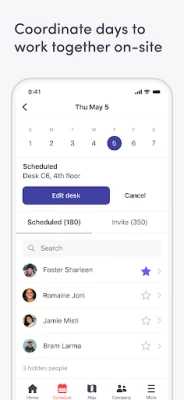
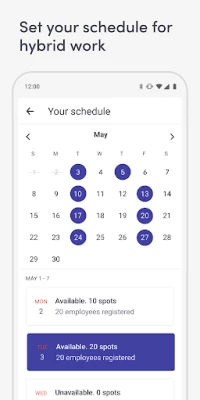
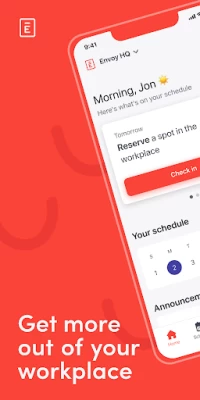
Set your schedule for hybrid work. Easily see who plans to work onsite each day so you can plan to be there too. Invite coworkers to join you in person for collaborative work.
NAVIGATE WITH INTERACTIVE WORKPLACE MAPS
Know where to go and who to meet in the office. Find where your coworkers are sitting, book meeting rooms, see visitor details, and know where to pick up deliveries–all from the interactive workplace map.
EASILY BOOK THE PERFECT DESK
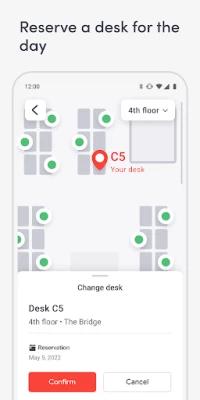
Book a desk by the hour, day, or week. Find a desk with the amenities you need to be comfortable and productive in the workplace. Save a spot by your team, favorite coworkers, or key collaborators to get things done.
BOOK A ROOM FOR LAST-MINUTE MEETINGS
Easily find the closest available meeting room on the interactive workplace map, so you can book a space, even when you’re on the go. Check in to your next meeting right from your phone, or free up the room for someone else.
INVITE VISITORS & GET NOTIFIED WHEN THEY ARRIVE
Invite guests to your office and keep track of who is scheduled to arrive and when, so you’re prepared for every visit. Receive a notification when your visitor arrives so your guest is never kept waiting.
KEEP TRACK OF YOUR DELIVERIES
Get notified as soon as your package arrives and easily confirm once you’ve picked it up, so you feel confident getting mail delivered to work.
REPORT WORKPLACE ISSUES
Create tickets right on your phone, including taking photos and noting the location of issues in the moment, so your facilities and IT teams can resolve them quickly.
CERTIFY THAT YOU’RE HEALTHY
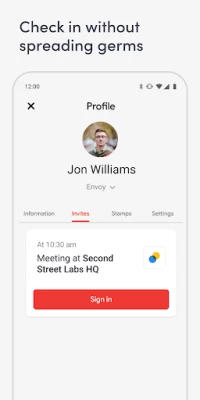
Get cleared to work onsite by submitting proof of vaccination or completing a health check. Once you arrive, reduce the spread of germs with a touchless sign-in using the Envoy mobile app.
Latest Version
4.82.0
September 16, 2024
Envoy, Inc.
Finance
Android
338,515
Free
com.envoy.app
Report a Problem
User Reviews

jawn
4 years ago
Envoy encourages me to use the app to sign in faster in the future so I tried it. Unfortunately it seems to require access to my location for this feature and although the help suggests I can scan a qir code or wasnt immediately obvious how to access it. Requiring location is an abhorrent design. I don't want Envoy to track me all the time just to use a feature that I should be able to access by explicitly using my phone, such as near field communication or scanning qr vodes.

Madhusudhan Kumsi
3 years ago
This app works only once for the first login. Once you verify your email and the first login is successful, if you close the app and launch it again, the app just keeps booting with a white screen and does not go any further. Even with all the required permissions given, the issue remains the same. The only way you can use this is uninstall and install and login at the time you want to use. It stops responding after the first login!!l! Hope a bug fix is released soon.....

Matthew
2 years ago
The app is completely unusable. Just about every core function of this app does not work. Half the time it will crash on startup. It crashes when trying to edit my desk selection. It crashes when switching floors. The switch floors button randomly disappeared one day and showed up weeks later. The indicators for free/occupied desks show up only half the time. Etc. It's a shame as everything is there on paper, but the execution is extremely poor. I wish my work didn't use Envoy.

Eric de Felix
2 years ago
Reserving a desk is always a hit or miss. Even if I try to book a vacant desk, it throws an error saying Unable to book. A constant error message always pop up right after opening the app. Haven't even done anything. It's unfortunate that my company uses this. Can't believe this app has an average rating of 3+, more of a 2 really. Terrible UX.

Anthony Steele
4 years ago
Terrible. Laggy, inconsistent UI, bookings don't show up on main screen, assigned desks come and go, and by far worst, a mis-click cancels the booking without confirmation, start over again from the beginning. If you try to select your booking, it gets deleted without warning! Did they do no usability testing at all? Very tedious to keep redoing entry and questions.

Chris Sos
4 years ago
For some reason places so much tracking in the critical path of this app. It's unusable if you even conservatively block trackers. Returns constant network failures to load things like the calendar or finishing registration because it's many network requests to things like Segment, App Measurement, Full story, Split.io. Seriously, not all of us like tracking. Make your app better and stop needing to spy on me to make it work.

SL Tan
1 year ago
App suddenly cannot load schedule and cannot reserve seats! Till now...it has been more than 3 days but the technical team still can't fix it and did not provide workaround. I reserved a seat today bu cannot check in...so i.am going to lose my reserved seat today. This is really pissing me off. Who uses such lousy app supported by an incapable team. The company should just close down since they can't even make their app work properly

Bob Yee
1 year ago
Check-in is one button, check-out is not obvious, should also be one button. They are constantly updating the software but I don't see what bugs they have fixed. Hope they improve the user interface and the update description.

Paul Taylor
1 year ago
Barely works. Truly terrible for any serious business. Must be hell to maintain. Constantly throwing errors. Constantly mis-syncing. Keep on getting reminders to check in even though I've checked in on the app. Web version and android app don't match. Features missing from android app. Unbelievably bad. If businesses are using this to track return to office, I imagine they'll have a lot of employees misreported.

Morinosuke
1 year ago
With the latest update I can't login any more. It asks to verify my email address which I did, but when I click on "Confirm my email" the app fails to launch. Gave up and switched to browser version instead. So disappointed.

David Burton
5 years ago
It does not work on my Samsung Galaxy S5 running Android 6.0.1 Marshmallow. It installs okay, and when I try to log in it sends an email to my email address, which contains a QR code, to be scanned on the phone. That SHOULD BE okay for me, because I have a desktop computer that can display the QR code, for scanning by the phone -- I don't know what someone would do who doesn't have another device, do display the QR code! However, it does not work. When I scan the QR code using the Envoy app on my phone, it scans the QR code. but then it says: "Unable to connect to the server. Please check your network connection and t..." (I presume that the "t..." is supposed to be "try again" or similar.) Of course my network connection is fine. I recently installed WhatsApp (mobile & web/desktop), which used a similar procedure, and it worked fine. So the phone is working okay. There's a "RETRY" button, but it just produces the same error again. I rebooted my phone, and tried again, a few hours later. Same error. This broken Envoy app made me 45 minutes late for an appointment today.

Eric Marshall
5 years ago
Just installed the app. I have the Google Pixel 3XL, so the OS is from Google. It's not like I'm running some 3rd party OS version. When I open the app, I'm taken immediately to the "Profile" screen with no way to navigate out of it. I can't use the app at all. All I can do is look at my profile, which does absolutely nothing for me.

A.J. Katharopoulos
3 years ago
App crashing repeatedly - completely fails to load. Version 4.14.1, logo just keeps flashing across the screen as the phone tries to load the app. Phone (Note9) is completely updated, Android 10). Worked yesterday (unsure of version), doesn't load at all today. Over time this app is problematic - sometimes it fails to load, needs phone restarted, etc. This time none of that has worked.

Aaron Umetani
4 years ago
We use this to check in for Covid at work. It stalls a lot either before or after the questionnaire. Also the questions are yes or no but it uses drop downs instead of radio buttons. waste of time. Update: if i don't immediately show the green "checked in successfully" status screen at the Covid check in desk, and instead open another app, I have to fill out the Covid questionaire again. Why doesn't it save it if we are supposed to be doing the questionaire before we get to work.

E. Aguilar
3 years ago
Too many glitches. I start the app and it keeps giving me a blank screen and restarting on its own. Extremely frustrating when I'm at work and can't even use the app for what it's designed to do. Have to constantly delete and reinstall. Unfortunately I am forced to use it, otherwise I would delete it.

K B
2 years ago
Update: auto sign in has ceased to work entirely with the upgrade to Android 14. It already didn't work most of the time previously. Issues seem to be isolated to phone types (my pixel for instance) . I have sent many, many bug reports and have had many conversations with support who assured me their developers know. We were hoping to use this at work but there is no way I can recommend proceeding without basic functionality working for all phones.

Tim
4 years ago
I'm forced to use this app at work but it is one of the worst apps I've ever used. It's so slow and laggy. It literally only does one thing (let you in) but UX is horrible and counterintuitive. You have to tap like three buttons to do one thing. And if you happen to be near a public WIFI but haven't signed in yet yet so the internet connection is still in limbo, the app will find itself in a crash loop that you can't get out of and force you to restart the phone. Simply embarrassing.

Justin Manuel
2 years ago
I like the app a lot - when it isn't being unbearably laggy, which I would say is a good 60% of the time. Both on wifi and 5G LTE, the app will usually stall when I try to book in for the day, schedule a few days in advance, and change my desk. I'll often get a 'Something went wrong / try again' message whenever I go to do something within the app. Its too bad, because overall, I do think the app is well designed.

David Rhoten
2 years ago
I need to use the app for ONE THING: checking in when arriving at our client's headquarters. But, apparently, if the invite is sent from Outlook using the Outlook add-in, the invite will arrive in email, but NOT in the app -- ever. So the whole app is useless to me. Note: have contacted support twice and been told while they're aware, it's not a high priority item, and they'll let me know when they get around to it.

Emily and Justin Biesboer
1 year ago
Lots of bugs. I keep losing the desk I want even though I'm putting in extra effort to wake up early and reserve it. I often book a desk and then the next time I look at the app the desk I booked is gone and reserved by someone else, and the app says I'm only scheduled to come in that day, but without a desk. Thanks for replying. I've reported all of the various bugs that have occurred. As soon as one is fixed another one starts happening.









