

ESS 45 Zebra
August 20, 2024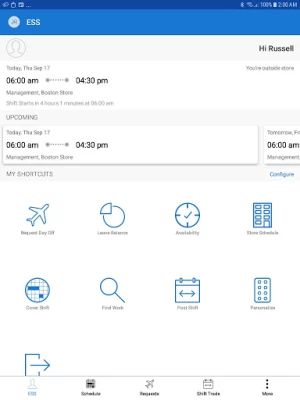
More About ESS 45 Zebra
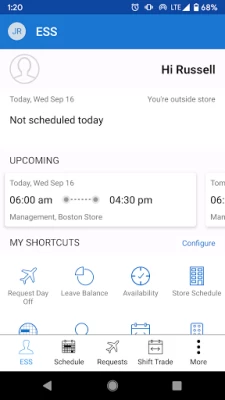
· New Dashboard
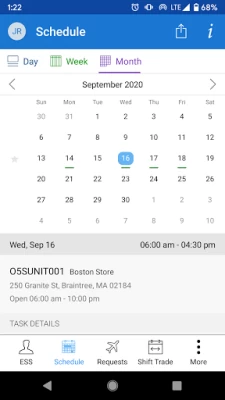
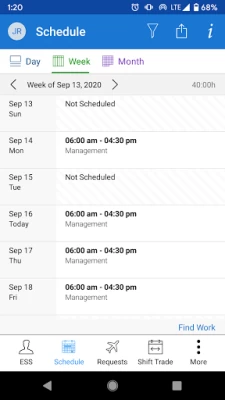
· View schedule
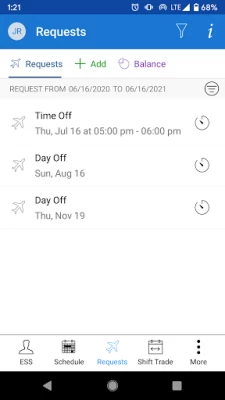
· Request day-off, time-off
· Perform Shift Trade with teammates
· Bid on open shifts or request additional shifts
· View timecard
· Update availability and get shifts accordingly
· Request for alternate work locations
· Clock your work hours using Geofence enabled mobile clock
· View absence calendar
Latest Version
451.4.20240522
August 20, 2024
Zebra Technologies Corporation
Finance
Android
141,397
Free
com.reflexisinc.reflexisess43
Report a Problem
User Reviews

ThyOverlord
1 year ago
App has broken irrepably 7 times, each time I've had to reinstall and reset up it entirely, great way to loose money trying to fix it before clocking in

Noemi Szalavari
1 year ago
The app won't change my verification phone number... I've tried everything. Worse app I've ever used. It could be a lot more user-friendly. A basic feature such as updating your phone number doesn't exist, constant bugs, buttons not responding...ect.

Sol Perez
1 year ago
Hi! I work at Burlington as well. I really need the app to get up and running again. It hasn't been working since yesterday. Whoever is in charge of fixing it, please fix it as soon as possible! I would greatly appreciate it! Thanks!

Alex Brookes
1 year ago
Less user friendly than previous versions, regularly logs out and requires password again, viewing store schedule shows all teams by default instead of just your own team/cannot save selection of teams

JunimoJill
1 year ago
Often doesn't work and I have to refresh the page over and over to clock in or out. Most recent issue is that it's not letting me configure my shortcuts and keeps resetting them.

Reney Watmore
1 year ago
Keep having to uninstall and reinstall every couple of months to get this app to work, not useful when the code needed to scan to then get access the app is on a poster at work. Still crashes, still having to un install and re install and now server errors, can't believe there has been no attempt to fix this problem.

Chris
1 year ago
My work requires me to use this to clock in and out. It just says "error null". This has been a problem for over a year, they don't respond support emails & my work hasnt got a clue. I personally rate this 0 stars, absolute rubbish.

Daniel (The IIWC)
1 year ago
Absolutely shite. Previous app was brilliant, I could set how long before my shift I'd be notified. I'd get notifications of changes to rotas. Now I can't get any of that and it's very frustrating. I want to be able to add it to my calendar, got my notification the night before my shift and a notification if rota changes. That can't be that hard to do???

Ryan Stephenson
1 year ago
Add to Calendar now adds to it's own calendar (not sync'd across devices), to which you can't add a notification, and which then disappears of its own accord, and if you try to add from the month view will only add the current week. That wouldn't be so bad if it could be used offline, but you can't. Constantly logs me out, so I have to press several buttons to access the app. The new home page doesn't even have access to all the functions, so you need to access them from another menu.

Goddess Anjanee
1 year ago
I had personal preferences set in the app. Ever since I updated the app, my preferences aren't saved. I've had problems clocking in and out. The app is slow to load when you are attempting to clock in for the work day. Please fix these problems. Thank you.

Melisa Yurtmen
2 years ago
Frustrated that I cant choose WHICH calendar to sync with. IT no longer has an option to let me choose which account (my actual gmail account!) to send my shifts to. Now they show seperately on a toggle-able screen for Reflexis - which doesnt connect to ANY OTHER DEVICE!? Uninstalling to reinstall 41 which was functionally worse but atleast it did the job!!!!

Mallory Laine Foster
1 year ago
I am still trying to figure stuff out on it still but it's good with clocking in and out sometimes. I don't get why it says you can customize the layouts and backgrounds and then when I click out of the app and go back into it, it's back to the original set up. Why ask if you wantto customize it and then change it back. Very irritating.

Gabriela Antunes
2 years ago
11/01/23 Update: Emailed developers and it was working well for a month now. It's doing the same thing again. 10/03/23 - I work at Burlington store and this is the new way we clock in and out and see our work schedule. I like it but at least 3-4 times a day I have to scan the QR code for it to log back in cus it constantly gives me a black screen. Sometimes it works sometimes it doesn't. The finger print ID doesn't work neither.

Tina Monaco
2 years ago
I'm no longer able to keep my personalized choices in the app. I loved the way the previous version allowed me to choose a two color scheme & a background color. Now, every time I open the app, it reverts back to the original boring white & blue background even if I save my changes each time. The personalization feature was the only reason why I installed the ESS 43 (which became ESS 45 over time) app over the ESS 41 app to begin with. Please fix the personalization feature because it was great!

Garrett Fitzpatrick
1 year ago
First it was displaying basically nothing but a line of code, now it's displaying an error message, the "report a problem" thing has two options that are effectively useless, and an email option that can't open email apps apparently, zebra technologies website has a contact option, but only gives you options for everything that isn't the app. Hopefully someone there sees this as it's the only way I can think of to actually attempt to inform someone that their app is broken, with no way to report

Logan McMorris
1 year ago
EDIT: STILL BROKEN. The app loads more reliably, but sometimes the password randomly doesn't work. I tried resetting my biometrics data as it kept entering the wrong info and I am instead locked out of the app. This is, again, unacceptable for something I rely on for my job. ORIGINAL: Experiencing the same problems as the other app. It just won't load. For a program where you rely on it for viewing your schedule and other stuff like that, the developer's negligence is unacceptable.

Suzan Collier
1 year ago
Wth is happening to this app?! Said my login info was wrong which it wasn't and now it's stuck in a QR screen! Was working fine then all of a sudden there's A HUGE problem and no way to contact support for help. If un-installed and reinstalled a few times, restarted my phone, nothing is working! It literally is still stuck in a QR screen. Won't let me go back, won't let me leave thr screen. Now I can't check my schedule. Pos.

Fae Aisa
1 year ago
Most of the time the app works good enough but every now and then it gives me an error.Today for the first time that's all it's doing.I keep trying to log in and double check my work schedule so I don't miss work or show up when I don't need to and today I can't.Error code every time.Tried restarting my phone. This is going to cause problems if not fixed. Still errors every time it's updated until removed, added and I re scan the qr at work leaving me hopeing my schedule hadn't changed.

Jena Hopper
1 year ago
I work at Burlington for the last week the app hasn't worked. I've uninstalled then reinstalled every day just to repeat this daily just to use the app. Today, I had to repeat the installation to clock out for lunch. No longer get notifications when changes to schedule are made. Posting a shift is worthless as no one else can see it. Same for finding work.

LeAnn Brown
1 year ago
For the most part, it works great. sometimes thinks you're not in store when you are, so it obviously has internet issues at times. the most recent update screwed up the 'short cut' section. I have certain ones selected & it shows them after you select them, but as soon as you get out of the app and go back in, it chooses which ones (even ones not selected) to show. It's so frustrating, pls fix this as well as the internet issues and it'd be perfect









