

Eventbrite Organizer
June 29, 2024


More About Eventbrite Organizer
* Create events directly in your mobile app.
* Edit key event details (like your event description, ticket types and quantity and more) on-the-go — perfect for the busy event planner lifestyle.
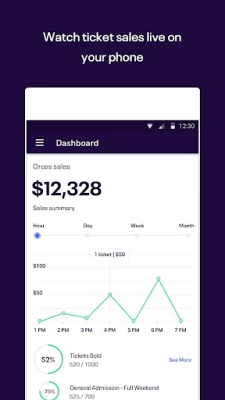
* Take control of your ticket sales with access to real-time data.
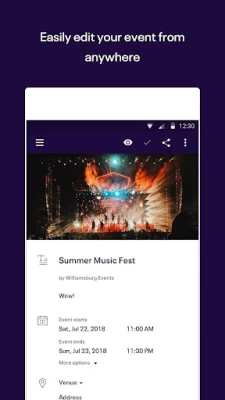
* Easily edit your event listing from anywhere.
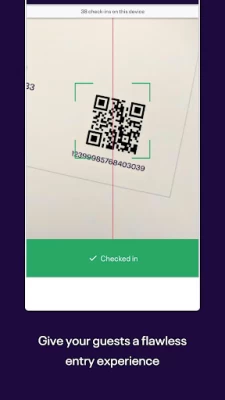
* Rely on easy-to-use ticket scanning and check-in to give guests a flawless entry experience.
* Keep your finger on the pulse of your event with live attendance tracking.
* Quickly accept secure payment for tickets and merchandise on-site and never miss a chance to sell.
Key Event Management Features:
* Edit from Anywhere: Make updates to your tickets or event listing seamlessly from your mobile device (which automatically syncs with the Eventbrite database) so you can stay in control of your event listing, no matter where you are.
* Check-in That Works: Reliably and efficiently check-in attendees by scanning tickets with the camera on your mobile device. Or, simply look up your guest’s name directly with a quick search of your guest list. Say goodbye to check-in headaches with our easy-to-use entry manager technology.
* Mobile Box Office: Accept all major credit cards, track cash transactions, print tickets and receipts on the spot, and send mobile and print-at-home tickets. Take your box office to the next level with easy-to-use accessories like our card reader and ticket printer.
* Solve Customer Requests Fast: Quickly look up orders, and reissue, cancel, or refund orders on the spot.
* Real-Time Data: All sales and check-in data is synced with Eventbrite’s servers, so you can use multiple devices at different entry points without missing orders or duplicating tickets.
* Multi-lingual? No problem: Organizer is also available in German, French, Italian, Dutch, Portuguese, Swedish, and Spanish. Olè!
Thanks for all the great feedback – we can’t get enough! Keep it coming at mobilefeedback@eventbrite.com. And if you’re loving the app, drop us a rating (and don’t be afraid to gush).
What is Eventbrite?
Eventbrite is the world’s largest self-service ticketing and registration platform, hosting a vibrant collection of live experiences to fuel people’s passions and enrich their lives.
Latest Version
9.20.0
June 29, 2024
Eventbrite
Finance
Android
1,397,709
Free
com.eventbrite.organizer
Report a Problem
User Reviews

Alecia Hudson
1 year ago
Glitches for certain features and says not authorized to access feature & to contact administrator, but you are the business owner and logged in as such. The app needs more features. It's a bit limited.

Daniel Benoit
1 year ago
Once was perfect But.....Now you can't publish a new event, it's forcing me to go elsewhere.

Cristi Blanton
1 year ago
It has an old email address and I can no longer access that account so I have now lost 3 tickets because I can't log into that email.

Celeste “Lola” Brewster
1 year ago
Issues since first downloaded. I can't even publish my 1st event due to all the glitches. Waste of time!

Luna De La Morte
1 year ago
could be more user friendly. I'm having trouble setting up my first event and sharing it to social media. I cannot find my own event when I search for it.

Giovanni Pineda
1 year ago
Terrible app, there are better systems to meet up with other people and organize events. This has been a waste of my time and storage space.

Clare
1 year ago
Clunky. Has less features than the website version of Eventbrite? I am not sure why time was wasted developing this when it's so unintuitive.

Mr. H
1 year ago
Here is what's displayed any time you try and update YOUR event: We're having difficulty connecting to the server. Check your connection or try again later Pathetic.

Andrey Sklyar
1 year ago
Errors, bugs and unusable. Switched to online mobile. That's only marginally more usable.

Switch Lounge & Nightclub
1 year ago
Aftre they starts charging monthly fees, everything went south in the app, they changed the lay out, takes for ever to load, scams left and right with people selling fake tickets, and they charge 120 a month, I don't like it... I'm looking for a bettre app

Ingo Schalk-Schupp
1 year ago
While the app offers a lot of functionality, it does not cover all of the web interface's. It is not documented at all. Instead, you have to rely on the documentation of the web interface only to discover that things are different or just plain missing in the app. Also, the app does not expose language switching to the OS, so I am forced to use it with my OS's default language, which makes communication with others about the app more difficult. I've seen much better.

Antonio Frias
2 years ago
Terrible app and terrible service. It's the only one out there doing ticketing for events in this way, but it's definitely disinterested in the user experience. I can't see most settings through the app, I can't save the graphics I made through canva for the events, and worst of all they keep your money for a really long time for no reason. I wish a competitor would come in and completely disrupt this industry, because between Eventbrite and Ticketmaster, event hosting sucks...

Colby Birdsell
2 years ago
I cannot find a way to just log in using the email and password I created for Eventbrite. When I try to log in, I get sent to a page to open my email app. The default email on my phone is not the email address associated with the Eventbrite account, and I DO NOT wish to change the settings on my phone or mix the uses of my email accounts to make the app work. I used the app for an event a few years ago and didn't encounter this problem. Super frustrating! Probably won't use this in the future.

Nick G
2 years ago
Excellent time waster.... Only Ap I've seen that update after update, nothing gets fixed. It's a simple AP...so not sure what they are actually fixing. Constantly "Server issues" after you carefully put in ALL the info and trying to add location. Haven't been able to add logo of organization for legitimacy. Add photo, enhance, crop..then it goes blank. Almost no one has one either, so it's been a time waster for everyone. Now looking for alternatives who isn't running their AP on Windows 98

josh dahl
2 years ago
Lots of great features that I cannot use because the page where you select your plan simply does not open. Huge frustrating time waste and no support at all. I am much further behind in my progress towards my event than I was before I attempted this pointless exercise in frustration. Edit: I tried reinstalling and I was able to make a test event. Now that I am actually trying to use it... Same problem. Please just turn on your servers. I cannot use a tool that always fails.

A Google user
7 years ago
It's pretty convenient, but once an event is saved it's difficult to make any changes. Haven't had any other issues, but since this issue is so big I could only justify a three star review. The location of my event changed so I changed it on the app. Took a real long time because every time I changed the address, the app would change it back to the first address I saved before I could tap the save button. Unfortunately, even after I made the change, the map still showed the original address on Eventbrite. Needless to say that caused issues

Thomas Harlin
2 years ago
The navigation between events isn't the most intuitive, and I've closed the app more times than I'd like to admit when I try to navigate back to my event selection. The check in camera for me also seems a little bit bugged, as it shows the image as a very heavily stretched image. I don't know how much that impacts the scanning functionality, but it certainly doesn't like to be scanned from up close. Overall useful to have, but not pleasant to use.

Alaina Zulli
1 year ago
Astonishingly badly designed for this being one of the main event organization companies. Apps should be designed to be easily intelligible to new users, but I just spent an hour trying to figure out how to check in attendees to an event. I finally found it, but it was not intuitive at all, and is unnecessarily complicated. I can't see myself using Eventbrite again. Meetup is awful and buggy but the Eventbrite Organizer experience was a lot worse.

R Groves
1 year ago
For some reason doesn't like to work to scan from my Galaxy s20 5fe, scans well using Galaxy S7 tablet. There's not much else the app can be useful for. The permissions and limits make it hard to do things, we have four different classes of tickets but I have to manually count each one because it doesn't keep a separate tally of which ones have checked in or not. So many things this app could better if they really took the time to work on it.

CuzImaThugLikDat
1 year ago
Whenever I have an issue with the app there never is a solution from their help center. To sell tickets, you need to use their own personal tap to pay Eventbrite Reader or manually put it in. The tap rarely works and often gives error issues and says that the purchase is complete when it does not go to a receipt email. I've been asking for an update and still no help. It's hard to run a business when they don't take you serious. This app is only good for people who purchase tickets online.









