

FEED Mobile
May 16, 2025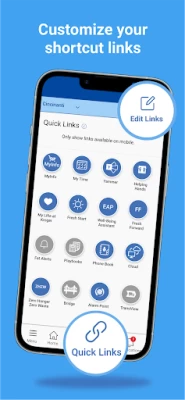
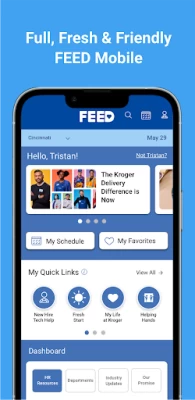
More About FEED Mobile
• Access your schedule.
• Keep updated on COVID-19 safety and associate resources.
• Read inspiring articles about associates and company news.
• Find daily news and notes.
• Access the tools you need for your job.
• And more!
FEED Mobile App is intended to help improve your overall associate experience by giving you a more convenient way (an easier way) to engage with company content.
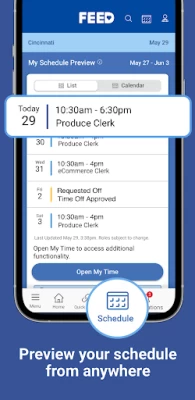
Scroll through breaking news articles on the home page or venture to the Schedule tab for hourly associates’ schedule. Check your paycheck stubs by accessing ExpressHR through your profile menu, the ExpressHR Quick Link or by using the navigation bar.
Learn about Kroger history and our programs in the ‘About Kroger’ page off the main menu. The ‘Zero Hunger | Zero Waste’ page features the progress we are making on our overall goal to reduce waste and hunger by 2025. Let your voice be heard on the ‘Your Feedback’ page.
Access Associate Deals off the main menu where you can find all the great benefits our company offers.
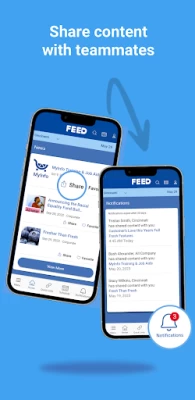
The ‘Company News’ page gives you a glimpse into the news and happenings at the Kroger Family of Companies. CEO and Chairman Rodney McMullen regularly gives updates on the company. Learn about programs and read inspiring stories from fellow associates. Be inspired to try new innovative food items and recipes by engaging in foodie stories posted to FEED.
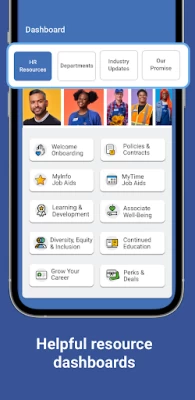
Additionally, associates can use the mobile app to easily access the tools they need to do their job by selecting their department page off the main menu.
All divisions are accessible and have their own destinations on FEED as well.
Latest Version
3.1.3.280
May 16, 2025
The Kroger Co.
Finance
Android
264,063
Free
com.kroger.feed
Report a Problem
User Reviews

larry h
2 years ago
I would give it negative stars but that's not an option. I have been trying to get my wife's check stubs but can't get into it. They might as well go back to paper checks and fire whoever came up with the idea for this app. POS now since the update no January 10 it won't even open. It just stays on the picture of the cut apple. I tried Uninstaller the app and reinstalling it but it won't let me sign in. WHY CAN'T SOMEONE FIX THE APP.

Takiya Smith
2 years ago
It's always something wrong with the site, or information on the site. My time has screwed me over and over really needs to work on operating system. I shows vacation you don't have and delays paycheck. It's happened more than twice and they still don't have it together. And the company instead of completely removing a non-working system keeps trying to repair me while my account keeps overdrafting because my check late. All around needs to be gotten rid of.

Patti Cooper
2 years ago
This app keeps flaking out, and I have to delete it and re-load it to work. Also, if I use the app to schedule vacation time, it doesn't show up in the main system. It only shows on my phone as requested. Overall, this app is very unreliable. The only reason I use it is because I have to for work information.

Kevin Andrews
1 year ago
I keep running into an issue where the won't fully load. It brings up the loading screen, which will start pulsing released. The only work around is to and reinstall the app, which I've had to do multiple times already. It seems to correlate with changing password, but that isn't the only time it happens.

Kelly Nelson
3 years ago
IT STILL DOESN'T FING WORK. It won't let me sign on **AT ALL**. There's too many steps to sign on when you already are signed on the app. I wish that,if you're signed on the app, it would/ could automatically sign onto MyInfo when you tap it in the pull down menu.Another thing, I can't see my schedule on calendar mode or at all like before since my disability makes it hard to see it listed(thanks for not caring for us on this trash and website). Website sucks as well. Worst system ever. 0 stars.

Huntress4Him “Demon Huntress”
1 year ago
I have been using the FEED app for about 2 weeks now. I am on the Samsung Galaxy S23 Ultra. The app was running wonderfully until Sunday, July 3, 2024. The app will not fully load and will make this bouncing action when it tries. I've asked numerous co-workers if they are having this issue and they are not. My next step is uninstalling the app and reload it. Stay tuned. My reasons for 2 stars; it was great til it stopped working.

Samantha Chase
1 year ago
App will NOT open. Have un-installed and reinstalled 3-4 times. Try to open the app and it closes automatically. Also stops working after having to change passwords. Fix this!! I work in the pharmacy and the system routinely does not recognize I'm standing in the store, resulting in having to walk clear across the store just to clock in. That's really frustrating and unnecessary when I need to get to work.

Danitza Enriquez
3 years ago
This app was better before the new updates, I was able to see my work schedule better this way, now everytime I click on the calendar icon all I see is a blank page. Nothing shows up at all, I have tried to uninstall and reinstall. My Google play app store updates my applications on auto. The last up date I had was on Nov.10,2022.

Sea gulls
1 year ago
Relatively often, I have to uninstall and redownload this app because it glitches on the opening blue logo page and becomes absolutely inoperable. I mainly use the app to quickly check my schedule, and it's extremely annoying to have to go through this process every 2 months or sometimes less. Unlike other reviews regarding this problem, I don't see a correlation to the changing of my password.

theunderdog724
3 years ago
Can't even get into my schedule. Whats the point? One of the worst decisions kroger has made by switching to this new system. Trying to fix what isn't broken. " oh the old system was outdated". yea well it was simple and actually worked!!! Don't fix what isn't broken. Usually when u update something it should become more simple. With the zebras and new rules that go with them that completely waste time..kroger has shot themselves in both feet

Isaac Brewster
1 year ago
App no longer loads. It flashes its sign in screen several times before taking you to a screen that's signed in to know particular user. Restarting the app doesn't help nor does reinstalling it. This app is totally useless. Furthermore, when it does start after weeks of not working, it takes you to a blank page instead of taking you to your schedule and does not allow you to view it.

SnazzyMazzy
4 years ago
Slow running and crashes ocassionally. This app is NOT convenient. On the feed website our schedule is one tap to quick view a drop list of our days to work. On the app however you must log in again to view the default schedule site. Changing my division has little to no changes. There is almost zero news relevant to me on my home page. Where is news regarding my division, health concerns, product info, help? Quick links are completely non-functional. Happy to see an app, but it needs work.

Edward Liu
3 years ago
Almost the only thing I actually use this app regularly for is to see my schedule. The new update nuked this feature and all I get is a blank screen. I've restarted, reinstalled and reset the app to avail. Please stop tinkering with technology and shipping a broken product. If you're going to change things, make them a change towards better not worse experiences.

Glen W
4 years ago
The app is more difficult to use than the website. Can't even see your eschedule without signing in again and they buried the eschedule button to make it difficult to find. The menu doesn't have links that you expect to find and none of the other sites (like ExpressHR) show up when you finally figure out where they go. Don't bother with the app, as annoying as signing in multiple times to get the one piece of information you're looking for, the website is much better.

raven
4 years ago
I love the idea of an app but I wish its layout was more mobile-friendly. The login pages and the e-schedule look exactly how they do in a web browser - I have to zoom in all awkwardly to navigate. Kind of defeats the purpose of an app. Also kind of annoying how you have to sign in twice to see your e-schedule (especially when the login page is laid out so poorly). Like I said I would love the convenience of an app but this felt sort of rushed. Looking forward to future updates.

Tannie Duong
1 year ago
Had to uninstall and reinstall. they need to be much better with the password. Especially because it is forced to be changed every 6 months, this app needs to be prepared in those instances. In this case it's not, I always have problems with it loading every time I need to make a password change. Makes it hard to see your schedule, because it basically glitches at the login and never is able to refresh itself.

inCOMPYtent
11 months ago
Last time I checked, It won't even load up past the splash screen now outside of work, and inside it take literally almost 40 minutes to an hour and a half or more.... and when it does actually DECIDE to load, it can't even load up the main page so I can access my schedule that's inaccurate more often than not, but I can't clock in. But this is just another par for the course with Fred myeres.

Micah Salmond
6 months ago
Same issue as many other users. I often can't get past the splash screen especially if I have not used the app recently. I am currently trying to get it to load. So frustrating. I have used the app for a long time and it seems to be getting worse (as in this issue happens more frequently now). PLEASE FIX

Angela Eye
6 months ago
I have figured out that it quicks working if you have to change your password. Change mine at work and then the app wouldn't work until I uninstalled then reinstalled. Doesn't give you login option once you do initially so when password changes, it seems to freeze. Other than that, convenient when in department and need to look something up on phone instead of going upstairs to computers.

Amber Wood
7 months ago
If I don't open it often. I have to uninstall and reinstall app to get it to open. Or I face the home screen for all eternity. 2024 edit: yea still crashes if I don't use it enough. Can't even open the app without the front page glitching. 2025 edit: same issue. infinite loading screen. fix the app so employees can use it!









