

Filerev for Google Drive™
December 04, 2025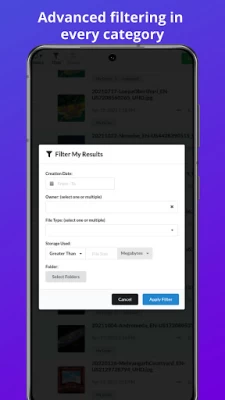
More About Filerev for Google Drive™
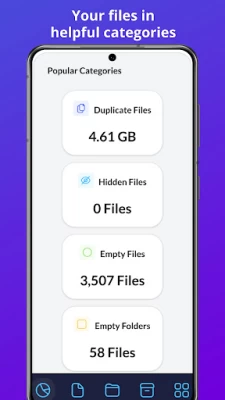
Filerev shows your Google Drive files in different categories, such as:
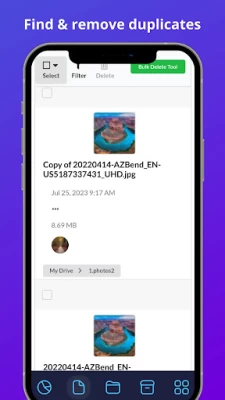
✔️ Duplicate Files
✔️ Hidden Files
✔️ Empty Files
✔️ Files Larger than X MB
✔️ Files Older than X years
✔️ Files not owned by me
✔️ Temporary Files
✔️ Files by Extension
✔️ Custom Files, where you can view files by custom criteria.
✔️ Google Drive Trash
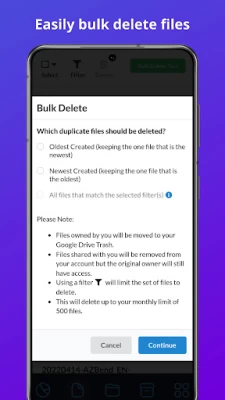
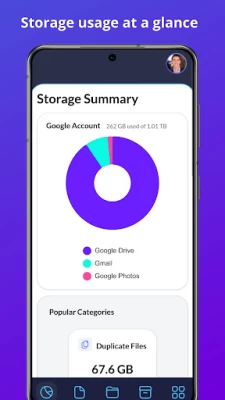
In each category, you will see the total storage space that your files are consuming and the number of files in the category. You can use filters to further drill down to specific files and folders. Then, you can delete the files you no longer want or move them to another location. The bulk delete tool is also available in every category, making it a breeze to delete everything in a specific category quickly.
Below the files, there is another category for your folders where you will see:
✔️ Empty Folders
✔️ Custom Folders where you can filter folders by custom criteria.
You can also use the Storage Usage Analyzer (aka Storage Usage Explorer) to browse your Google Drive folders by size.
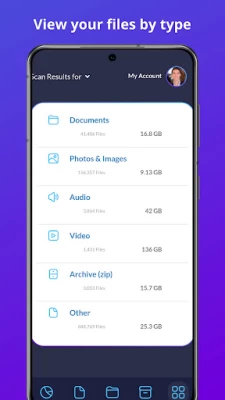
You also can browse your files by specific file types. The file types are first broken down into high-level types such as:
✔️ Documents
✔️ Photos & Images**
✔️ Audio
✔️ Video
✔️ Archive (zip)
✔️ Other
When you view any of these categories, you will see your files further broken down into categories for specific file types. For example, the documents category might show your files in categories such as Microsoft Word, PDF, JPG, Excel, Google Sheets, PowerPoint, etc.
💰 PRICING
With the free plan, you can scan up to 1 million files in your Google Drive account and view how your storage is being used. You can see the number of duplicate files, empty folders, large folders and more that are taking up space in your Google Drive account. You can also delete or move up to 500 files or folders each month.
Upgrade to a paid plan that starts for as little as 4 per month (paid annually) to unlock more features. The paid plans have additional features, and you can scan more files, delete more files and browse large folders and empty folders.
Install the app above to start using the free plan or you can view the plan comparison by visiting https://filerev.com/pricing
🏦 SECURE & PRIVATE
We care about the privacy of your data and are committed to protecting it. Our motivation is to help you organize your Google Drive account, and we will not use your information for anything other than that. Everything is transferred over a secure SSL connection, and we encrypt any account information we store.
We also regularly submit Filerev for security reviews and audits to ensure your data stays safe. You can read more about this here: https://filerev.com/help/faq/is-filerev-safe/
** Please note that you can find and organize photos in Google Drive, but Filerev does not currently show files in Google Photos.
Google Drive is a trademark of Google Inc. Use of this trademark is subject to Google Permissions.
Latest Version
December 04, 2025
Brett Batie
IT Tools
Android
68,807
Free
app.cleandrive.my.twa
Report a Problem
User Reviews

Coty Fraker
4 years ago
I have been charged twice for this cleandrive. I never put a credit card on file, yet my card was charged. I wouldn't download this app if I were you.

selnkl
4 years ago
It's very unfortunate that an application of this calibre is rated below 4 stars.Though pricing might be an issue for many,it should have been rated at least 4.5+ for the sheer work the developer has put in!!!

Eamonn Doyle
4 years ago
App scanned 160,000 files, 100gb taking 15 mins. I begin looking at the report detail - hit back button to return to summary and the app begins to perform entire scan again. Poor. Uninstalled.

Kawi Vulcan
4 years ago
Doesn't work. Remained on the startup page with the logo for several messages. I unistalled the and started process again but the program still wouldn't start. Too Bad.

Bobby Moore jr
1 year ago
Every time I try to open the app I get a error message stating that I do not have an internet connection when I absolutely do I have an internet connection with my phone service and I have Wi-Fi full bars on both so why am I getting this error message you know this app will be a godsend if I could actually use it

nat lider
1 year ago
Easy to use UI but will only find dupes with the same name - doesn't recognize dupe images under different names Edit: thanks for reply but that was not my experience when using the app. I still found duplicates after using

Perry D Riley Jr
4 years ago
Not much to go on from here with the way the app is set up give me the money and makes you feel like the maker of this app dose not care if it works or not many tools that comes with it but from this demo it's definitely hard to tell even much less too spend the money on mybe how many times have spent the subscribion fee too find later something just stop working,,,, ect,,, ect,,,, too many things like this on all app store Alpcations..

Shawn Thomas
4 years ago
Pricing structure a little high, this is probably an app I would use once or twice a year so I can't really justify $5 a month. It's about half the cost of the 2 terabytes a month I pay Google for and it would have saved me 20 gigabytes. Nice idea though, Google drive definitely needs better cleaning utilities.

D Jones
4 years ago
Thank you first off to customer service for helping me in chrisis. Next, let me say this program is great for seeing what is actually on your gdrive, in detail. Also, its great because it does what no other program I have found does, it will actually help you get rid of all of the doubles and tripples of media & files that take up space un-nessacerily on gdrive. I could not believe how much space it gave me. I went from having used way over 200 gb to having 100 gb free on my gdrive. Thank you

Animesh Majumdar
1 year ago
The app is very poor. It shows duplicate files, but you have to choose them individually, one by one, to delete them. There is also a security concern, as you have to give permission to access all the files on your drive. Not recommended at all.

Jose Lopez
4 years ago
Wish I could give it 5 stars because it sounded like an incredible idea, but after two days of trying to use it, I can't. I started it yesterday and after an hour received a message that stated it was in a maintenance period. So I tried again today, I started it at 10 in the morning, and it's now 17:45, and it still on zero percentage, either the app has a problem when the screen goes out, or something. Again, sorry. Best of luck, maybe I'll try it again in the future but now it does not work.

Debra Fezza Reed
2 years ago
Too new a user, so too soon for 5 stars. I started a free trial and signed up for 1 month. I've had my Google drive forever. I started small, now I'm getting space warnings on 2Tb. Clearly I'm hoarding 😉. I've been using this for 4 hours and have deleted 500k duplicates !!!!! I had to go Premium+ (premium $30/mth plus $20) which buys me 1.5m deletions and 10m files. I shouldn't need a cleanup like this for another couple years. $50 well spent.

Mandy Ake
10 months ago
This app is awful! It gives you 1 scan per month for free and coincidentally the 1 scan had an error or problem apparently so I'm supposed to pay the app to do what I have no idea if it can even correctly do what it says!!! The app is pretty low quality in several areas.

M. Goldstein
2 months ago
works pretty nicely, at least compared to other Android apps

Vikram Kanth
3 years ago
Phenomenal app There is no equivalent solution for what this app does. Going Pro is worth every cent. Thanks to the developer team for doing such an exceptional job. I was running out of space and this app did a brilliant job in saving space by analyzing duplicates and older files which I did not need. From occupying 200 gb of storage I went straight down to 150 gb!! Now imagine how much money I have saved by not having to buy additional storage.

Lennard Kowalik (Len)
1 year ago
When I tried to register, I got a message saying that the app does not comply with Google's secure browser policy, so I'm installing it. Update Feb 20 2024 I received an email from the developer. I thought that I would just try installing it again. No issues. Looks like a very useful and well thought—out app.

Evan Gallic
4 years ago
I've re-written this a few times before posting it because I don't know whether to give it two stars or five. I'm going to settle on four because my only real complaint is the pricing model. Pro - I can't find any other app that performs a similar function, and it seems to work well. I haven't paid yet so all I can see are the results, but they mostly look good (I wish it would identify empty folders though). It performs functions Google should have built into it already. I appreciate that it exists. For the price, I wish it worked with more cloud providers. Con - I HATE the pricing model. I hate software that you may only use once or twice, but prices itself in such a way you'll feel like you're overpaying if you pay for just a month, but you'll feel dumb if you pay a year and only use it for a month. I think part of the problem is the scope of the app. You can use it with multiple google drives, which makes the pricing ($10\month, $21\quarter, $48\year) a great value if you have four or five drives to maintain regularly. It makes it a terrible value if you just want to use it once every few months to make sure your drive hasn't gotten out of hand. I'm still going four stars and will likely pay for some amount of service at some point because I like supporting small devs, I think there is value in this tool, and it will save me time. But at $48/year to clean up a couple hundred GB? I could just pay $99 and go get another 2TB cloud storage from another provider. Good software, tough to justify the cost for individual users. I wish I could just pay $20\year and tie it to a single drive to maintain or something. If more cloud services are added, I could see justifying the $48\year.

Misses Moron
3 years ago
It won't open. Just says select account. And goes back to this screen. ** Rated 3 ⭐ reinstated free trial. Prompt response ON A WEEKEND. 👍. * Hey Brett, I just got your response. I re-downloaded your app. And it's asking me for. Payment. My free trial has ended. I never got to use the app. It's not even letting me fill in the contact form. I click in the dialog box and the page resets itself. If you need more info, Email me.

Ben Schrader
3 years ago
Thank you so much. As a web developer, this app is a life saver for reeling in the massive amounts of files spread everywhere across too many clouds. Between Google Drive, Dropbox, and OneDrive, my Chromebook, and my Windows desktop(s), all of them have had some situation where folders (and files) files were duplicated, folders (and files) were empty, and huge files disappeared into unknown places. This app took care of all that and I've tidied up my 800+GB drive (now 300+GB of useful files)

Elli
1 year ago
Very good and actually gets the work done which none of the other apps I've tried do. A bit expensive since I have a lot of data though. And despite be having a premium subscription, it won't let me delete and sort through everything I need to this month but need to wait until next month. Super frustrating. I'd rather just pay more and get it over with right away then wait, the cost is still gonna be the same in the end. But all in all, I'd recommend this one!









