

Grasshopper
June 21, 2024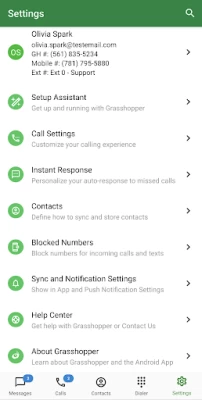


More About Grasshopper
All-in-One Platform
- Single location for all customer calls, text, voicemail, voicemail transcription, fax, and instant response - all at the palm of your hand.
Look and Sound Professional
- Immediately identify a business call. Customize greetings and extensions to sound more professional.
Easy-to-Use
- Un-complicate your day-to-day, and easily onboard to Grasshoppers virtual phone system.
Privacy
- Get a business line to keep your number, well, private.
Try free for 7 days
Grasshopper Key Features:
- Call and Text, that show your business number (requires working phone service and data access)
- Supports MMS and Group messaging capability for local numbers
- Extensions
- Instant Response
- Call forwarding
- Business Contacts
- Virtual Receptionist
And More!
Please send feedback and questions to grasshopperapps@goto.com.
*Texting is available in US and Canada only. Carrier compliance requires 10DLC and Toll-Free verification.
Latest Version
5.28.0
June 21, 2024
Grasshopper Group LLC
Finance
Android
415,802
Free
com.grasshopper.dialer
Report a Problem
User Reviews

Timothy G
5 years ago
About 2 weeks ago I stopped getting notifications for text messages and voicemails. I've uninstalled and reinstalled without change. Also, I constantly have to swipe up in text conversations in order to force a refresh of the conversation because customer replies don't come through. The desktop app is even worse!! It doesn't even have spell check built in for the text messaging I wish I would have looked at other companies before going with these guys.

MJ Brenden
3 years ago
Nice app! I like that everyone can see the text messages and respond as one. I like the call forwarding feature if one person doesn't answer. I like that i can call from the grasshopper app and it knows my contact names. Improvements needed: it sometimes logs me out of the app for no apparent reason. It would be nice if I could add the phone numbers directly to my contacts from the app. It'd be nice if i could dismiss a call right away and have it roll vs having to wait for it to ring.

A Google user
6 years ago
Good but not Great. The app offers a cost-effective client engagement interface. I love that incoming messages are transcribed to be read conveniently anywhere. However, to optimize the usefulness and professional efficacy of the app some improvements are needed: 1. There needs to be a complete history log associated with each outside client phone number that shows all incoming, outgoing, and text communications initiated/completed through the app. At minimum, there should be some sort of indicator to show that a missed call was at least responded to so that teams can know which calls need to be addressed. 2. Notes logged on the desktop app should sync and be visible on the phone app. Since there is no complete history log associated with individual phone numbers, I use the “Add Note” feature on the desktop app, however, these notes are not visible on the phone app so we have no background history when addressing calls on the go. Adding these features would more closely mimic the benefit of utilizing a man-powered call center.
A Google user
6 years ago
The app does what is needs to do, but I'm unable to conduct wifi calling with the app in the background. As soon as I push the home button to put the app in the background, the audio quality goes down 90%. "Bad audio quality connected. Please check network connectivity." My connection is fine, as the app works when in the foreground. ive already uninstalled and reinstalled, bit that didnt resolve it.

Keith Elbertson
4 years ago
I have been using Grasshopper for may years now. Although the automated attendant (system) works very well, this app leave much to be desired/corrected. The biggest annoyance is badges on the app icon. Right now I have seven voicemails in my inbox but the badge shows one. When in the app, the inbox shows four. To clear-up this the only option is to uninstall the app and re-install it. I have to do this several times per month to get close to syncing with the desktop app. The desktop shows the correct count. In reading another user with the same complaint, tech support said it was due to an inconsistent internet connection. Come on people, it's a cell phone. They never have consistent internet connections. When you listen to a voice mail in the app, it offers delete on the right side at the bottom. Clicking on DELETE here has no effect whatsoever. If you are not going to make it work, get rid of it in the app. Although you can text clients from you phone with the app, you do not have access to them from the desktop app. Also, when you wish to delete a text from the phone, you must to one at a time. Such an unbelievable pain to do. No mark for delete then get rid of the whole lot. From the desktop app you can add notes to a voicemail message. These notes are not available on the phone app. It would be great if you would make the phone a desktop apps work the same way as each other. As it is, the phone app is just barely usable.

Jacob Barbian
4 years ago
When it works it's ok. It worked great for the first couple weeks, but then issues. Missing call, not receiving messages (text or voice) consistently, they some times shown up hours later or the next day. Can't access recent/missed calls and other features on phone app. App says its refreshed the call or message info, but it never does. Not being able to call out through app and dropping calls. These are the major issues we have been experiencing. Could be great but it's been a let down.
A Google user
6 years ago
This app lacks serious functionality, there's virtually no reason to even use the app. You cannot manage your Grasshopper account, make any changes to the settings, extensions, voicemails, away greeting - nothing! Text messages, and call logs - that's what you get. Everything else has to be managed from their website, which is also lack luster and complicated. Update: No longer able to make outbound calls off WiFi. Again, very limited performance with app, very disappointing.

moni rosiles
5 years ago
We have had multiple problems with this app. First, we have had problems getting mms messages. This is so important for our business to provide our customers quotes. We either don't get the pictures at all, or many hours later. Also, we very rarely can make calls out, constantly get an error message. We don't get the notifications either. So many problems with this app & it is costing us business.
A Google user
7 years ago
Wanted to like this app/service. Really did. Signed up some time ago but cancelled due to poor service. Got an email offer from Grasshopper stating two months if I re-subscribe. Sure, sounds great. I re-subscribe but get charged. When I call customer service I'm told there is no such offer, even though I can clearly access the email sent. If anyone is on the fence about subscribing, I recommend to stay away.

Chelsea Rice
2 years ago
Unreliable garbage. It's hit or miss if notifications come through in a timely manner. Often it won't ding until I open my screen, which defeats the purpose. On calls there's a several second delay when speaking which makes things difficult. Now to top it off, notifications have turned themselves off and locked the toggle into the off position and it says "this app doesn't send notifications" so it's pretty much useless unless I check it constantly. Which as a midwife makes it useless for me.

Terrell Nixon
2 years ago
Overall this app seems to be ok. Do not need alot of bells and whistles but a good foundation. The main problem with this app for us is that they make it very hard to set up your own voice prompts. You have to do it thru a computer mic or go thru steps from hell to use phone. I did the 7 day trail but by time I was able to get a decent mic set up, work went crazy and trial timed out. They called and offered help, but only if I paid for it. Based on that, I can not recommend 😐

Elizabeth Clark
2 years ago
Always goes haywire right when you need it most. Repeatedly disallows phone calls when I need to be on a call. Texts sometimes come through on my notifications tab, but when I go to the app--they don't show up until I refresh the screen a few times over the course of (sometimes) 5 minutes. This is not ideal because I use it for work and need to communicate effectively with my clients.

Clifton Harris
2 years ago
Good app. Easy to navigate. Calls are good. I wish it would allow you to create contacts though. Texting is very limited (cant click links from text), and you can lose texts if you're in an area with weak signal. Sometimes there are significant delays in notifications of texts and missed calls (you should refresh often). But overall, it does what you need

C Michels
1 year ago
Works well. A few upgrades would be great, like scheduling & deleting text messages & deleting messages for those sharing/using the same app across the board. The app sometimes stays on in the phone mode acting as if you are on a phone call & trying to end the call doesn't work, you have to close the app & then re-open. Sometimes calls still come thru even though we've set work hours to receive calls.

Erika Boyer
1 year ago
Great App for small businesses!! The company I work for uses Grasshopper. We run our main line and several extensions for our different managers and departments. you can easily forward an extension to anyone's personal cell phone, and I love that I can text members of my team from it. I wish it had better group texting capabilities, but I'm really satisfied with it, and it's a great tool for what we do. Highly recommend, especially when your team is mostly remote.

Tracie Roth
1 year ago
New update is garbage, as is support. The new update severed the connection to contacts and support kept saying there wasn't an update and never a way to connect contracts to Google. Both of which are completely untrue. We use this to run our business and without a way to save contacts for clients and vendors we're dead in the water. Avoid at all cost!

Trish Sunderland
1 year ago
The latest, "update" is absolutely horrendous. When you go to type a text and start typing someone's name, NOTHING pulls up. I thought my "synching contacts," got toggled off - nope. Happens to everyone on our team, across different devices. Numbers that are clearly programmed, only show up as numbers from the list view, yet when I go into the chat, the name will be at the top right. Your app no longer does its MOST IMPORTANT function, for our team anyway. What are you doing to rectify this??

Tim Tom Jr.
1 year ago
I give it 4 of 5 stars. I purchased this app for the year and love the features it has. Only thing I wish the app had was an option to change the color of the screen when a call comes in. Otherwise, the app would be 5 out of 5. Also, the support team is AMAZING! If you need anything, they respond very quickly & speak english very well which is a huge plus. Overall, great app especially if you're a startup business.

William Miles
1 year ago
The functionality of the app is great, it helps me run my business while on the go. The only issue I run into is when it forwards a call, the app rings as well as my phone. If I answer through the app, my phone will continue ringing in my ear as I'm trying to talk to a customer. Only way to stop it is to put the phone on vibrate or silent. When turning the ringer back on, the phone is still "ringing" until I force close the Grasshopper app. Other than that issue I love the app!

Greg Smith
1 year ago
Does a pretty good job for what it is advertised and designed for. A little buggy in a couple of areas. Just yesterday, about 40 text messages that had been previously read anywhere from a day to a few weeks ago were suddenly showing as unread. Sometimes, when calls are forwarded, the voicemail gets left on my phone instead of in the grasshopper app. Multimedia messaging is a bit subpar compared to normal multimedia texting on Android and Apple.









