

HCMToGo
June 16, 2024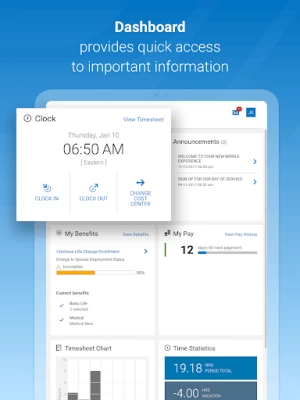


More About HCMToGo
*IMPORTANT MESSAGE FOR NEW HCMtoGO USERS*
BEFORE YOU LOGIN - employees and managers:
• If your administrator has not setup the new HCMtoGO app for your organization, you will NOT be able to get access. Please check with your manager or company admin to get access to the new app.
• When logging in with HCMtoGO you will need to select the region you are using as well as the Company Shortname (The unique Identification number your company administrator needs to provide to you.)
• After you enter that information you will be prompted to enter in your Company, Username, and Password. If you get stuck on this your COMPANY ADMIN can help you out.
• Companies need to be using approval workflows to process To Do Items.
• Supported Timesheet Profiles are Bulk Hours and Start/End (All Days) only.
• Administrator should provide their company’s Short Name to users for login.
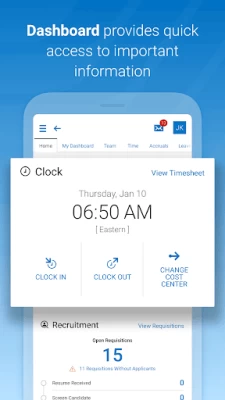
Now that you are ready to join HCMtoGO here are some of the awesome things you can do within the new app to enhance your human resource needs:
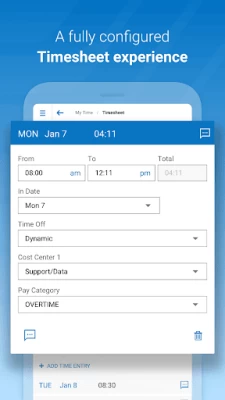
• Check and/or edit your timesheets for accuracy
• Submit and view time off requests
• Check vacation/sick balances
• Enroll in benefits and view existing benefits
• Check your schedule
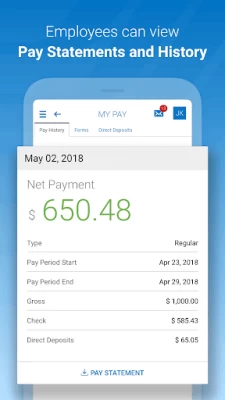
• View pay stubs and manage direct deposits.
• Check your schedule and, if enabled, swap shifts with peers
Your employer must have the HCMtoGO software configured for mobile use. Contact your system administrator for more details.
Key things to know as an administrator:
• Users need to have permission to access the new app via their security profile.
• Users need to be permissioned to have access via their UI Preferences widget within their security profile.
• Companies need to be using approval workflows to process To Do Items.
• Supported Timesheet Profiles are Bulk Hours and Start/End (All Days) only.
• Administrator should provide their company’s Short Name to users for login.
• Basic Authentication with SSO is not currently supported
Latest Version
1.92.11
June 16, 2024
Workforce Ready
Finance
Android
761,036
Free
com.hcmtogo.workforceready
Report a Problem
User Reviews

Thomas Conover
4 years ago
This app is horribly designed compared to others (T-sheets, etc.). There is no way to stay logged in. There is no way to take a break without clocking out. There is not an easy way to add a note to a current shift (takes 4-5 steps). Truly poor. Edited: keeping it 1 star because now it keeps asking me to rate it. It will not stop asking. Would have been 2 stars because the turtles are cool.

Scott Rudell
5 years ago
Clunky and user-unfriendly. I interact with the app for punching in and out, as a time clock. Usually on punches after the first in the day, the button to clock in/out is visible, but when pressed, instead of clocking in/out it takes you back to the sign in screen. Despite knowing this flaw, the false positive feedback is convincing enough that I typically goof up several punches a week.

Matt C
2 years ago
For an app that tracks hours worked so you can get paid properly, it should function near flawlessly. This app only manages to open up 1/10 times. It constantly freezes on startup and most of the time requires restarting my phone for it to work. I have a Galaxy S21 with great service. This should not be happening. You seriously need to update the backend of this app.

M E
3 years ago
big problem is the over stringent security on the employee login, for clocking in and out. The protocols are higher than any banking platforms I've used. It forces you to change pswds periodically. It won't let you reuse any.. so this makes it hard to remember them OR you have to have them saved in Google OR you have to write them down! All are bad! And even then, it will be twitchy on logins. Keeps admins busy! Resetting passwords!

Brandon Kowalski
2 years ago
Has random occasional log in issues. When requesting time off for days before and after days without scheduled shifts it isn't smart enough to automatically remove those days and you have to put in multiple requests to work around it. If you have to add a note to your time sheet you have to click save in two different spots otherwise it doesn't save it. It is a workable app but is not user friendly.

David Smotherman
5 years ago
Very outdated compared to others homebase etc. Feels like example playing organ trail when you can play a Xbox 360. Can't view other people's schedules being setup as a mng. Very difficult to navigate around, ask time off etc. My final feedback look at other time clock apps and try to be better. Homebase even allows teammates to send high fives. Seriously lacking. Not a negative review. Just needs a overhaul

Mickey Dean
4 years ago
It's ok. Don't have too many gripes, aside from constantly needing to change your password and the occasional hiccup when clocking in/out. The 1 star however is for the CONSTANT pop-up asking if you'd like to rate the app. It reappears no matter how many times you say no. At first I just told it to remind me later and then I started flat out saying no. I've been saying no for 4 months now. So finally I decided to give in and rate it. Hopefully now they'll leave me the hell alone.

Jeffrey Michels
2 years ago
App doesn't open half of the time, just stays in an endless loading screen. Edit, once again the app would not load after opening and closing it multiple times last night, i tried opening it again today and my account is locked even though I didn't even get to attempt to login because the app couldn't even get to the login screen to begin with. This app is trash. I think this is quite possibly the worst app I've ever been forced to use.

Charley Bell
4 years ago
Everytime I open the app it asks for a rating, even after ive repeatedly pressed no thanks. Time sheets are also needlessly complicated for the average user. Needs to be streamlined to allow the average person to quickly and easily ask for time punch modifications and pto requests. Always reverts to the "Start" menu, and you have to switch to the "home" menu. The software engineers need some average joe QC. It would vastly increase the functionality of the app. Just too much going on.

Michelle Schaker
5 years ago
Login randomly works. Really non intuitive app, hard to find what you need. **update this app is NOT AT ALL user friendly. My home screen or whatever appears when I log in has changed. Not sure why, I am not able to figure out how to fix it. This app can't find an internet connection half the time, so manual fixes are needed. A LOT

Trevor
2 years ago
haven't had issues from management side but its extremely annoying that you often have to restart the mobile app multiple times for it to load. especially when hourly folks are clocking out at the end of a long day. go figure an app called wurk doesn't like to work. and the new default landing page is less convenient and offers quick access to options that aren't necessary for most. and haven't figured out a way to ease requirements for changing passwords but it's excessive

Denise Breden
5 years ago
The app was recently changed. In my opinion, it is more frustrating to navigate. It is always on the time sheet. I mostly care about the pay stub. You have to go through quite the process to get the information you want. I think it is frustrating to find anything you want. Notifications during Covid layoff were suppose to be shown. We were suppose to have something that showed there was a notification, which none ever showed. Finding the notification was time consuming and difficult.

Bryan
3 years ago
I have to go through multiple pages just to clock in or change the job I'm at. The home screen is useless as the info could be placed on the home screen instead of going through the small corner to make everything much easier. You should also add a feature that automatically deducts 30 minutes for lunch. It is very difficult in construction to make sure you clock out for 30 minutes exactly then clock back in. The pages load slow so I've been getting less time than I actually put into the job.

Erik Roberts
4 years ago
The user experience is really not easy, getting new hires to understand it and be able to use it is not easy. Even when employees are.around for awhile and get experience using it they tell.me they have a tough time with it. Even the different items I have to use are not always easy to find, even when I have used said item, several times. It just doesn't seem to.put things in obvious aces, but instead hides them. It's a great idea and makes so much sense, but the user experience is poor at best.

Eric Clark
2 years ago
The app developer is an iPhone person. When we inquire about app issues on an Android platform, the response we get is, "Well, the app is designed for IPhone". The ongoing issue on Android is when starting the app on regular data (not Wi-Fi), I only get the splash screen or first screen, but it never goes any further. I either have to connect to Wi-Fi or put my phone in airplane mode and then back to data to get it to function. Please fix it!

Mike Pierson
4 years ago
This app takes something simple, recording work hours, and makes it difficult, time consuming, and unreliable. It takes anywhere from two to five minutes just to open the app. When clocking in or out, it doesn't always give the confirmation message, not does it always record the clock in or out. It cannot handle shifts that go past midnight. This app has lost over 20 hours of my time in the past two pay periods because of these issues. It's garbage.

Some Dude
4 years ago
Although it likely has the functionality you need, it just isn't intuitive/ user friendly. Just feels like programmers made the app without using any real human being feedback. Has always felt this way. You constantly have to change your password. The security feels higher than my banks, which may be appropriate for an employer who has all your personal info to protect, but for an employee that just wants to clock in and out, there is no need to force password changes. I have other gripes

Dustin Chang
4 years ago
Slowest work app I've ever used. Saving times and per diem just show a loading icon forever. Navigating the app is not user friendly and has to be shown multiple times just to vaguely remember how to do something again. Terrible convoluted app that needs a lot more work. If a clock in app requires a hands on presentation, then you need to go back and redesign it. All of us using it are working in the field. We don't need an over complicated system just to clock in and out. Update: still terrible

Adam Moon (Weq)
4 years ago
An awful piece of software. On the low chance it actually starts on the first attempt to load it, I'm lucky if it is quick enough to let me clock in on time. The website functionality on mobile is actually a better experience and I find myself more often than not frustrated and closing the app again, to use the Firefox mobile browser version which never seems to fail. On top of that until I was willing to rate the app it would ask me upon every single visit to the home screen.

Sean Gobbell (GobbS)
4 years ago
I am more and more frequently running into issues staying connected and logged into the app. Initially I am able to log in without issue, but when clocking in/out or changing cost center, my phone suddenly loses all cell service (despite full coverage before and after) and a prompt comes up saying that the connection is lost. After tapping "continue offline", I am usually kicked out and forced to log back in. I sent an email to support with a screenshot of the issue. I appreciate any help!









