
JetSign: Fill & Sign PDF Forms
June 29, 2024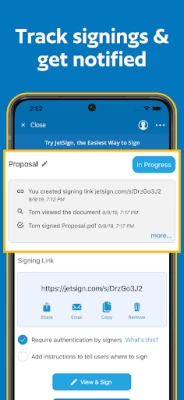
More About JetSign: Fill & Sign PDF Forms
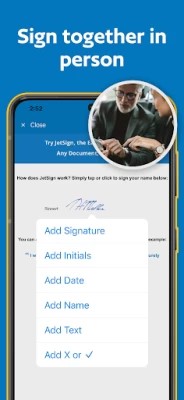
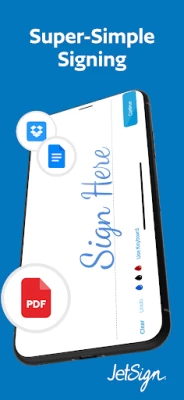
Tap or click anywhere to sign with your finger. Add your e-signature, dates, and text to your document and generate a signed PDF!
FILL & SIGN FORMS
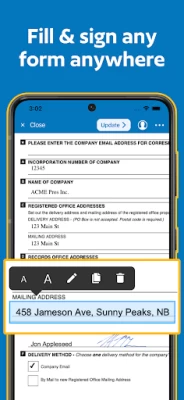
Easily fill and sign forms by editing text directly on the document - no text entry pop-ups required! Resize text, add checkmarks and X's, and clone fields with our form filler features and save as a PDF.
INVITE OTHERS TO SIGN WITH SIGNING LINKS
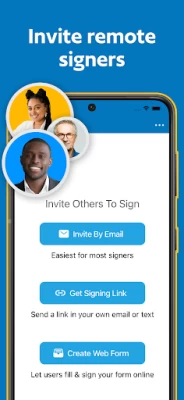
Send out documents for e-signature by email or with a simple signing link that you can share in your own email or text message. You and your remote signer(s) can view and sign your document with a full audit trail. When the other signer adds their e-signature, you will get notified of the signed PDF by email.
ADD SIGNING FIELDS FOR REMOTE SIGNERS
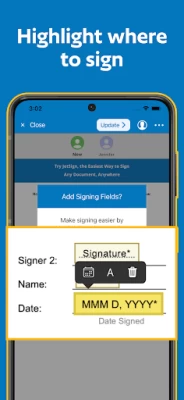
Make signing easier by highlighting exactly where others should sign, initial, and fill out your document! You can also add text, name, date signed, and checkbox fields to your agreements and forms.
SAVE TIME WITH TEMPLATES
Add a document once and re-use it daily for new customers and signers, including signer roles and fields, and template fields to be prefilled before inviting customers to sign.
CONVERT ANY FILE INTO A SIGNED PDF
Add one or several documents at a time including Word (doc/docx), Pages, PDF, HTML, RTF, WordPerfect, images, and 15 other file formats.
EASY IMPORTING
Add files from Dropbox, Google Docs & Drive, Microsoft OneDrive, Mail, and other apps to start signing.
STRONG SECURITY
We protect your documents in the cloud with leading encryption methods (AES-256), SSL hosting, and full audit trails for electronic signatures.
To share documents across devices and with other users, JetSign uses encrypted cloud storage in a secure US-based data center. View our Privacy Policy for full details at https://www.jetsign.com/privacy.
JetSign can be used for NDA's, sales proposals, contracts, job offers, lease agreements, and more. Discover how easy e-signatures can be - download JetSign and get started for free! (no account or registration required)
About Us
JetSign is made in Vancouver, Canada and is a secure e-signature service by GrowthClick Inc. We're focused on creating a super-simple signing experience that you'll love using from your smartphone, tablet, and web browser.
Get started for free (including up to 3 signed documents) or upgrade to unlock everything. Our plans start at $4.99 USD per month ($35.99/year) for additional signing and more features. (Note: Signing documents sent by other users is always free).
Payment will be charged to your Google Play Store account at the confirmation of purchase. Subscription automatically renews unless it is canceled at least 24 hours before the end of the current period. Your account will be charged for renewal within 24 hours prior to the end of the current period. You can manage and cancel your subscriptions by going to your account settings on the Play Store after purchase.
Privacy Policy: https://www.jetsign.com/privacy
Terms of Use: https://www.jetsign.com/terms
Latest Version
2.7.1
June 29, 2024
JetSign
Finance
Android
1,457,125
Free
com.jetsign.app
Report a Problem
User Reviews

Victoria Harrison
1 year ago
super easy to use, very user friendly. I love that you can have all parties involved sign the document in person as well as remotely. Definitely recommend this app!

Tyga Hero
1 year ago
I rarely give out 1 stars but you can only sign 3 docs for free. That's insanely greedy and poor business practice. No worries, I just had AI expedite this for me. And it will manage this for my organization moving forward.

Freedom Gautusa
1 year ago
When I double checked my document is right, it looked good. But it turns out that was not right. It looks like your texts are in the right spot but after you sign and complete it, it turns out that it's not. The texts move after completing it, making your texts overlap with boxes and therefore unreadable. I had to restart because I cannot edit the form. Still haven't finished it. "Rate the app" popped up as I was going to try a third time. Other than that it is good and easy to use.

DW
3 years ago
Decent app. Much better than DocuSign as it allows you to insert text, and sign wherever you need. The only reason I gave 4 stars is that it costs $4.99/month to use, and I only use it once every few months. It would be nice if they had a purchase option where you could purchase credits per document kind of like SnapFax does instead.

lacey lambert
4 years ago
The only time I bother writing reviews is if I'm impressed, or horrified, at how an app functions. Super glad to say I'm writing this review for first reason. I've used several pdf editing tools, and some tools for creating signatures. This one did it all. It was a little bit of a headache, but that was only because of the number of docs involved. Congrats on being the first app of your kind that I would be willing to part with a subscription for. Thank you to the devs.

Lavan Volkov
3 years ago
Holy cow, an app for filling out stuff that actually works!!! You can even have others sign and send your files via email or download. It's great. One bug though, is that it will make the text box stretch clear to the right and I can't zoom in and see the left side of the document.

James Gentry
4 years ago
This is really a messed up app. It looks like it's going to be just great, but it's not. You cannot get the pdf form to fit in your phone screen. You can't zoom.in or out so you can see your progress then after a nail biting hour, the page you are working on disappears. Oh my God have to start all over. It's a headache app, do not download. Wish I could of given it a negative 10. The good reviews? Really? Not true it's a headache app.

Shilo Lorenz
2 years ago
I liked it when I thought it was free. Mediocre app but good for that price... Until I ran out of free signatures and found out it's $99/year. So not a free app after all. I would rather watch a thirty second ad before signing than pay a subscription fee. Response: the description says that it is $35 a year but that offer was not presented to me, only $99. If it's only three signatures, your program is bugged because I got six free signatures and no prior warning.

Jen
2 years ago
7 day trial. 3 signatures or 7 days. After that $99.99 annually. DocuSign gives you unlimited signatures and up to 3 free signature requests. They also have better features from the start. This one doesn't get a chance once seeing DocuSign. Edit: that's actually very interesting, thank you. It doesn't change that you don't have unlimited signing.

Z Raquel Francis
3 years ago
Out of every document signing app I've tried this is by far the simplest yet efficient tool to quickly and painlessly complete documents. The fact that you can check boxes, type on whatever line you need to while easily moving it to the best position on the document, actually sign your signature and place it or size it how it needs to be presented is awesome! There are alot of features to make any document look seamless. Thank you JetSign, this is the best app by far!

A Google User
5 years ago
This App Is FANTASTIC! I really needed to find a good app to be able to sign various forms and documents with. This app definitely did not disappoint! 😊 It is very user-friendly and straight forward. I was able to sign a few very important documents with ease and I'm used to having a very frustrating experience with these kinds of apps. Other apps have come up short when it comes to delivering on their promises but JetSign far surpassed my expectations! I would recommend this app to everyone!

Nicole Wyatt
4 years ago
Literally, since the internet came out, i have tried every editing app. They either glitch or says it's free until you try doing something. This app, you don't have to position and size the text to put it in place... Unless you want too. There is a drop down menu with every option and no sign up in the beginning... Its like a "get started" button...that actually gets you started!!!! THANK YOU FOR YOUR "USER FRIENDLY" COMMON SENSE!!!!

Esther Choe
4 years ago
Awesome app for esigning! After trying several Adobe apps and having multiple issues trying to sign documents, I found this app in the play store. It literally took less than 20 seconds to sign the document and send it. It is so user friendly. All of the prefilled fields showed up like they were supposed to (wasn't happening with Adobe apps) and it was very easy to select fields to esign and date. So thankful that there's apps like this out there!

jackie c
4 years ago
Honestly, I'm not one to review apps but this one is really good. Does exactly what I need it to do with no weird changes to the formatting of the original document. User interface is intuitive and ease of use puts Adobe to shame. Didn't require an account to use and sends the file to your email so if you're low on memory you don't have to download the file (but you can if you want). Big fan and happy to pay for an app that truly does make my life easier.

Shannon Davis
2 years ago
Incredible.... after using this for a very specific purpose, I am already very impressed. I've tried so many overly complicated digital signing apps over the years and all have pretty stressful to use rather than quick and simple. This app is so different from the others and very intuitive. So simple and easy to use. It also responds well to my stylus (Samsung S22 Ultra). Thank you for making an awesome app!

shiren abdul
3 years ago
This app is great!! It makes life so much easier when you are on the go and have to sign documents that are time sensitive. This app has saved me on numerous occassions and I would reccommend it to anyone for personal or business use. Oh and it is SUPER EASY TO USE!!!!! I'm not the most computer savy individual and Its pretty straight forward and simplified for even someone who may not be like me. Its the best of the signing apps in my opinion. Thanks Jet sign!!!! 👍

Tabrina G. Thomas
4 years ago
This App is awesome, fast and efficient. Its like having a secretary right at your fingertips. I used another app right before it which would not all me to move the text box to position the info into the document which was frustrating. I immediately found this App downloaded it used it properly and I was satisfied and relieved of all frustrations within 2 minutes.

Rochelle
3 years ago
USE THIS ONE- I just tried a handful of form fill and sign apps to do a single document and this is the only one that worked without any glitches! The others wasted hours of my time sadly. Will be back next time I need this. User friendly, not a lot of ads and it sends the documents without rearranging everything- in short, it works the way it's supposed to.

Jonathan Weiss
4 years ago
An amazing app for signing, dating, and adding text to pdf docs. Use it all the time with no issues. Gives you the option of either downloading document when completed, or emailing it (user must have email client). It's for simple forms though, as user must tap where to add text, date, or signature on documents. Note: don't expect to have the fields on the document, which require input, to be automatically selected by this app, as it's basically up to you where you want to add something.

A Google user
5 years ago
Very intuitive and easy to use. A convenient tool to have when you need. Wish the subscription fee wasn't quite so much or was graduated based on how many files you sign per month. E.g., three or less per month $1.99, five or less $3.99 etc. Because although it's nice to have when I need it, I don't use enough to justify $4.99 a month. That is why I gave 3 stars but the function and design of the app itself is 5 stars.









