

Kiwibank Mobile Banking
May 31, 2024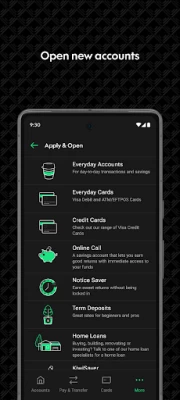
More About Kiwibank Mobile Banking
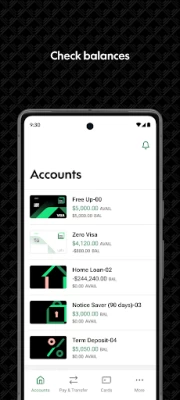
• View account balances and search your transaction history
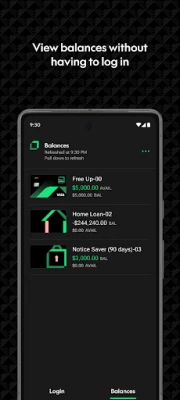
• Set up Quick Balances and add widgets to your home screen, or on your Wear OS watch, to get your balances at a glance without having to login.
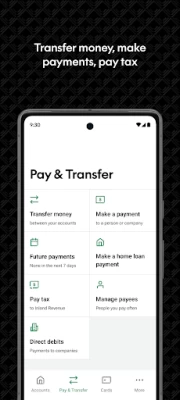
• Pay your bills or transfer money to family, friends and others
• Manage your payees
• Pay tax directly to IRD
• If you have a home loan with us, you can refix or switch to a variable rate when it's up for renewal
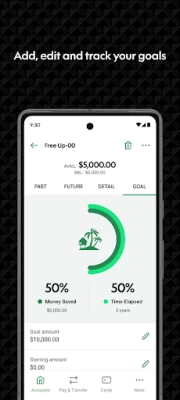
• Set goals using Goal Tracker.
• Do your business on the go. View, authorise or delete upcoming payments, including batch and multiple payments
MANAGE YOUR ACCOUNT
• Change or reset your password
• Update your KeepSafe questions
• Update your contact and tax details
• Send a message using SecureMail
• Personalise your accounts with your favourite photos.
MANAGE YOUR CARDS
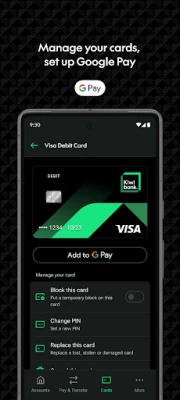
• Set up Google Pay and pay with your phone anywhere contactless is accepted
• Set or change a PIN on your cards
• Block or unblock your cards
• Replace your lost, stolen and damaged cards
• Cancel your EFTPOS and debit cards
APPLY OR OPEN
• Open and manage your everyday or investments accounts
• Apply for a credit card
• Order an EFTPOS or Visa Debit Card
• Join Kiwi Wealth KiwiSaver Scheme.
SECURE BANKING
• It’s safe, secure, and backed by our internet banking guarantee
• Securely access your account with a PIN code or biometric with Touch ID on supported devices or
• Log in with your Internet Banking password
• KeepSafe and two factor authentication provide an extra layer of security
GET STARTED
Our mobile app is free to download and easy to set up, you just need to be a Kiwibank customer.
If you need more information about setting up or using our mobile app, you’ll find answers to frequently asked questions here - https://www.kiwibank.co.nz/contact-us/support-hub/mobile-app/common-questions/
Please let us know what you think about the Kiwibank Mobile Banking app under the Contact Us menu in the app.
Latest Version
4.23.0
May 31, 2024
Kiwibank Ltd.
Finance
Android
1,239,213
Free
nz.co.kiwibank.mobile
Report a Problem
User Reviews

Teao Matiu
2 years ago
Edited Update: I still have no complaints. The App is user friendly. Useful functions that save a trip to the actual bank. Good visual and lots of info for financial planning. I'm all for the alternate options logging in opposed to remembering my passwords AA++ As a member of KiwiBank.. My best feature is being able to see/view my balance (and 1 other linked account), without needing to Login. The Security Mail feature is also a great feature. Response to questions are fairly quick and helpful.

Eli Watson
4 years ago
I've loved using the Kiwibank Mobile Banking app so far! It is easy to navigate and really helpful for tracking my balance. Unfortunately the recent update has stopped me from logging in when opening the app - both through passcode and finger print scanner. When attempting both, an error message appears stating "Login Error. Sorry, we couldn't log you in." Hope this gets fixed soon!

Danielle Nuku
4 years ago
Apps fine overall, don't usually have any issues. However I would like to be able to screenshot on the app. Used to be able to but now it says you can't due to security reasons, I think that isn't very useful. I need to take screenshots for so many things, going back to previous purchases without having to scroll forever and/or needing to provide proof of account etc. Need this feature back thanks. Also if there is a setting to change it, I can not.

John Osgood
1 year ago
The app seems to take a very long time to load. It's a real pain in the backside when I'm needing to either pay someone, or to try and transfer money.

Graham Wilson
1 year ago
App keeps stopping recently, tried uninstalling etc and all that. It's been serviceable for years but now has crapped out. What's happened??

Meh
1 year ago
Still runs like absolute trash, takes 10 minutes just to log in, pathetic, what a way to treat loyal customers. This app has been garbage for years.

Michel Angelo
1 year ago
Apparently the problem is that all the payments are automatically set up to be transferred in 3 months time. I have never chosen this option and I do not know why every single time I want transfer money from my Freeup to my Noticesaver, I need to change the date manually to "today".

Steve Rose
1 year ago
Works well on my Pixel 7. Uses all of the screen to good effect. Can read everything easily. I do most of my banking using it, I only use my PC when I want to export a file to it

kylie bartley
1 year ago
Let's you enable screenshots in the security settings, but even once enabled, you CAN NOT take a screenshot

Gordon
1 year ago
Great app .I don't like the green buffering circle.try to find one payment is complicated takes awhile load all the transactions

Mia Faulkner
1 year ago
It's a good app, I like it. Easy to use and navigate. The only thing I would like is if I could move around my accounts, like hold down on an account to drag it higher or lower, so I could have my less used accounts at the bottom and my most used at the top. Edit: nevermind it's a feature! Thanks dev

Mac Super
1 year ago
I closed my account 2 years ago and via tax summary kiwi bank never deactivated my account like remove my name and ird number from there system they been taxing me for the last 2 years yet im no longer with kiwibank called them twice only for them to close the account not deactivate it and remove me access to logging online so I tried another way via phone banking and found out my old account is still active so if your no longer with kiwibank bank double check if your account has been deactivate

Taran Gill
1 year ago
Please introduce push notifications with real-time balance. This would make life a whole lot easier vs quick balance via the app.

Chris Malcolm
1 year ago
Google wallet does not work despite Kiwibanks claims I have just tried doing what has been suggested with every permutation that I can think of. Still no luck. The option to add a card to Google play is not displayed despite have deleted and reinstated the Kiwibank app several times, complete with biometric details.

Lanthorn Creative
1 year ago
I have a Galaxy A24, I can't order a new card in my version of the APP, this would bump it up to 4 stars... Is this phone specific? And AP transactions at 8am rather than 10am. So, it stays at 3 stars.

Mike Davis
1 year ago
Quick and easy app to use. Never had a problem with it. Update after 3 years use - still never had a problem. Is easy on battery use too.

Sebastian Tippett
1 year ago
Very good and usable app. Would be great to have a 'save to phone option' for receipts. Usually I have to email them to myself which is fine, but time-consuming.

Rogical
1 year ago
App plays up when I'm trying to transfer between accounts, or send money too somebody. It logs me out after selecting which account I want to transfer from. Happens randomly, and sometimes I have to attempt to transfer multiple times in one sitting. Please look into this inconvenience.

Timeus Kavana
1 year ago
Everything about the app was really straightforward and simple to access different options throughout the app. But I wish that there was a notification where It can let one of my accounts know that money has come through rather than checking through the app to see. But overall everything spot on👍

Clayton Bennett
1 year ago
I like it. Kiwibank is easy to deal with. The only negative I've experienced with Kiwibank is the low quality of the plastic cards. It's a shame that they charge $10 to the customer to replace them, which needs to be done about every six months to have a functional card. The plastic itself seems fine - but the chip and strip stop working.









