

ManageEngine MDM
June 01, 2024

More About ManageEngine MDM
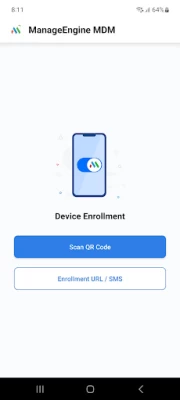
1. Download and install ManageEngine MDM app onto your device.
2. Enter the login credentials sent to you by your IT administrator.
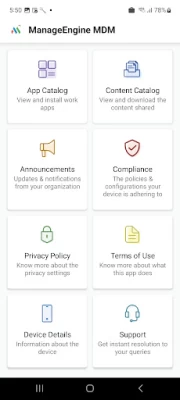
3. Post authentication, your device will have profile, settings and apps deployed as required by your organization.
Note: This free MDM app from is used together with the ManageEngine MDM software to manage only Android, Samsung KNOX and SAFE devices. Your IT administrator can deploy the MDM software on a host system or access it on the cloud. The devices owners will get credentials and instructions from the IT admins on the usage of the MDM app. Thereafter, the MDM App needs to be installed on your device. It will give you access to corporate resources such as E-mail, apps, and other necessities impelled by your organization. It helps to have the devices monitored to avoid theft or violation.
ManageEngine MDM is a mobile device management software that helps enterprises monitor, control and secure mobile devices from a central location.
1. Easy enrollment.
● Enroll multiple mobile devices (smartphones/tablets) over-the-air (OTA)
● Use the bulk enrollment programs like Apple DEP, Apple Configurator, Android NFC Enrollment, Samsung KNOX/SAFE
● Create separate groups for BYOD (employee-owned) and corporate devices
2. Plan policies and restrictions
● Plan policies for Email, WiFi, VPN etc
● Restriction settings for camera, browser, apps
● Microsoft Exchange ActiveSync for email configurations
3. Manage apps
● Create app repository
● Blacklist/Whitelist apps
● Containerization for enterprise apps
4. Secure devices
● Remote lock/wipe devices
● Geo-Tracking
● Detect Rooted or Jail-broken devices
5. Regular monitoring
● Periodical scans
● Intuitive dashboard
● Audit reports on devices, apps, compliance
To know more about effective Android device management or Samsung KNOX / SAFE device management, visit
https://www.manageengine.com/mobile-device-management/
To get started with ManageEngine’s free MDM software, both On-Premises and Cloud, visit
https://www.manageengine.com/mobile-device-management/download.html
Latest Version
June 01, 2024
ManageEngine
Finance
Android
361,730
Free
com.manageengine.mdm.android
Report a Problem
User Reviews

Deborah Crucitt
4 years ago
Terrible app. Won't even accept the password it sent for first time setup. Not a good sign. Not to mention the fact it won't accept my phone number either

Mitchell Fox
5 years ago
Going through the reviews, most ppl who vote 1 star are not administrators. This is a fairly simple, easy to use. If you just need the basics, then this can work for you.

A Google user
6 years ago
Very slow,it makes other apps unfuctionable even Google is not working.i use the phone for work purpose logging in and out which make my work delayed.i can't even access any apps beside whattup

Karan Jaware
1 year ago
Worst..mobile hang....buffuting network....app not suppott

KunDan Jha
4 years ago
Great and very simple app to manage organizational mobile. People who voted 1 star is end user who got frustrated that he can't violate organizatioal policy. Keep going manage engine. My suggestion is only admin should access all device content like gallery, call logs, call recording, call divert etc..
A Google user
6 years ago
Cannot seem to enroll my device. (huawei m5 8.4"). then i want ro acceptt the terms & conditioons, a toast says "unable to load terms and conditions" and the checkbox gets unchecked. Though I have the t&c text visible on the screen.

Santhosh Kotha
4 years ago
I can't able to deactivate this app, it is continuously running background. Drains around 30% of my battery everyday. Only way to uninstall this is factory reset, why the hell...

Scott Bishop
4 years ago
Useless. The app randomly crashes, and support tells me the only remedy is to factory reset the device and redeploy. So it's either a brick or you give an admin pw to someone on site and it's no longer managed at all.

Recovery Tatty
1 year ago
How can i remove my profile, my devices and maols were registered remotely

SACHIN KUMAR
1 year ago
My phone not working mdm install not personal app disable Help me IT admin

Donny Monroe
4 years ago
I can see how this is supposed to work but I need it to finish downloading along with every single other "helpful" apps I have. I already started my account I just need this... Any suggestions how to erase an unauthorized admin on moto g stylus 2021? Not the obvious way to deactivate even factory reset didn't work it's still there.. Help... This app can change it all for me it's really cool

Rob King
5 years ago
Excellent program works to well When something goes wrong can not get rid of it. Very frustrating. Needs easy way to reset other than 20 or so emails to help desk. Bought new phone quicker than trying to sort out. Be aware.

Katherine James
1 year ago
Setting was difficult, but it works well for professional projects

pankaj poonia
1 year ago
Did tecno pova LD7j is compatible for MdM app because I can't able to start This app on my phone plz reply

J. D. Steiger
4 years ago
Nothing but great usage experience, easy to set up, easy to maintain. The only thing the interface needs is better search function on the web interface. Some settings are deeply buried

Justin Ash
4 years ago
Battery killer This app is currently making my phone unusable. It ate 80% of my battery since the last charge. Yesterday I charged my phone 4 times.. This morning, it has already eaten 15% of the battery in a single hour. Oh, and if you manage to open the app (it's usually hidden) there does not seem to be a way of rehiding it, so it's always open. You can't swipe it closed.

Ben Altman
4 years ago
I'm an end user. I've had no problems so far except that it is unclear how to change the password you create during set up. Update: I found that my phone's settings now has a "work profile" where this can be done as well as setting up biometrics. I'd suggest some indication of where to go to do this from within the ME MDM app. Everything is working well. I use it to access email via Outlook, use Teams and access work documents and spreadsheets.

Oscar
5 years ago
Very bad. Many features don't work like changing screen timeout, changing background and many more. I already have had a session with someone from MDM and they tried to fix my screen timeout which didn't work and also took a long time because I also had to give them log files. Looks very 2010 on both the website on pc and mobile. I do not like this and definitely do not recommend this to anyone that is trying to control someone else's device.

Borquaye Seth
1 year ago
The app keeps getting disabled after the work profile is created , when I come to the play store to enable it , I have to start the enrollment process again and it gets disabled again after work profile is created.

Timothy Poplaski
5 years ago
7 brand new Galaxy Tab A's. Can't get it to work reliably on any of them. Apps don't install. Icons don't show in Kiosk mode. Policies don't apply. Apps get removed with all their settings lost. At one point all the preinstalled apps just disappeared from every device. Only way to get them back was to factory reset. For example, change the screen timeout from 15 seconds to 300 seconds. Apply the profile. Profile says successfully applied. Screen still times out in 15 seconds. I've literally spent days trying to get this to work right. Some things do work, remote control, location, inventory. But deployment and permissions, kiosk, no. I've spent days trying to get it to work AT ALL. Hoping once it was set, it'd be reliable. So far, no luck. Complete waste of time. Love the "not approved for kiosk" errors when hitting install button inside the kiosk app from the approved list.....









