

Meow Money Manager - Cute Cat
August 26, 2024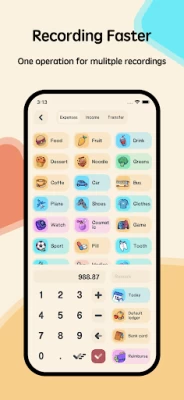



More About Meow Money Manager - Cute Cat
💡 Cute icons
200+ cute icons for you to custom your own money manager. Meow Money manager has various record type, including food, bills, transportation, car, entertainment, shopping, clothing, insurance, tax, telephone, smoke, health, pet, beauty, vegetables, education, salary, awards, sale, refunds, investments, dividends etc.
💡 Expense Tracker & Budget
Record daily expenses and income activities. Calculating the difference / balance.
💡 Instant and powerful statistics
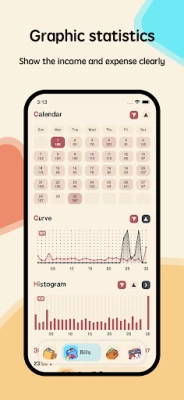
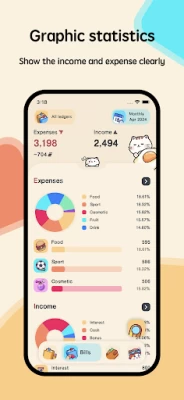
Reports of financial recording activities per day, monthly, weekly and yearly to make it easier for users to monitor their finances. Based on the record entered, you can instantly see your expense by category and changes between each month. And you can see the change of your assets and income/expense indicated by a graph as well.
💡 Export reports
Export reports in the form of CSV.
💡 Pie chart
Pie chart features make it easy for users to view reports.
💡 Backup & Restore
Meow Money manager support Google Drive backup and WebDav backup, the backup files will be auto saved when you add the records, and you can also backup files manually.
💡 Asset Management
You can create your asset accounts, such as cash, bank card, funding, stock etc. and tracker the asset account's modify record, transfer record and order record.
💡 Dark Mode
You can choose the dark theme or light theme as you like. Both modes are very beautiful.
💡 Currency Symbol
Meow Money manager support different currency symbols, including: Dollar, RMB, Pound, Euro, Franc, Rouble, Rupee, Lira.
💡 Fingerprint app lock
You can setup fingerprint app lock to protect your privacy, it need to enter fingerprint when open app.
So, what are you waiting for? Download the Meow Money Money(Expense Tracker & Budget) right now and start managing, tracking, your expenses and income!
Latest Version
1.4.8
August 26, 2024
System monitor tools lab - Cpu Ram Battery
Finance
Android
514,089
Free
com.glgjing.money.manager.bookkeeping.meow
Report a Problem
User Reviews

Dawn
1 year ago
I love how the team takes user's input seriously and actually implemented it. However lately I'm facing issue where recurring record aren't being executed. I've tried deleting and re-adding those recurring record and it gets executed for a few times before stopping completely. Hope this issue gets fixed soon.

Nathalia G.
1 year ago
I've been using this app for a few months now. Still the free version, as it is VERY good. For someone who used to organize their budget and stuff manually on Google Sheets, this app is a godsend. The options for customization are great. Not to mention it's pretty cute 😺

Larissa Leal
1 year ago
Cute and easy to use. I wish it had the ability to itemize transactions, but other than that it hold a lot of cool features and useful tools to track your budgeting needs. I highly recommend the premium add on as it is a good deal for your money!

Andrew Griner
1 year ago
I really like how this app looks. Developers should be very proud. My only issue is I wish there were more budget options to select from. I am paid biweekly so it's hard for me to create a budget when monthly is the only option close to it. Please add this 🙏

Choong Wing Hong
1 year ago
Been using this app since Aug of last year. Love both its functions and its cute aesthetics! The ads are not that intrusive either imo. Only thing I feel is missing is a function to add photos of bills and other documents to transactions, would make this a perfect financial/budget app imo.

Paul Tolentino
1 year ago
ive been using this for about a year now and i can say that i love it! the updates are cool, but i wish darkmode weren't paywalled and that you could also include bulk purchases with separate categories (e.g. you buy in a supermarket with various items but you wanna record them in their respective categories and still have them together in one purchase)

Luis M
1 year ago
It's the best app I have used for money tracking, the only issue I have is when I move a record to a previous day and the value is erased. It's annoying and I have to fill it again everytime. Please take a look at that problem, is easily reproducible ⚠️

Andrey Rybakov
1 year ago
I have a problem with the subscription: I have two google accounts on my device, I've bought a life member subscription with one of them, but the application is checking the other one by default and shows that I am an unsibscribed member. If I delete the second google account from the device, then the membership status is correct (permanent). However, this is not a solution for me since I need to have both accounts on my device. Please advise with this problem.

Sony Nguyen
1 year ago
Pretty cute and functional meowny manager app. I was suprised with its UI and detailed tracking features. The app is also really responsive with a lifetime purchased. Categorizing is also pretty well thought. My suggestion is please add new icon for categories like water bill or digital banking account. Also please a way that I can break my budget into bank account and cash. And finally a way to display total budget when right when income is added.

Lijesh T U
1 year ago
The app is very simple and easy to use with colorful UI. I want to suggest some changes in the category icons as there are so many icons are available but less useful ones. Rather providing more number of icons please try to provide with icons that are useful and missing like the one of train, taxi, wi fi etc. And even basic features like subcategory, dark theme etc are only for members and please try to provide them free as these are basic features of a money management app.

Galuh Widhiatmoyo
1 year ago
Cute, informative, BUT it just frustrates me why I can't make the start date at the 31st or 30th date of the month. That's when i get paid and immediately pay my rent. Also, why can't i see my previous month's expenses? Am i missing something? And when I switch my language to indonesian, it's still in english. Overall, i think while the UI is cute, the options don't offer much and often misleading. Please fix this quick! At least let me see the previous month's expenses

Don-Lyn Koyama
2 years ago
great app! love everything about it and truly has amazing features. super cute as well! was wondering if you can add more specific budgeting features? for example, i budget bi-weekly when i get paid and it can get confusing with only the options i have available. would be great if you can set specific dates for the budgeting.

Ardo Kusuma
2 years ago
Interface is cute. Tempted to buy lifetime membership. Though a few things preventing me from doing so. #1 no web app. #2 reached out to Dev about some questions, still no reply after a few days, quite worrisome. #3 no currency support. Say I spend in USD, and sometime spend in YEN or some other currency, I want to record it with specific currency. I don't want to convert it to my home currency. ---- anyway, very cute, but my needs are not met. Also, no free trial to test premium features.

Janine
2 years ago
I had no issue using the app and, so far, everything works great. I love the theming. If you are using the free version, the ads can get very annoying since they come at odd times and you don't have access to the dark theme. My only gripe with the app is that there's no option to do a savings plan properly, so it's a slight annoyance when I want to save 50 for example but it's still included as part of my overall spending money making me think I have 150 when it's actually 100.

Roebee Mayhugh
2 years ago
Awesome Keeper. On this day, I suggest the very first thing you do is Customize your "Assets" which will be your sources of payment for recurring bills and expenses, and delete the on-board generic ones which aren't fully modifyable. If you don't you may end up creating a New General Ledger and starting from scratch as a work-around. I spent 2 days customizing and learning. After that it's a total piece of cake! Very modifyable and customizable but no tutorial.

beholdits QueenDani
1 year ago
It's cute, love the graphics. There was a bit of a learning curve when first downloading the app. A bit annoying that I had to subscribe in order to add any budgets or change the categories, but it's $1/month. I do not like that there are no reports at month's end with starting numbers & total expenses vs income. For someone who does bookkeeping, this isn't very helpful. It's cute for tracking expenses but that's it. My numbers got messed up somewhere during the month due to a recurring expense.

Aesthetic Clown
1 year ago
I admit it's very cute! However I also admit it's a little difficult to use and get used to. Not to mention, when you add an expense, it does not automatically deduct from your income, which means I have to input the same info twice to track once transaction. I found another app that deducts automatically for me and in different categories. Hopefully this app is updated in simplicity and connected in expense-income! :)

Modest Neko
1 year ago
Adorable and super helpful. Helps me keep track of my different card amounts and spending. Not sure how reimbursement works though. I would love if they could add things that I want to save up for and maybe money put toward it. But even just the option to list those things would be nice. If there is a way to do it, let me know. Got the full version. $11 forever is definitely worth it!

Logan Rose
1 year ago
I really love this app :3 It's so cute and user friendly, even without the premium (although I do think it was worth the few bucks I spent). In the past, I never used a physical budget, and that was fine for me, but as life has gotten more expensive, it's been really helpful to have something to track my finances. Physical budget books are difficult to remember to update, but as soon as I make a purchase, I can just put it in here, super quick and easy no matter where I am. A solid 10/10.

Olivier Solace
1 year ago
Love this, but my one desire would be to be able to exempt certain expenses from the weekly budget. For example, if my budget contains only the categories, "Food," "Gas," and "Video games," then if I log an expense under the category, "School tuition," then I don't want that to be subtracted from my spending budget. As it is, even if "School tuition" isn't included in the budget categories or if it's in an entirely different ledger, the budget amount will still go down.









