

MyPB by Public Bank
July 18, 2024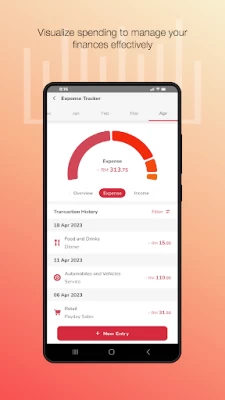
More About MyPB by Public Bank
For Existing Customers
Step 1: Download MyPB App
Step 2: Login with your User ID and password
Step 3: Setup your PIN
Step 4: Register and activate PB SecureSign and you’re good to go!
For New Customers
Step 1: Download MyPB App
Step 2: Register via email to check out our non-banking services or apply for a savings account with us to fully immerse in all the services we have to offer
Step 3: Setup your PIN and you’re good to go!
BANKING MADE EASY, FAST AND SMARTER
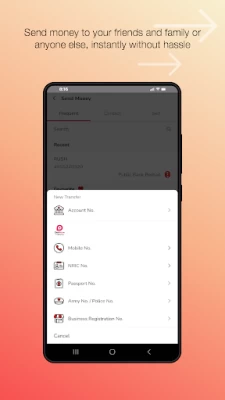
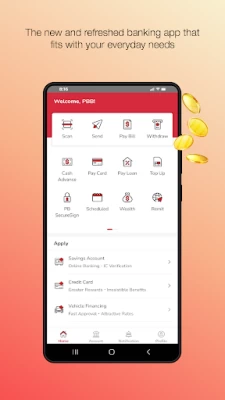
- Transfer funds easily with our Send Money function to yourself, friends, family and everybody else in a few taps.
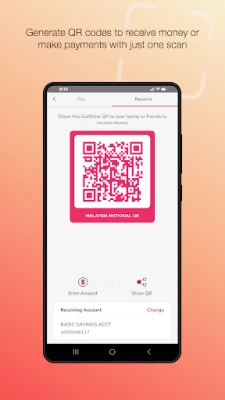
- Payments to merchants locally or abroad are now easy with DuitNow QR.
- Looking to buy a dream home or fancy yourself a new car? Check out your affordability, calculate your monthly instalments and apply with just a few taps.
- View your ‘Wealth’ to see a big picture of your net worth
- Get a financial overview and have a look at your income and expenses with a newly designed dashboard
INTEGRATING INTO YOUR EVERYDAY LIFE
- Storing cards are a hassle, we know! You can now store all of your physical cards virtually and display them in the form of a barcode or QR code.
- Need some quick cash? Just apply for a cash advance from your credit card and get access to your funds quickly
- Need to top-up your mobile or for your games? Skip the queue and top-up seamlessly with us
… and many more!
MyPB Mobile App will seek permission for the following:
- Access to your Camera for DuitNow QR scanning and for accounts applications
- Access to your Storage for profile personalisation and device binding
- Access to your Location for device authentication and security purposes
- Access to your contact directory for convenient Prepaid Top-Up or DuitNow Transfer transactions
- Access to your phone’s audio to enable you to make a direct call to the bank’s hotline
- Access to your Settings to enable push notifications to receive incoming notifications and for transaction approval
Latest Version
0.0.14
July 18, 2024
Public Bank Berhad
Finance
Android
300,133
Free
com.pbb.mypb
Report a Problem
User Reviews

Jeffrey Wong
1 year ago
usb debugging is been switch off in background. but it still appeared everytime. it is very inconvenient for me to switch on and off everytime device:honor 90

Lai SChee
1 year ago
Always keep on appearing message wireless debugging and usb debugging enabled although it is NOT enabled. Uninstall and install also no change. Very poor experience, cant do the transaction on time.

Omar Nawawi
1 year ago
Registered because the old app seems to cause problem. But new app I can't even get the OTP code to finalize setup. Seems you tech team only put visual over functionality. Should fire whoever thought to launch without Quality Assurance.

Vellan Subrumaniam
1 year ago
Downloaded yesterday. Looks and works awesome. Views and layout was good in Maybank usually. But Maybank has ruined everything with MAE with intention to compete with E-Wallets. As a BANK app, i salute this app. Most importantly, Loan accounts and Credit Card accounts are shown forefront so that we wont miss payments. That was problem with old PBe app. Please notify PBe users to upgrade to this PBmy app. Looking at other reviews, this app receiving low rating bcs of extra security feature.TQ

Jasmine delaviz
1 year ago
I have been dealing with this issue for so long now. Can't perform any online banking transactions anymore. I have been to a branch and have asked customer service to help me in person. But the setting is just out of control. So disappointed!

Chung Wei Wong
1 year ago
Developer mode is off. Tried turn on and off manually, then restart few times as instructed, still encounter problems and unable to proceed. USB and wireless debugging are turned off by default.

Triple A (Kucing Berjanggut)
1 year ago
This app only good for recieve money and transfer immeditely to other bank app.. thats it.. Always problem with - USB debugging (my phone is always off devoleper mode, and no it is not open at the bacground, your app is the problem - connection time out (other bank app work perfectly fine) - take way longer time to read QR - take longer time tu use when make payment, more faster use other payment app or just pay cash.. - it seems like this app always lost connection with my internet

Isaac Yong
1 year ago
Everytime I restarted my device, and wanted to open this app, it shows that I need to turn off the USB debugging. Hell man, I didn't change any setting, are you for real everytime I need to turn on and off?

Chew Kay Hwee
1 year ago
Very poor experience Regarding this app I have printed the QR code from mypb this app. I only can receive payment from other banks but cannot receive from other liked touch n go e-wallet and is related to all e-wallet as well all cannot scan the QR code as it not supported I am doing small business trader. Not very user friendly this app and also not very stable at all especially doing all kinds transactions liked FPX & etc very hard to get the pb secure code to key in. Please improve the apps.

Mike Kidd
1 year ago
Its better than the old app but please fix the USB debugging issue. Its a hassle to keep toggle it on and off again everytime. Its strange that your app required checking USB debugging to work while I have like 4 other banking app that doesn't care. Its not very "mainstream".

Thavaruban 1802
1 year ago
I'm trying to log in to the app , but it's like hang cannot even tap any button . I even directly go to the PB branch near to my work place they say can't help and she tell me try use this new app it's just the same as the previous app , no any difference . the staff saying maybe my phone got problem. It been 2 months I'm having this issue

Jason Tan
1 year ago
Is very inconvenience that suddenly disabled the screenshot feature as I would prefer to keep a screen copy of my new balance after payment made.. Now i have to go backwards to use the desktop version again.. I don't really understand how the screenshot having security concerns where u guys have no way to block consumers to use in desktop or use another phone to capture via camera.. Come on.. Assess the security properly.. Don't do for the sake of doing..

Mark Wan
1 year ago
The app is giving me headache. It keeps asking to turn off USB debugging and stop ing me to login. I never turn on my USB debugging. Even I tried to turn on and off the USB debugging, the app allows me to login for some times only then it repeats the same issue again. Please fix this!

Hammer Head
1 year ago
The interface is pretty good compared to the previous PB app, the only issue I have with the app is it checking if the phone has USB debugging enabled, presumably is one of the method used by PB to check if the phone is rooted or unlocked bootloader, which I don't agree with this checking method. PB is the only one using this method out of 4 traditional bank online banking app I have.

jet2x10
1 year ago
'For Android devices, you might have your USB debugging enabled.' clearly i never turn on this thing. the solution is we need to turn on usb degugging, then turn off again. after restart, same thing happen, we need redo same solution. please make this app work properly.

A Johan (AJ)
1 year ago
Poor user experience. The fact that we are forced to use thier custom keyboard at login and unable to use password managers is really inconvenient. Performance is not great. Requires many taps to do basic thingd. I have to manually add my credit cards in the app to be able to view them. It looks better than the previous app, but whoever designed the UI and UX needs to experience the inconvenience themselves. 👎👎👎👎👎

Jerry C
1 year ago
Every time when there is Android updates installed, I have to repeat the same steps for Developer Options again and again. Not user friendly. Make life difficult for users especially for those who know little about Developer Options.

MrJudge R
1 year ago
Updating my review. The UI is definitely nicer than the old one, but the UX is worse. I cannot even scan and pay using QR as the app can't even scan the QR. Not able to use a password manager is stupid. Using a password manager for a very complex password is a lot more secure than remembering simple passwords.

LonelyKidLim
1 year ago
My usb debugging, let alone developer mode, has never been turned on prior to using this app in the first place(thought my memory failed me and i actually turned on developer mode for the first time when trying to "turn off usb debugging"). Yet the app will just redirect to the website link telling you why you couldn't use Mypb (security risk), this phone has never been rooted/developer mode never turned on etc, yet i'm getting this funny issue for no apparent reason from UI's end. Great UX.

Chun Hao Tan
1 year ago
The app suddenly freezes up for no reason and I couldn't perform any transactions. Cleared data and when restarted there's a prompt saying my other apps' accessibility services cannot be enabled because the other apps can read my screen or this useless app would freeze up. Yeah so much for security, I don't see other banking apps doing this, just MyPB. Now because of 1 useless app I cannot use at least 4 of my other apps normally, all of which downloaded legitimately from Google Play.









