NETGEAR Insight
July 29, 2024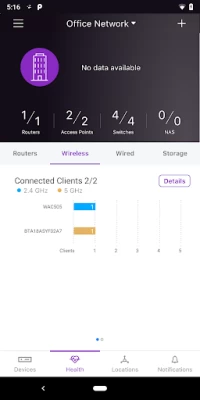
More About NETGEAR Insight
GC108P
GC108PP
GC110
GC110P
GC510P
GC510PP
GC728X
GC728XP
GC752X
GC752XP
GS108Tv3
GS110TPv3
GS110TPP
GS110TUP
GS710TUP
GS716TP
GS716TPP
GS724TPv2
GS724TPP
GS728TPv2
GS728TPPv2
GS752TPv2
GS752TPP
MS510TXUP
MS510TXM
WIRELESS & WIRELESS ROUTER GATEWAYS:
WAC505
WAC510
WAC540
WAC540B03
WAC564
SRK60 Orbi Pro
SXK80 Orbi Pro WiFi 6
SXK30 Orbi Pro WiFi 6 Mini
WBC502
WBC502B2
WAX610
WAX610Y
WAX620
WAX630
NETWORK STORAGE DEVICES:
Monitoring and firmware management of NETGEAR ReadyNAS 420, 520, 620, 3000, 4000 and 5000 series
Here is the full list of devices Insight manages by model [https://www.netgear.com/insight/devices.aspx]. Make sure your device is on this list to ensure your device will be manageable by Insight. After download,
create your Insight account and let Insight help you add your Insight managed devices and create and configure your network.
Insight Advantages:
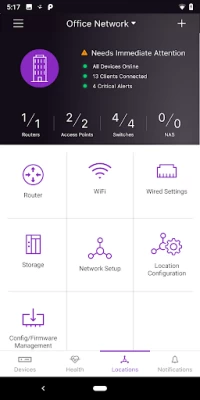
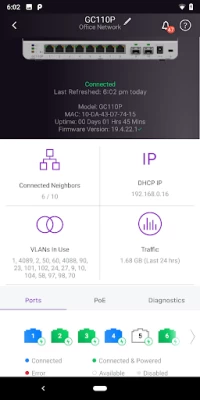
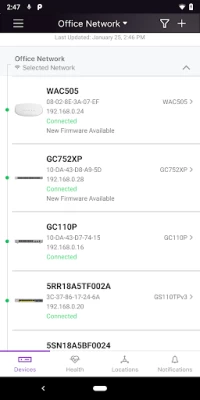
Use Insight to discover, register, install and configure your Insight managed devices - switches, wireless access points and router gateways, and storage devices, as well as to setup your wired and wireless networks.
Additionally, with the Insight app you can check the status of your network, re-configure and fine-tune settings and troubleshoot. You also can receive alerts and notifications on critical and important events related
to your devices and networks. Most of the features available on the Insight Cloud Portal are available on the mobile app, making the NETGEAR Insight app an excellent tool to help stay on top of all your Insight-devices
based networks. Additionally, with the Insight app, you have direct access to NETGEAR Help and Support. You truly have full visibility and control of all your networks in the palm of your hand – anytime, anywhere.
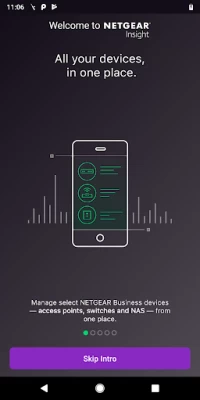
Unlike most network management solutions, NETGEAR Insight is a complete unified network management solution built specifically for the SMB market. With the easy, user friendly networking experience, NETGEAR Insight app enables
multi-device configuration, network management, monitoring, and service deployment of select NETGEAR wireless, switching, routing and storage devices.
Feature Highlights:
* Remote access into your networks and devices from anywhere right through your phone
* Unified and simplified multi-device configuration from your phone
* Unified cloud management of both wired and wireless networks
* Manage multiple network locations from one screen
* Troubleshoot issues and get NETGEAR Support right from your Insight app
* Intuitive mobile user experience
* No additional need for cloud controller, appliance, network manager, or PC/server
NETGEAR Insight Managed Devices -- check for list of devices managed by Insight [https://www.netgear.com/insight/devices.aspx]:
* Insight Managed Wireless Access Points – Meeting the need for higher bandwidth, multi-user support
* Insight Managed Switches — Networking made simple
* ReadyNAS Storage — Powerful, scalable
Now NETGEAR Insight supports landscape mode for tablets. Additionally, the NETGEAR Insight Cloud Portal is also available at https://insight.netgear.com.
Latest Version
7.4.4
July 29, 2024
NETGEAR, Inc
Finance
Android
507,243
Free
com.netgear.insight
Report a Problem
User Reviews

Matt Epps
4 years ago
Charging $9.99 subscription to manage my own managed device? Shame on you netgear. Squeezing the consumer with expensive hardware and now a yearly fee. Unlike Linksys which I can do for free. Guess what I'm listing on eBay tonight for sale. Your hardware. You just lost a consumer. I would understand multiple devices. Or even new purchases. But you just updated your app to now require a yearly fee, instead of grandfathering current device owners. You all should be ashamed.

Manjit Babbra
1 year ago
Absolutely Useless. I can't even connect to the switch I am standing next to and definitely on the same network. Scan code does not work. Manual entry results in device already registered

Brian Bergin
5 years ago
Lacking in basic functionality. No ability to create LAGs on access points. Cannot configure multiple DNS servers (forced to use Google DNS for secondary). Automatic Optimize WiFi channels dumps all APs on the SAME 5Ghz channel. Wants to only use channels 1, 6, & 12 for 2.4Ghz when auto optimize is used. Creating VLANs for APs is a mess too. Insight is a consumer grade product at best, no where near the level of competing products. Too bad because my WAC540s are fantastic.

Ed Bells
3 years ago
Fails to detect my 2 GS110EMX switches that are on the same subnet as the client insight app device. I can login to the switches from the same client device's browser, so this is clearly an insight bug. To make matters worse in trying to open a support ticket the app insight is not an option Total waste of my time on this seriously flawed application

Chuck Coker
1 year ago
This app is almost impossible to use. It sends you around in circles. Nothing is intuitive—you have to guess at everything. Nothing works like it should. I really wish I could set up my equipment without using an app.

Dave Murray
1 year ago
Fails at the basic step of registering new devices for warranty purposes. I never even saw the network monitoring functions. Worthless app.

Carol Thomas
4 years ago
Downloaded the app because the instructions for the switch I bought (GS305E) required it. All instructions followed, checked and rechecked. IP address does not appear when logging into the app. The switch works, insofar as it is connected to the router, and two pcs are working through it. In the app, GS305E is not listed as a supported device. So far unable to go online to change password from "password".

Paul Killeen
4 years ago
Useless app. I have connected my router have devices connected and it is providing access to the internet for all devices. Sounds good so far. BUT. Download the app, that worked. It searches for the router and finds it with model, ip address & serial no. Good so far. So lets set up an account to manage the router. Click the setup account button and it says NO INTERNET CONNECTION. How is that when the router is already providing internet connection to all the patched devices. !!!!?????!!$@$##.

Jonathan Brier (wolfgang8741)
3 years ago
Overly complicated and slow, The designers of the app should look to rethink their strategy as the multiple nested tiers could be flattened to allow easier discovery of more common tasks such as static IP assignments. The app devs should do more caching instead of waiting to query everything each load of a view. If I have one device associated and I closed the app, keep that device for faster access and add a button to refresh as navigation.

David Batchelor
5 years ago
Wow, this app is profoundly poor. I have had at least 6 Netgear routers plus switches, extenders, power line Ethernet devices and this is crazy. I just purchased an OrbiPro (really great so far) tried to use this app as recommended by little piece of paper in the box, 2 hours later, as it couldn't find my device, I configured the Orbi on its web page, all is great. Finally the app see my router, now seems to work well, newbie would freak tho

Baluchitherium Neidkowski
4 years ago
Doesn't connect to router. In the beginning, I couldn't use the app to set up the router and satillite, Orbi Pro WiFi 6 Tri-Band Mesh System (SXK8). I ended up hardwiring my laptop to get it set up and going. No problems with that. The app is just garbage. Even now it still won't connect to the router.

Jeffrey Dang
4 years ago
I've been happy with the app itself but overall the netgear ecosystem has turned to garbage. The orbi specific app doesn't work at all anymore and this insight dashboard keeps on showing error notifications from my orbi. I tried customer support which amounts to just resetting everything and waiting for the issue to resurface later. It's been years and I'm doubting netgear will actually look into a root cause fix.

Henry S
4 years ago
Updated Dec 2020: Just received an email that they are discontinuing the "basic" subscription which was free for the first 2 devices. Now I'm supposed to pay $10/year for this BS reason: "due to our customers' needs for both a web and mobile experience". Classic bait and switch. It is one thing to change your business model for new customers, but you shouldn't break agreements with existing customers. Original 5-star Review: I didn't have high expectations, but came out very impressed by this app. Many of the issues people posted about in 2018 have now been addressed.

Garrett Pauls
4 years ago
This app is pointless. I bought a netgear switch, the installation guide specifically told me to download this app to configure it. I did, at which point the app forced me to register before I could do anything, and then tried to trick me into buying a subscription that I didn't need, and THEN couldn't even manage the switch, instead directing me to the web UI. To which the in the app link was broken, and I had to navigate to by typing the IP anyway. What a waste of time.

A Google user
5 years ago
For the most part, each update brings more functionality. I was skeptical about the interface and hardware but I am getting more comfortable with "insight" line of hardware and gui. I would love to see more "dials and buttons" added the app and web console. Having some more "global" configuration features would a great addition so that it could be pushed out to selected hardware. Merging the features that are available on the "local" interface to the app and insight console would be appreciated
A Google user
6 years ago
Worthless. 3 new GS752TPS switches; figured app may be a useful for initial deployment prep...it's NOT! Discovery is ridiculously slow (20+ sec); refresh forced with EVERY navigation action; will hang requiring force close. Tried to change switch IP, but it didn't work -- just made the switch unrecognizable to the app AND my network (can't even ping it now). Only benefit was registering the switch. Netgear look to companies like Ruckus and their mobile apps that provide viable tools for IT pros!

M D
3 years ago
I need this app to allow me to manage my switch. The web interface does nothing when I tap it but the IP button does. This will be the last switch I purchase and will research a company that gives me that ability. This app is useless. What's the point in using the web interface on my phone since I have to zoom in to view? It only takes a bit of coding to load it into the app for doing your configuration. I had high hopes but Netgear dropped the ball again. No more products for me or my company.

Jon Green
4 years ago
If your trying this as a Meraki alternative (for switches), I will be polite: Netgear has given themselves many opportunities for improvement/growth, when comparing to the competition (managing network switches, since that's all I currently is it for). I'm not too pleased. Tedious, slow, poorly implemented. Hoping they completely rebuild from the ground up soon. Great idea, poor execution.

Joe Madison
3 years ago
Forced updates are the opposite of customer friendly. It seems every time I want to check something quickly within the app I have to update it. Thankfully I am typically somewhere with excellent data speeds so this usually takes less than a minute, however it would have been far more convenient to be able to say no to the update, check what I needed to check, and then update the app. I'm sure people in places when slow internet, or are on metered plans might not appreciate this at all.

Gabriel P
1 year ago
confusing when adding a location, a network and devices. it tells you it will change the pass to all the devices before you even added any. Connecting to new router Wi-Fi is a pain, every browser gives safety warnings and it won't connect, Edge or Chrome. Even LAN from PC won't connect. You have to select Use Connection As Is in settings to finally connect to the router. then the whole setup process is confusing, no chance to get support either, this app is one of the worst I've seen









