

Ninox Database
June 29, 2024


More About Ninox Database
► CLEAR PURCHASING RECOMMENDATION
"With Ninox, I have found an impressive companion for the growth of my business.
Value for money could not be better. "
- epicstudio -
SO MUCH MORE THAN A DATABASE
"This database is simply brilliant and really easy to use. And best of all , it's constantly evolving. "
- trailer-man -
EXCELLENT PRODUCT / FUNCTIONALITY
" I've been working with Ninox since 2014 and I'm very excited about the intuitive user interface and functionality. The application is really great! "
- arwis -
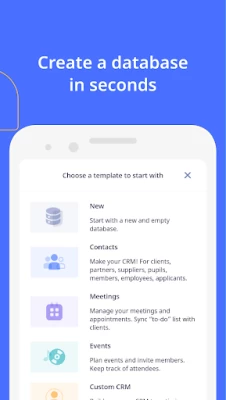
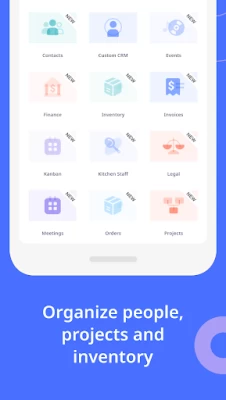
► TEMPLATES
• Inventory
• Invoices and Accounting
• Meetings and Events
• CRM
• And many more!
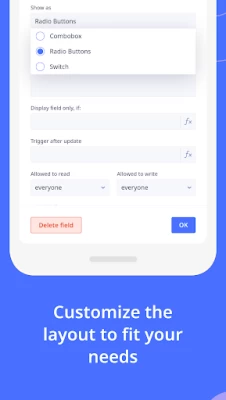
► 100% CUSTOMIZABLE
• Create forms, data fields and triggers
• Links between tables
• Calculations with visual formula editor
► WORKING ON TEAM
• Invite others to work together
• Set role and rights
• Real-time syncing on all devices
► DATA FIELDS
• Rich Text
• Selections
• Date / Time
• And 15+ more!
► YOUR DATABASE ON ALL DEVICES
Ninox is available for
• Android
• iPhone
• iPad
• Mac
• and on the web
You can install Ninox on multiple devices. To keep all your devices in sync you can get a Ninox Cloud subscription which also gives you access to Ninox on the web.
- Privacy Policy: https://ninox.com/en/privacy.html
- Terms of Use: https://ninox.com/en/terms.html
Latest Version
3.12.5
June 29, 2024
Ninox Software GmbH
Finance
Android
132,694
Free
de.ninoxdb.ninox
Report a Problem
User Reviews

Jim Dutton
4 years ago
No experience! This rating is for the app only and not the desktop. App opens shows the team and freezes! Thats it, very happy to find a simple drag and drop crm to fit our needs, but the app needs attention!

MMAR58
4 years ago
It's a good and easy but effective app. Thanks. Wish to have same kind app for pc too. But the problem is, we can't zoom in and out in tables. Which feels irritating when i want to see more

A Google user
5 years ago
Feature packed, maybe even more than other table/database apps. Works offline. Login not necessary, it works out of the box. All features free except maybe sync? I've not tried to sync to my own server tho.

EiDoDoos
2 years ago
im very familiar with memento db app. i tried ninox and found: we cannot add multiple image. add new record, back button is weird. good thing is it have great and amazing feature, more advance and flexible.

Walid Mullick
3 years ago
Looks good but due to its slow operation speed I feel like uninstalling the app. It has lot of useful features and they are customizable. Please fix this. It will be a great app for sure.

Md. Ashraf Shameem
3 years ago
Appreciate the developers for their outstanding efforts. I would have rated the app five-starred. One problem I came across was that when a subtable is added to one of the tables under a database this is automatically added to other tables where such an addition is not intended. Hope, it will be resolved soon and help us work with it.

Jone Chong
3 years ago
Very competent app. Hopefully the date selection field can scroll left and right instead of using the arrow. Which is slow if I want to search a date few years back

Mark Lee
3 years ago
Slow... The app is already slow when customizing your tables, I can't imagine just how slower it will be when it's actually populated with data. Some database customization is also a bit confusing.

Richard Garbett
5 years ago
Very much improved from the initial version, GPS links now work, images open in native app so it's now fab. The only issue I've found so far is that the photo orientation doesn't save when taking images so all my portrait shots turn landscape.

Brendon Koh
5 years ago
Ninox is the most powerful database solution that enables businesses to automate business processes. The cross-platform ability ensures that you are able to access your data in the cloud everywhere you go. You don't have to be afraid about data loss with the secure design and automated backups!

Sagar vavadiya
1 year ago
Vary best app to manage your database, like habit traking, daily task management, it also give facility to export and import data in CSV, exl format, you can use it by making form related database.
A Google user
6 years ago
I have been using this app on the iOS platform for several years now and have been very pleased with it. on the Android side I was using a different database application. this was making it murderous 2 keep my data updated between device. I thought ninox was great as an IOS app by itself but now that is cross-platform it is outstanding. I think it is probably the only one that is. it even allows you to collaborate for free for the purpose of syncing between databases.

David Funnell
4 years ago
Ninox cloud database is a fantastic database solution which is amazingly customisable with little requirement at a basic level for coding knowledge. The fact that it has cross platform capabilities is an added bonus, however the only problem I have with it is that I am finding the android app freezes everytime o try to use it. This doesnt happen with the IOS app. Any advice on this would be greatly appreciated. Edit: The android app is now working fine.
A Google user
6 years ago
- Does not allow me to scroll table left-right to see all columns - upper left button(save button) is too smal it can be relocated to somewhere bottom - I would like to have night option (black background) - entry of data does not have to be llike a wizard on a multiple pages - app is generaly very slow - app is based on a good idea just need polishing

sotomig
4 years ago
The app is good, very easy to customize but its too hard to make a back up. The save as button does not work 90% of the time and when work have an error. Also its imposible to transfer the database to another device. The import database button does not work. In the web page of the app only have help instructions for apple products not for android version.

Simon Smailus
1 year ago
This app does not import ninox databases. What an epic fail for an app that doesn't import is own databases! It also will not import from Dropbox. It doesn't recognise when Dropbox is installed.

Bernard Kripkee
1 year ago
When XLMdb stopped working in Android 14, I had to find a new DB for my phone. I tried several. This was the best I found. I use it to record various things of importance.

Andras Medgyesy
1 year ago
Pretty good product and app, I miss the android navigation buttons (it is hidden), and on its place are important command buttons what shall not be tapped accidentally. And the window doesnt rotate when I rotate the phone, by a database software it is unconfortable to use in vertical mode. These two features would be highly welcome by me.

Alister Gabriel
2 years ago
I use Ninox for several years now, and is pretty ok, although there is enogh room for improvement. But now in the offline mode the app on a brand new Samsung tablet opens just fine but won't let me create a new database or upload one, neither from Dropbox, nor from local storage. I tried all I possibly know to fix it. Maybe on android 12 this app is not working. Such a waste of a great potential. Hope Ninox will fix it before I'll see myself forced to migrate to some other software!
A Google user
6 years ago
Not as customizable as it has potential to be. For example, you can change icons for the spreadsheet as a whole file, but not for a specific field. Say you want to have a symbol that identifies a debit from your account (like emoji of money flying away), you can't do that. You're stuck with a default right-pointing arrow, which could've been fine but that's the same icon for credit (the opposite of debit). Last, FYI to @NinoxDevs, you misspelled the word "ammount." Only 1 'm' in amount. Cheers☺









