
Online Banking for Business
November 19, 2025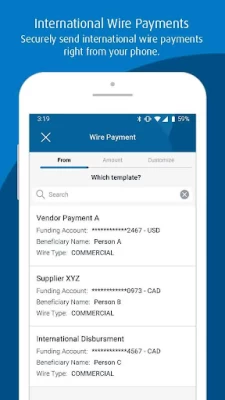
More About Online Banking for Business
• Verify your identity with Biometric ID
• Sign in with your fingerprint
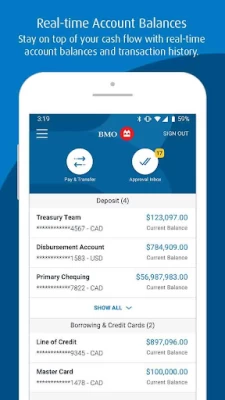
Monitor Your Cash Flow
• Check real-time account balances and transaction history
• Get helpful Cash Flow Insights
• Quickly search for transactions
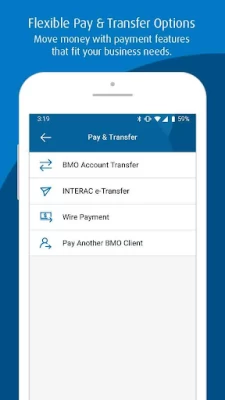
Send & Receive Payments
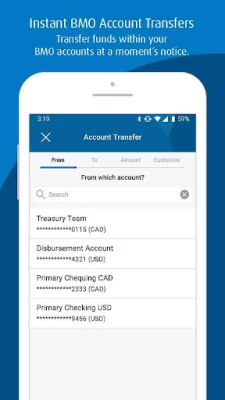
• Account Transfers: Instantly move money between your accounts or pay your BMO corporate card balances.
• INTERAC®* e-Transfer: Send or receive transfers; pay money requests. (Canada only)
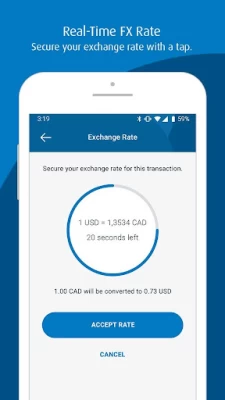
• Wire Payments: Use your company’s beneficiary list or templates to send money around the world.
• Pay Another BMO Client: Instantly deposit money into the account of another BMO client. (Canada only)
• Generate a voided check/void cheque: View or download a voided check/void cheque showing account information for your CAD and USD deposit accounts.
• Tax & Bill Payments: Same-day bill processing and real-time account balances. (Canada only)
• Zelle: Send payments within the U.S. (U.S. only)
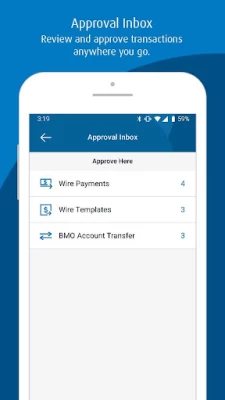
Mobile Approvals
• View pending approvals for all services
• Review and approve on your app:
- Wire Payments: templates, payments and investigations
- Account Transfers : transfers
- INTERAC e-Transfer: transfers and money requests (Canada only)
- Electronic Funds Transfer (EFT): templates, payers/payees, payment files, corrections and resubmissions (Canada only)
- Automated Clearing House (ACH): templates and payments (U.S. only)
- Recon Management – Positive Pay: Pay/Return decisions and decision approvals (U.S. only)
- Digital Cheque Service: Pay/Return decisions (Canada only)
- Tax & Bill Payments: tax and bill payments (Canada only)
- Zelle: payments (U.S. only)
- Real-Time Payments (RTP): transactions and return requests (U.S. only)
- Approve Users: new users and changes
- Approve Groups: new user groups and changes
Manage Your Users
• Unlock users
• Reset user passwords
Get Started
To use the app, you need to be registered for BMO Online Banking for Business. Simply use the same credentials you use to sign in on your computer.
Not a client of BMO Online for Banking Business? Visit bmo.com/main/business/online-banking-business for more information.
Important Disclosures
You acknowledge and understand that this app incl. updates or upgrades may (i) cause your device to automatically communicate with BMO’s servers to deliver the functionality described above and to record usage metrics, (ii) affect app-related preferences or data stored on your device, and (iii) collect personal information as set out in our privacy policy. You can withdraw your consent at any time by uninstalling the app.
®Registered trademark of Bank of Montreal
®* INTERAC e-Transfer is a registered trademark of Interac Inc. Used under license.
Latest Version
12.5.2
November 19, 2025
BMO
Finance
Android
91,273
Free
com.bmo.business.mobile
Report a Problem
User Reviews

John Warnock
4 years ago
If your app is telling you that it needs to be updated and you're not seeing an update available in the Play store, here is the fix: Play store is caching your old app. Don't uninstall the app. Go to Settings > Apps > Select Google Play Services (clear cache and data), Select Google Play Store (clear cache and data). Thanks Tracy from BMO for commenting the instructions above. Other than this glitchy issue the app works well for me. No complaints!

Michael M
4 years ago
The app works for what it is intended. However, the updates for the mobile application is horrible. Most people use pretty new smartphones and your app just doesn't adapt to the resolution of them. For my case I am using pixel 5 and once I login to the app it goes full screen and not allowing me to press the options button and or sign out. Worst is if I had to add new payee I can't complete it cause the save or accept button is not touchable due to the screen resolution. Update: FIXED

C Harkness
10 months ago
QR code in top left corner doesn't work can't pair phone this way for biometric. Try texting option all it does is take me to the app download page which I've already got. My God you make simple things so excruciatingly difficult I want to pull my hair out. So non intuitive I can't register my phone. Disappointing app Edit support desk couldn't help but Reddit did there's a tiny hidden checkbox and if your android is after Android 12 which my god we are on 16 would be everyone.

Steve Melo
5 years ago
Awful app. Not only does it give you no direction for customer and user id criteria, but as soon as I go to type in my card number, the app itself restarts and freezes after on the splash screen and has been doing it repeatedly since I installed. Would have been great to have 2 separate apps, one for my personal finances and one for my business but doesn't look like that is going to happen now.

anthony da costa
1 year ago
Would love it if I could get a notification when I need to approve anything in the app Edited after answer. Dropped rating to 2 stars because after getting an answer, went to turnnon notifications and found out theres a $1 charger per message and on top of that it's not a push notification, it's an email

Siddhinath Bichu
2 months ago
very friendly. some new updates can make it better buy overall good.

Imraan Khan
3 years ago
When you initially open the app it says your app is out of date. When you click on update now the page redirects to the play store. Your only options are to uninstall and open. Why is there no update option? Very frustrating. Now I am stuck unable to access business banking for payroll. Thanks that helped

Akil Walji
3 years ago
Forces me to install the app, after installing, takes me to the "install app" pop up and no option to cancel the popup. So only way is to go back to the play store. Loop! Guys, can't you test your apps before releasing them to us? Whats the point of forcing us to do use an app which does not work? Pathetic thought process you and your dev team have!! I have thus given this app 5stars!

Stefan Cowan
2 years ago
I have used the Mobile banking app for years and have always struggled with the 3000 day limit. So I've tried the business app. It worked for a time but the fraud team keeps locking me out and I just don't have the time to bother with it nor do I wish to buy a computer. Make it work with my phone and I'll use it.

Martin Lynch
4 years ago
This is a *very* bad app. Firstly, it inexplicably asks you to grant it permission to access your phone calls, and call history, and make phone calls on your behalf. If you're trying to set up biometric authentication through BMO's strange text system, you'll learn, after a frustrating 30 minutes of trying, that it flat out doesn't work (and cannot be setup from within the app). Everything about BMO's tech feels like it's from 1993, and is riddled with friction and frustration.

Alex Barry
2 years ago
This is the worst banking app, and one of the worst apps that I have ever experienced. Unfortunately, it's not even optional to use, as it's required in order to approve and release EFT payments that are setup on a computer. IF the app will even open and let me sign in, it doesn't work properly, and features and functions are sometimes missing, including biometrics. I followed the instructions to link with the computer online version, but this app is just garbage!!!

A Google user
5 years ago
This is the worst banking app I have ever used. Every time I need to open it up for biometric verification of withdrawals from my business account, it fails. I have spent about an hour every month getting my biometrics reset over the phone. This is frankly ridiculous and a waste of my time. I have other things to do then stay on hold for an hour to reset a system that consistently fails. It was working relatively well prior to a December update. Fix this.

James Rex Hartman
4 months ago
The application is very difficult to set up. It kept freezing, and what should have taken 15 minutes turned into 3 hours. After using it for 2 months, I rate it poor at best.

Nathan Deppner
3 months ago
the app does not format properly to pixel 9 pro screen and the CRITICAL button that allows you authentic payments is hidden. The amount of time I have spent trying to figure out where this button is would make you sick. This is unacceptable for an institution of this size. **update** the facial authorization often "hangs", approves you but then forces you to return to the approval page. after that it's 50/50 whether the approval works. my whole office loathes using this app.

jessica vandenberghe
2 months ago
I am working for a bookkeeping firm with multiple clients who need biometric id, and this app wouldn't allow it.

Ryan Morcom
4 months ago
The online for banking business app, DOES NOT provide the same level of administrative functions as it's web based or desktop access does. Even as it tries forcing you towards the app versus logging in to the web based platform when on a mobile device. The app has ALSO failed to approve payment set ups, even after biometric authentication has been received. All in all, a poor app that for small business needs, let's the users down.

Barret Procyshyn
3 weeks ago
dual authentication requires multiple tries. not easy to use. glitchy at times. very restricted compared to business site on desktop.

shiva ganesh
1 month ago
Every time I try to sign in with the app, I have to click on the send code button multiple times then I get to the enter code screen and sometimes even after giving the correct it throws an error. Please fix this, it is so frustrating.

Jane Lin
1 month ago
The absolute worst online business banking service I've ever used,the browser experience is only marginally better. I've never encountered such a convoluted and bug-ridden security process just to send EMT. The chances of a transfer working on a first try is 50/50. Occasionally, it won't even let me log in. Reading other comments, I'm amazed to see the same complaints were made as far back as 2020, yet nothing has changed. Whoever made this should be ashamed of themselves. Oct.18: can't log in.

Josh LaDuke
2 years ago
This app does not send a push notification when a biometric login is required for payments initiated on PC web browser. One you open the app, there's a blinking orange icon to click on for it, but a push notification would be very helpful (sifting through dozens of apps to find this one is a bit ridiculous in 2023). This functionality exists on iOS, but doesn't seem to work on the Android app. I'm using a Samsung S22 Ultra. And yes, I have notifications turned on properly.









