
OnTheClock Employee Time Clock
September 08, 2024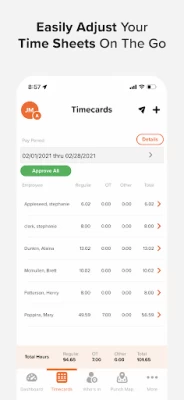
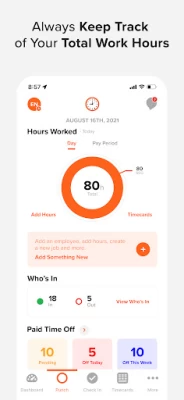
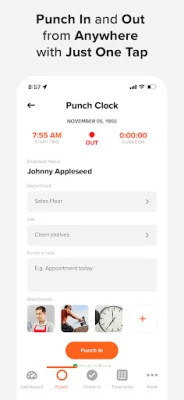
More About OnTheClock Employee Time Clock
Why choose OnTheClock? Here's what our customers have to say:
⭐⭐⭐⭐⭐ "OTC simply rocks! The platform is super easy to use and accessible from anywhere in the world." - Safiya, OnTheClock Customer
⭐⭐⭐⭐⭐ "On the Clock is ideal for even small businesses! We spend less than 15 minutes a week figuring and writing paychecks." - Jeff, OnTheClock Customer
🎯 Top Features: ⏰
• PTO Tracking - Easily manage your team's paid time off, ensuring accuracy and transparency.
• Job and Project Costing - Keep track of project costs and allocate resources efficiently.
• Employee Shift Scheduling - Plan, organize, and assign shifts with just a few clicks.
• Timecard Editing - Managers can easily edit timecards and add hours when needed.
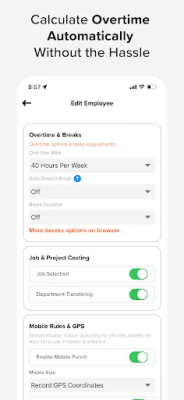
• Overtime Calculation - Automatically calculate overtime pay to ensure compliance with labor laws.
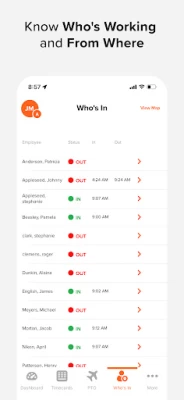
• Geo-Fencing & GPS - Know who and where your employees are punching in and out.
• IP and Device Restrictions - Prevent buddy punching by limiting clock-ins to approved devices.
• Biometric/Fingerprint Option - Enhance security with biometric authentication for clocking in and out.
• Payroll Integration - Seamlessly integrate with popular payroll providers for a smooth payroll process.
• Automation, Paid Breaks, and Reminders - Set up automated processes to save time and effort.
• Automatic Break Deduction Options - Customize break deduction rules to suit your company policies.
• Tips, Bonuses, and Commissions - Easily record and manage additional employee earnings.
• Group Punch Option - Allow quick punching for employees using a single device.
• Department Assignment - Organize your workforce by assigning employees to specific departments.
• Flexible Pay Periods - Align pay periods with weekly, bi-weekly, monthly, or semi-monthly options.
• Messaging - Keep your team connected and informed through our in-app messaging feature.
• Surveys - Gather valuable feedback from your employees to improve company processes.
• Employee Check-In - Monitor and manage employee attendance with a quick and easy check-in process.
🌝 Stellar Customer Support:
Our top-notch Customer Service Team is always happy to assist you with your employee time clock needs. Join our free training webinars that will walk you through every step of setting up your account to fit your company's unique requirements.
Phone: 888-753-5999
Email: support@ontheclock.com
🔒 Security You Can Trust:
We take data security seriously at OnTheClock. All sensitive information is encrypted at the database level, and our servers feature biometric locks for added security. Your data is automatically backed-up, ensuring peace of mind.
👍 Proven Reliability:
OnTheClock has a demonstrated 99.999% uptime, meaning less than 5 minutes of downtime per year. Our service is constantly monitored for issues or failures by a third-party monitoring service, ensuring a seamless experience for you and your team.
Join thousands of satisfied customers and give OnTheClock a try today. Download the app and start your free trial now!
Latest Version
6.2.0
September 08, 2024
OnTheClock.com, LLC
Finance
Android
329,472
Free
com.ontheclock.otc.otc
Report a Problem
User Reviews

Alex Campbell
2 years ago
The app was working fine until the latest Android update. The home screen will pop up for a split second then disappears. The only thing to select is my name, which does nothing. Currently the app is useless.

TheMadHatter 233
3 years ago
Absolute TRASH! My phone has the required 3gb ram to play. I've tried tweaking the visual settings as well and I still cannot play! I was pre-registered and SO excited to play this game but nope! Soon as I jump out and try to land. Instant freeze and crash! The game is so much fun too and very disappointing that I cannot play. Would give 5 stars if I was able to play.

A Google user
5 years ago
I have tried multiple hour tracking apps to keep a small renovation crew organized and accountable, on the clock has been the best one by leaps and bounds. Extremely easy to set up and use for multiple people, the exact features I need in an app, and free! Outstanding work!

Matthew Shetzline
2 years ago
Great features such as GPS tracking and IP lockouts. Set up was easy and tracking is easier. There are a few things i would like to see, custom PTO and more overtime options, but still a great time clock option.

Erik County
1 year ago
The punch clock has to be reset about once per week. Looking into alternative products

DestinyDream 101
4 years ago
It erases my history of previous weeks. I used to be able to look at a whole month at least before. Also it randomly clocks me out in the middle of the day. When I go and add more missed hours it erases those before hours earlier that day and replaces it with the more current hours. Please fix whenever I bring up to people about that there's a problem with my hours. It causes frustration and fighting. I don't want to have to mention it to people because it goes nowhere. Fix if you can.

Anthony Boyd
1 year ago
It's a great app being using it for awhile now. I had a galaxy s9 it works fine. I have a Galaxy A15 5G and it keeps crashing. Why? I need the app to work for my job.

Jason Taylor
1 year ago
Was a great app but now I can't login or get my time sheets pulled up. Until this bug is fixed 1 star is the rating.

S K
2 years ago
Fix the bug and you'll get 5 stars. I used to be able to write notes when I forgot to punch out. Now the save button no longer exists and I have no option but to navigate away without saving. I can text my boss, but texts can get easily drowned out as the days go on.

Keem Busari
1 year ago
The app has enable me to keep track of my employee attendance as I work away from the shop. I know when she is in the store and out of the store. It is a wonderful invention.

Heather Engle
4 years ago
They are super friendly and helpful at On the clock, if you have issues they are willing to work with you to resolve any problems. The app is a sometimes finicky and that is probably due the constant updates to make it work for everyone. In the last 3 yrs, My difficulties with this app have been minimal. I like that I can leave notes, when I punch, and that I can see the running /accumulated time of my work day. There are functions not applicable to me, but I could see how useful they are
A Google user
6 years ago
This app is so much easier to use than the ADP timeclock app. stays logged in & no slow loading screens. Unfortunately, it can't get the most basic aspect right: the time. I started noticing differences between my phone's time & the clock in/out time shown in the app. Just this morning I went to clock in at 10:08 & the app gave me a clock in time of 10:15. There's also no means to report this bug within the app, hence my review here. My coworker w/ an iphone also experiences this issue.

Natalie Felt
2 years ago
This would be a lot better if I didn't have to go in and change the time zone, btw which I can not find the settings to change it. This is actually my husband's time clock for work. I have gone through every spot and even logged into it through another phone. Other apps can read time by the phone loaded on. This seems like this one should, too.
A Google user
7 years ago
I really, really, really enjoy this app. I'm a one person office/consultant but I have clients! (yay). The app has helped me track time for those requiring me to do so... and in the process I'm seeing what great features the app has when I get more staff/coworkers. I've even introduced it to a few of my clients and think it would be awesome for their businesses a well. It allows you to sign in/clock in from anywhere... or not-- your choice. It allows messages to be left for each punch to help explain what is going on during the work period. I really think it's awesome. I might not be using it as it was totally designed... but I think it's very functional. Good job. Nice work. Oh yeah, I really love the free version for my company size... but scalability is very reasonably priced as well. Personally, I think this is an all around 5 star app... keep up the good work!
A Google user
6 years ago
Since the recent update, i can't clock in. 4-27-19 after i updated the app, i couldn't clock in. When i opened the project menu, there was no selection to select. The same thing for task, nothing to select. So it wouldn't allow me to punch in. I guess "OnTheClock" wants employees to work for free.... I'm not sure if it's the app that's a problem or the creators of the app not updating employers about the settings that need the app to work properly. Disappointing..
A Google user
6 years ago
This app is very convenient for employees to use at multiple job locations. As admin, this has saved me hours in making phone calls and sending texts to find out where and when employees are working at different jobs. It is also very easy for them to use. If they store the sign in info in their phones, they can quickly open the app and clock in or out. As admin, I can make changes, add time, or check from MY phone where people are, and if they are still at a job site or not. LOVE IT! Very happy!

Charlie Morgan
4 years ago
This app is beyond great. I have had other ones before and this is the best. I need to talk with them I have some ideas that would make it better. But I'll say in the construction industry this is great. Especially if you need to adjust a time entry it not a problem. So being able to adjust it or update it is amazing. And for what little money it cost to have this and no more paper time sheets that are not filled out on pay day.. Time saver... direct accountant access is awesome too.

Jeff Johnson
3 years ago
Good UI, good app, even more great features online, good prices, even good support! There are very few businesses that I can check all those boxes on. Thank you! (PS: I looked through several of the negative reviews people have left, none of them make any sense to me. I've been using this service for my business for years and it's been great, no issues. In the very rare instance I've run into a problem, I've been easily able to reach someone by phone and take care of it quickly.)

Sookie Ortega
1 year ago
I have been using on the clock for about a year. And yes this is very helpful to see your hours. I really enjoy the dash option. It provides every paycheck every day you worked all the hours accumulated. However for some reason I can't figure out why mine is not working. I have not yet tried customer service. However I feel, they would be very helpful to fix my issue.

David Sellon
2 years ago
Intuit this ain't. For starters, when you search for the app in the Play Store, a bunch of clock apps appear in the list; you really have to hunt for this one because they unwisely chose to include the word "clock" in the name. I liked that you can do up to 2 employees for free, but there is no obvious way to add a 3rd via the phone app, or the link to the website from the app: you have to use a desktop computer. There are more issues but I'm running out of room.









