
Ooma Office Business Phone App
July 21, 2024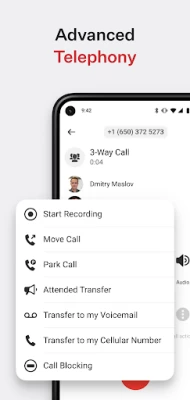
More About Ooma Office Business Phone App
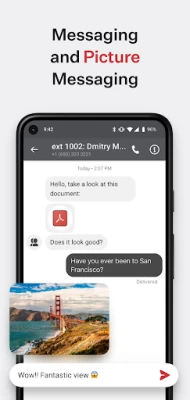
Co-workers can easily stay connected with group messaging, group calls and extension dialing, letting you connect to colleagues whenever you need to from wherever you are.
Never miss a call.
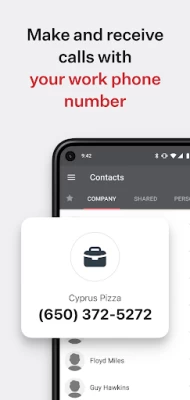
Forget about missing important calls by routing all your important business phone calls right to the Ooma Office app.
Manage business calls better.
Easily transfer calls to your co-workers to help clients and customers get the help they need faster.
Eliminate business interruptions.
Seamlessly flip calls between your desktop phone and mobile app to keep the conversation going.
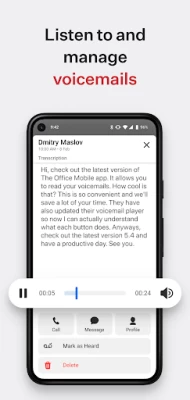
On-the-go voicemail access.
Check your voicemail from wherever you are right within the business phone app.
Easy setup.
Keep your current number or choose a new one from any available area code. Toll-free numbers are also available.
Current customer? Log in to access your advanced features.
Just log in with your phone number, extension and password to get started.
***** IMPORTANT NOTICES - PLEASE READ *****
The Ooma Office for business mobile app works with Android devices running 8.0 and higher.
Be aware that some mobile network operators prohibit or restrict the use of VoIP (Voice over Internet Protocol) over their network. They may prohibit the use of VoIP over their network or impose additional fees and/or charges when using VoIP over their network. By using Ooma Office over 3G/4G/LTE, you agree to familiarize yourself with and abide by any restrictions your cellular carrier imposes and agree that Ooma will not be held liable for any charges, fees or liability imposed by your carrier for using Ooma Office over their 3G/4G/LTE network.
Latest Version
7.0
July 21, 2024
Ooma
Finance
Android
255,547
Free
com.ooma.office2
Report a Problem
User Reviews

John
1 year ago
I completed the registration form a week and a half before our number ported to them, but they lost the form, and I had to start over. As a result, we've been living a nightmare trying to run our business without SMS text capability. Been on the phone with tech support numerous times over the last 2 WEEKS, been elevated, etc., plenty of excuses and prevarications, but no texting. Now, we're faced with starting over with a new provider. Take my advice and AVOID this company: I wish that we had!

Tom Gregorski
1 year ago
It is a toy not for any business in need for reliable communication. Application constantly asks for password. Will not ring if you are not logged in (this is not like Skype or Teams). Support is incompetent, slow and refuses to reset the password. I asked for escalation but nothing happened. Very frustrating when you must make this this important call. There is no easy way to automatically reset the password. Prepare for some loss of business.

Antinea Martin
3 years ago
Horrible experience so far, calls are getting missed, I have been asking for text capabilities and have been waiting for 2 months now and still don't have texting. Customer service is not great. I wish I had never made this change but I'm stuck now because I ported over my Google voice number for my small business. What a mess! Totally not worth the money!! 2lines for $67 a month for headaches

A Google user
6 years ago
very glitchy. I have a galaxy 10 and the app requires me to log back in almost daily. The Ooma app also drops calls for no apparent reason when you are connected with a bluetooth headset. The app does not always recognize the bluetooth headset as well. The sound quality is good and the interface is easy to use.

Thomas Slychan
4 years ago
Poorly just poorly!!!! Using this App for several months now. App responds time is super slow. It brakes up all the time. You miss a call and try to call back: "call can not be put thought due to server problems". I contacted them several times and the problem still there. Messages don't go through, it says sent but not delivered and receiving is also out of option. Have this problems for weeks now. I finally transferring to T-Mobile. Losing a customer and I'll warn and not recommend to people.

Tyler Swanson
2 years ago
One of the most frustrating apps I've ever used. I got this because Google voice had way too much of a delay for calls. Ooma promised the delay was better. It's somewhat better in that one area. In every single other way it's much much worse. Also they didn't tell me that once I ported my number over then I would never be able to transfer it back to Google voice. Now I'm forever stuck with Ooma. Do yourself a favor and stay far away.

Ray Habib
5 years ago
I have been using this app for six months. The proposed features for this app are great, but the functionality is sub-par. The biggest problem I have with it, is poor voice quality even when I am standing next to the router, most call have a high noise ratio and it drops calls randomly. I hope they can fix this soon.

Jesse Rothman
2 years ago
Used to be great and worked for me flawlessly for years. I had a small issue and tne tech who tried to fix it reconfigured my account and messed it all up. Took months of frustration and long hold music to rectify. I was still able to keep it working bare minimum after this, but my mobile app ability suffered. 6-8 months later, Now its lost all functionality becuase they keep updating to offer more and "fix" things. Gets worse evertime. They have cost me so much time and thus business

Se Min John Park
4 years ago
I switched from sideline just for the automated receptionist function. But that's the only thing that keeps me from going back to sideline. Once sideline enables that feature I'm going back. Unless, ooma changes the following. 1. Fix call logs. Always have to refresh multiple times for the logs to appear. 2. Fix text messaging so that I can store unlimited msgs. 3. Some voicemails don't show up as text previews.

Kat
2 years ago
This app is horrible. Half the time, the calls don't even come through. I have it set up to ring 6 times before going to VM, yet I'll only get 1-2 rings before it goes to VM. Or I get a notification 5 minutes later saying I missed a call when my phone never even rang. Phone calls won't hang up- have to restart phone. Outgoing calls won't connect/dead air. Now it's also having connectivity issues with my earbuds. Update 9/19/23: Now every call has delayed audio!!!

Susy 1
5 years ago
This app needs alot of work. 1. YOU CANNOT TRANSFER CALLS! When I try to transfer calls it sends the calls directly to the other person's voicemail. 2. The app rings 3-4 rings after the physical phone or desktop app ring. 3. If you are on data and not on wifi, you're screwed, too many dropped calls. 4 You cannot save contacts to the app, you have to save them to your phone.I am stuck with this for a year now, you cannot text on desktops, you have to find your own hold music, not enough features

Jessica M
2 years ago
I randomly miss calls, they don't ring at all, and my calls go to voicemail after 2 rings instead of 6. I use this app for work so I need it to work. The volume isn't routed through my call volume it goes through my media volume which makes no sense to me. I can't use my phone to play music through Bluetooth speakers and still get phone calls and the call waiting doesn't work when I'm on my actual phone it just sends my calls to voicemail. This app is an excellent idea but poorly executed
A Google user
6 years ago
Total rubbish. App works fine for about a week. After that I would miss calls whether I'm on their Wi-Fi or cellular. Incoming calls wouldn't show up at all in some cases, but the phone would ring, not showing caller ID screen. Customer service told me download and reinstall the app even though I have the current version. Calls would drop frequently on wifi. Switched from Vonage, contemplating switching back, their app had more robust features and rarely dropped a call.

Brandon Wheeler
3 years ago
Garbage app. Regularly freezes while calling, headset (wired or wireless) support is spotty at best. And frankly the interface is clunky, ugly, and not at all intuitive. Why would anyone build a calling app that doesn't default to the dial screen? And this is to say nothing of the service itself, which leaves much to be desired. But hey, what do you expect for the cheapest VOIP service on the market?

LaNina Dobson
2 years ago
If it weren't for the virtual receptionist, I'd go with a different app. Constant glitches. Shows that you're on the phone long after you've hung up. Randomly stopped sending picture messages from the second line. Texts come in and send with a huge delay even when I have 5 bars. Customer service is trash. Just a huge. annoyance. Feels so unprofessional. Currently looking for an alternative.

Penina Wiesman-Schuster
2 years ago
This app is unusable. I get a call, and when I answer, the ring tone keeps going off in my ear, making it impossible to hear what the other person is saying. If I've got the call on speaker or Bluetooth, the ring tone is audible to the other person as well. Very unprofessional. I've basically gone to just letting calls go to voice-mail, but even when I miss a call, the ringtone STILL goes off incessantly, sometimes for hours afterwards. I have reached out to ooma 3 times about this and nothing.

Michael M
4 years ago
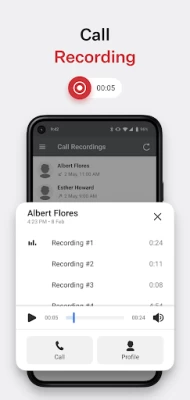
Love the fact calls are recorded, we can text, and it follows us on multiple platforms like internet, laptop, and cell phones. Only suggestion would be to make it easier to answer calls when on another call on my cell. I hear the phone ringing but there isn't any prompt to switch calls. Must be because I'm on my cell and preference is set on data calls. Overall very happy with system.
A Google user
6 years ago
This app would work if microphone volume in VOIP mode would work. Using cellular mode is the only way to have good call quality consistently. UI is much better in VOIP mode. Cellular uses the default android dialer, and closes the app when you hang up - annoying. Overall quite clunky. When receiving another call (call waiting) while on speaker phone, the screen is locked to the incoming call. Dismissing the waiting call hangs up the current call too. It's like this app is in beta or something.

Nate Red (Interrobang)
1 year ago
Clicking "accept call" and then having it miss the call is a real fun feature of a PHONE app. It is infuriating to have several major but simple bugs that meed fixing. Delays (5+ seconds) in call connection, failure to answer calls when I click accept, and 0 indication when calls end. Overall Ooma is nice as a concept but there are several issues that just make it obnoxious to use when customers can't get it.

Sophia Berg
1 year ago
App is absolutely terrible. I have reached out to ooma several times and if I get a reply they just say to delete the app and redownload it. Calls are dropped when I hit accept. Sometimes I am in the middle of a call and connection is lost. Sometimes I can listen to voicemails on the app and sometimes I cannot. Half of the calls don't even come through the app until I get a missed call notification. Very very glitchy and not a good look when I have to call customers back all the time.









