
Parallels Client
August 19, 2024
More About Parallels Client
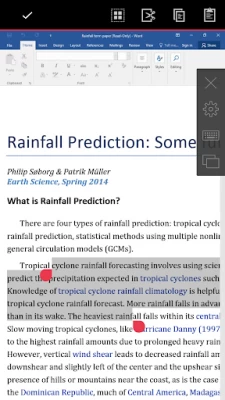
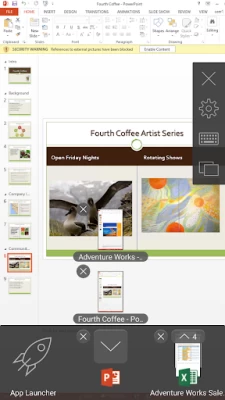
• Work on any device from anywhere
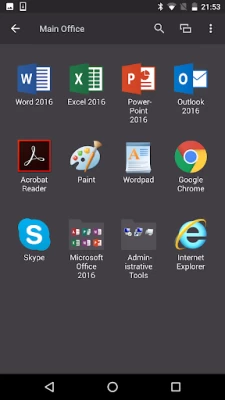
• Access any Windows corporate application
• Resize and optimize published applications for a native look and feel
FEATURE HIGHLIGHTS
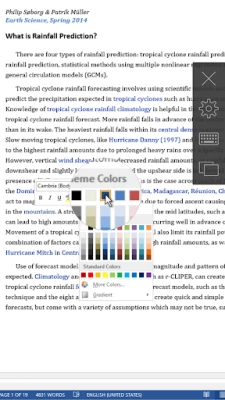
• Seamless access to Windows applications on your device
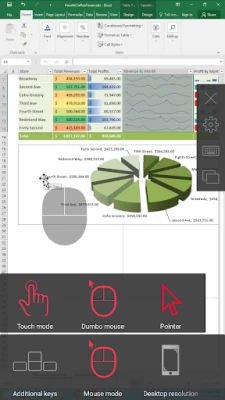
• On-screen mouse for easy, intuitive navigation
• Higher level of security when you connect over SSL
• Works with virtual desktops, RD session host, and Windows PC host
• Universal printing allows you to print from your device to any printer
• Graphic acceleration using RemoteFX
For technical documentation and other resources, visit https://www.parallels.com/products/ras/resources/.
If you have questions about Parallels Client, please visit our support page https://www.parallels.com/eu/products/ras/support/.
Latest Version
19.4.2.25071
August 19, 2024
Parallels International GmbH
Finance
Android
257,685
Free
com.parallels.client
Report a Problem
User Reviews

A Google user
6 years ago
Cannot type the server address or any other information because the keyboard appears and disappears too quickly.

Richard Weil
1 year ago
Very poor and hard to use.
A Google user
5 years ago
security pin doesn't work! the pin page is omitted when the all launches. can't believe it, please fix it immediately!
A Google user
6 years ago
I'm using the TC2000 through this app and it is a nightmare. Every minutes logged out. To log in, takes 1-2 min. Can you make this more faster and easier?

Julio Gonzales
2 years ago
Buggy, slow and hard to navigate through on mobile devices. 3 stars in tablets.

Abdulfatah Adeniyi
5 years ago
I was having an issue with this app. Even as a non pro subscriber they called, email and took their time to attend to my need. Much appreciated and highly recommended.
A Google user
6 years ago
registered username and password... site gave instructions for android download... followed instructions. Wouldn't allow me access days unable to login username or password incorrect. double checked everything and still can't access. wastde of time.
A Google user
7 years ago
Doesn't work with physical keyboard. Dumb virtual keyboard is always losing focus when you're typing. Legacy client was a way better.
A Google user
6 years ago
Cannot edit or create connections as the keyboard immediately disappears when trying to edit a field. I am on the latest version updated Dec 10, 2018. no new updates available.

Miroslav Barac
5 years ago
Great app. But, Is it possible to import data from a client that is set up on a tablet and how? I see that there is a share option but I don't see how I would import that file to the new client. Thank you. Regards!

Chibueze benson
1 year ago
Great app but recently I can't import or share files from my device to the app

Ivan H
1 year ago
After latest update, I cant use this app, everytime open this app it will only showing a blank apps and not responding

Michael MacConnell
3 years ago
Used to be great but the latest update is awful. A giant grey square appears in the right third of the screen and moves up and down with when the keyboard is launched. Changing resolution doesn't help.

J. Edward Romeo
4 years ago
Functions... Sort of. Taps work... sometimes, others you have to change mouse modes to make it recognize taps again. Can't zoom out to full desktop, doesn't refresh when switching between portrait and landscape. Has potential but doesn't work anywhere near as well as the app on other platforms.

Karl Thompson
1 year ago
It's nigh impossible to navigate on a mobile screen!!! It's clunky and slow.....

Silent
4 years ago
I've been using this app for years now without much problems till now... I only use this for RDP connections and I now wake up in the morning to this 'Pre-launching sessions..." Which shows up and NEVER GOES AWAY... I have to force close the app to get it to stop and go away. I have no Parallels programs, only RDP. What are you pre-launching? Why are you randomly sending data from my phone without me KNOWING or being able to stop it?

Che MaRy
1 year ago
since the last update it frozes on the startup screen were it says Parallels. It's a Samsung s23, never had this issue before

Bil Cozbi
1 year ago
It pains me to take a star off from my rating, because I know how bad the alternatives are. But I have to, even though 2 or 3 years ago everything was flawless. How is the app still incapable of managing display orientation? Why keep that setting in there if it's never going to work? It doesn't work on any of my devices. Also, again: Give us the choice to show function keys OR TO NOT SHOW THEM when keyboard is on. And recently added help icon in the toolbar is another inexplicable space waster.

Meet Bhatia
1 year ago
I have recently purchased samsung s24 ultra. Now the app is not connecting to remote server sometimes. It was working good in my old mobile samsung note 9. plz bring any update because it keeps connecting and I have to uninstall and install the app then it starts working but again after sometimes the situation is same. Admin plz check and resolve because it is very help full app other (any desk, ultra viewer) then accessing my server on remote.

P T
5 years ago
I love this app for our new scan gun device the Honeywell CN80. I have one issue though. I would like to be able to disable the copy paste clip board menu that pops up at the top of the screen. It resizes the remote app we are using when it pops up. None of our users within our app need clip board. Is there any way to disable this? EDIT: Latest update now has the ability to disable this menu via "show text selection toolbar" menu. Thanks dev team! Changed review to 5 stars!









