
Power Automate
July 08, 2024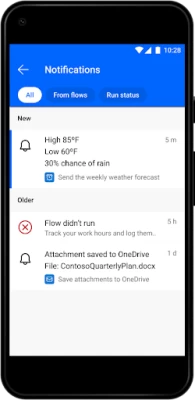
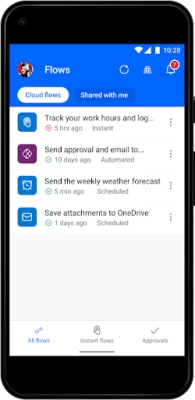
More About Power Automate
Edit your flows on the go
Get a notification when you receive an email from your boss
Record your work hours to a spreadsheet with the tap of a button
Automatically download email attachments to cloud storage
Capture, track, and follow up on sales leads, and connect to your CRM platform
Get notified when a work item is updated
And so much more!
Key features:
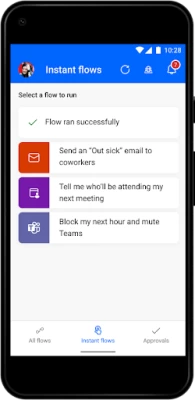
Trigger flows to run with just a tap
Monitor flow activity directly from your mobile device
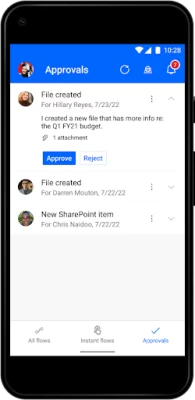
Grant approvals from the palm of your hand
Send and receive push notifications
Create a shortcut for an instant flow on your mobile device's home screen
Hundreds of apps and services connect with Power Automate, including the following: OneDrive, Dataverse, Office 365, Outlook, Microsoft Teams, SAP, Twitter, JIRA, Google Drive, Azure, Dropbox, and more!
Download the Power Automate for mobile app and start automating your tasks today!
Please refer to Microsoft's EULA for Terms of Service for Power Automate for Android. By installing the app, you agree to these terms and conditions: https://go.microsoft.com/fwlink/?linkid=2131507
To learn more about the full capabilities of Power Automate, visit Microsoft.com/PowerAutomate.
Latest Version
3.0.891
July 08, 2024
Microsoft Corporation
Finance
Android
1,098,903
Free
com.microsoft.flow
Report a Problem
User Reviews

Ryan Elsenheimer
2 years ago
I'm very impressed by how you responded to my previous review. not only did you recognize the mistake, you also respected everyone here by just listening and actioning these reviews. This is a huge step forward for MS. For the longest time, support has been horrible with MS. This is the first time you didn't ask customers to go elsewhere for support. Also, this new version is almost perfect again. Notifications seem to not be working quite right yet from the app, but otherwise 5 stars!

Yinka Osho
2 years ago
I have read most replies from Microsoft on the search and create a blank flow functionality and up till date, nothing has been done. I would expect that since Microsoft has observed that these features have been reported several times, they would atleast give this change a priority on their backlog list...hence the rating. Hopefully we see the change rolled out very soon

Jason Schafer
2 years ago
The App is great but I'm disappointed by the incomplete feature sets provided for the Google Tasks functionality. You can create Tasks but you can't update or complete them. But you can complete Update Microsoft To-dos. I feel like we should be able to trigger any updates from a Google Task so we can reflect those changes 1:1. Little disappointed that the feature sets for some of the connectors are so limited.

kookie mons ter
3 years ago
Was working fine before. I was automatically logged out and wasn't able to sign in for several weeeks now. I already tried to use signing in via password and signing in via code sent on my email. I already uninstalled and reinstalled as well. I even restarted my phone. I already cried several times too. (Stream Ven Para btw 🔥! Weeekly We Can Do!!)

Elier Herrera
3 years ago
The previous version was more useful. This version only allows us to turn on/off the flows and see their state. Previously we were able to create flows and see each individual step. It is also very slow now to load and it doesn't remember the last environment selected.

Herrick Andrews
1 year ago
misleading. it doesn't let me create my own flows, i have to start with templates.

Andrew Post
2 years ago
It works fine enough. However, you are "greeted" by a tutorial EVERY time you open the app that you either have to skip or go through. Then, you have to log in almost EVERY time you open the app. That constant login makes things like the widget button useless. If the app's logged in session is over, you have to open the app to use the widget button.

Pablo Alperin
4 years ago
It provides a very good tool on mobile... once it works. (Almost) Every time I open the app, it doesn't work. It doesn't crash, it just 'cannot use this button now, please try later', or uh-oh, there was a problem running this or that. So I restart the app, and there is a problem after selecting the country, so it's a close-restart-try again cycle until it finally works... until I want to use the app again in the afternoon or the following day. When it works, I find it very good and useful

Eliana Castaneda
1 year ago
Works well most of the time. Occasionally it will send an email at a day that it wasn't scheduled to. Would be nice if I could at least search for the template I need instead of having to scroll.

MM RR
4 years ago
Doesn't work with latest version. I installed an older version (2.35) and each time I installed it, it would work for one day. The next day it would not. I found out that the auto update was killing the app. I switched off auto updates and installed the older version from an apk file sent to me by my IT manager and it has worked since. Pretty poor show really considering this was months ago and a fix is still not provided.

Bogdan Jarosh
1 year ago
It's gone a billion years to find template I want. No search, only see more templates.

Mark H
3 years ago
Every time i open the app, i have to sign in again which is annoying. When i do sign in, its very clunky and not mobile friendly. I.e. the text box for a condition is only 1 line height. The text in the box itself is 3 lines high. Unfortunately, microsoft haven't updated this app since 2019 so it looks like this app has been abandoned. The recent feedback for this app is overwhelmingly negative. If Microsoft has no intention of updating this app, it should be pulled from the app store!

kn3gg
1 year ago
Can't create a flow without using a template. I don't want that. Furthermore these templates mostly use some products I need to link then. Without me wanting to use those programs. Just let me Design a flow. The load time of the templates is a huge turn off too

Yash Gupta
1 year ago
It's a good app overall, we can look over at the statuses of the scheduled flow and turn off the flow as well if needed but it would be great if we would get notification incase any flow fails.

Ariel Tavori
1 year ago
No dark theme. Templates update four items at a time, and have no search function, or even a basic indication of how many total templates there are. Such a good and useful concept with SO MUCH resources behind it!.. How is it even possible this so half-baked?

Otto Becker
1 year ago
Laggy UX. No ability to search for connectors but forced to browse through recipes.

Al Lam
1 year ago
You cannot make a custom flow easily, nor can you search for an automation that you need. It lacks most of the app navigation tools that makes the desktop app so good, so it is extremely disappointing to see that this app was so poorly thought out.

Stefan Boyd
1 year ago
Absolutely abysmal in terms of the user experience. Half the time it kept refreshing when the login code to authenticate is sent to my email. On top of that you have no way to start a flow with a blank template nor is there a search when looking through the templates presented 🤦🏽♂️

A Google user
6 years ago
June 2019 version is NOT stable. Gets stuck at blue login/startup screen or later just re-opens to an all white screen. Tried repeated re-installations and cache clearing. No dice. Hopefully MS will get the problem figured out and release an update. I love Flow, but seriously bummed the Flow app currently sucks.... especially as I just started to play with the new Location (aka geo-fence) trigger. :-(
A Google user
5 years ago
It's great and has further potential. My only issue is that I use Flow for my personal Microsoft account as well and the app doesn't support multiple accounts. I would love that feature to be added ASAP. At least, the ability to add a personal and business account. I could get away with it if I use Samsung Work folder to separate certain business apps' environment from the same apps' of my personal account. But, I can't use the Flow Buttons Widgets at home screen. So, PLEASE make it possible!









