

Proxmox Virtual Environment
July 05, 2024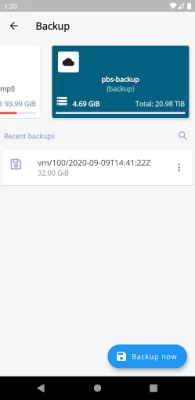
More About Proxmox Virtual Environment
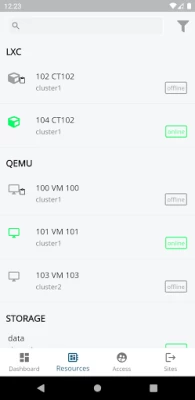
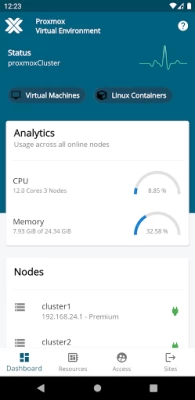
- Overview dashboard of Proxmox VE cluster or node status
- Login manager to connect to different Proxmox VE clusters or nodes
- Search and filter functionality for guest, storage, and nodes
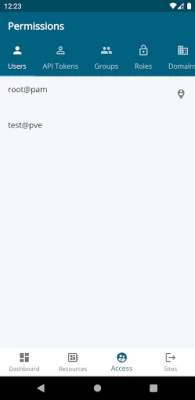
- Overview of users, API token, groups, roles, domains
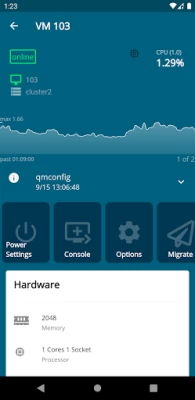
- Manage VM/container power settings (Start, Stop, Reboot, etc.)
- RRD diagrams for nodes and guests
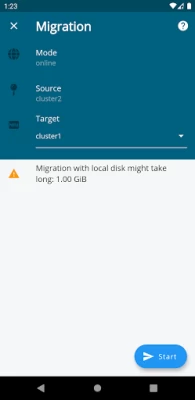
- Migration of guests (offline, online) between cluster nodes
- Back up data to different storages including Proxmox Backup Server
- Storage view to access and or search content
- Task history and current task overview
Proxmox Virtual Environment (VE) is a complete platform for enterprise virtualization based on QEMU/KVM and LXC. You can manage virtual machines, containers, highly available clusters, storage, and networks with an integrated, easy-to-use web interface, via command line, or via the app. The open-source solution enables you to easily virtualize even the most demanding Linux and Windows application workloads, and dynamically scale computing and storage as your needs grow ensuring that your data center adjusts for future growth.
To learn more, please visit https://www.proxmox.com/proxmox-ve
Latest Version
1.8.0
July 05, 2024
Proxmox Server Solutions GmbH
Finance
Android
135,151
Free
com.proxmox.app.pve_flutter_frontend
Report a Problem
User Reviews

Semira Uthsala
5 years ago
Works perfectly. Nice ui. So far all the features tested works perfectly. With storage enabled on resources panel it giving me some error (unsupported operation: infinity or NaN tolnt) other than that all ok. Thumbs up for the really good work 👍👍

Nick Huffman
1 year ago
Not a bad app but don't expect a lot from it. You can start, stop and view basic metrics and thats it. No creating containers or VMs. No uploading or downloading ISO or templates or anything really useful. Og yeah if you get the SSL errors just turn if enforce SSL in apps.

Salvatore Manna
4 years ago
The app works fine except that it doesn't read node CPU usage data properly. I have 2 nodes that are perpetually reading 0.02 and 0.07 %, when the numbers average roughly 15% and 10% respectively. I sought help on the forums and received no helpful response Update: Issue was fixed so I'm changing my rating. I still think this app leaves allot to be desired. The Proxmon app is better than this one and actually has working novnc consoles.

Barlap Woozie
2 years ago
401: authentication failure The app keeps receiving this error when i'm connecting to my proxmox host machine. I'm able to log in after skipping this error but overall is very annoying. Edit: After the new update the 401 error is gone. Changing back to 5 stars.

Johan Josua Storm
5 years ago
Cannot connect because of the implied default port. My proxmox is behind a reverse proxy so it doesn't use port 8006. When I try to connect to proxmox.host.tld:443 the app changes it to proxmox.host.tld:443:8006. Maybe change the interface to a fqdn field and a separate port field where 8006 is filled in by default but can be changed in the port you use. Until then the app is unusable

Konrad Tjaden
3 years ago
Pretty good app, would have rated it 5 star of the server/url for the environment did not force the port at the end. My env is behind a reverse proxy making the app useless for a quick remote view & need to revert to a browser. App Only works local lan with the enforcement of a port as a postfix, please remove it!

Stephen Joshua
4 years ago
Works very well, very clean and well-designed app. Unfortunately without terminal support, there's not a lot to do in the app besides look at some basic stats and start and stop instances.

Chandler Deng
4 years ago
Well thought app. UI is very fluent and informative. One issue I spotted is it fails to load Win11 VM data with some deserialization error, cannot find Win11 as key in OS map. Could use a minor update to get that fixed.

Max Arens
5 years ago
This seems promising, and what is there is good so far. However, when viewing a VM if you click options this error pops up: NoSuchMethodError: The getter 'type' was called on null. Receiver: null Tried calling: type I'm guessing this is due to the app being new and not fully polished. Other than that, seems great!

Akash Banerjee
2 years ago
Kindly add a Node shutdown option. The console from node view is not accessible through the app. Nice UI and very much responsive. Really liked the design. Thankyou for integrated password manager access, that's really a pain in web console.

PT G
2 years ago
The only real issue I have with this app is it doesn't remain logged in. I used MFA on my accounts and the app automatically logs out after a set amount of time, especially if the server power cycles. It is an unworthy limitation even from a security perspective since most people I believe end up using it as a console for monitoring and basic control.

Dany GINHOUX
3 years ago
Great! Work very well for any basic tasks on vms and nodes. I'm discovering all others functionality. I'm still searching the tasks... I Don't let your pve directly available, I use a reverse proxy with authentication backend like authelia. Not directly compatible with the app, it's normal. I use a wireguard tunnel and everything work fine.

Jugal Shah
4 years ago
Like it so far for viewing resources. It could be better at managing resources however. The app doesn't seem to support making changes. Also, it would be great if it used fingerprint auth rather than having me login each time. I realize that may present a security concern, so perhaps the process can be to generate some sort of token with limited scopes at the pve and then store that on mobile devices for use with fingerprints. That way risk can be minimized and the token can always be revoked.

Sander Bron
5 years ago
Looks great, some issues though. The biggest one I found that didn't get fixed yet, is the auto scroll down in the logs. If a (backup) task is running, you can't scroll up to check older entries. It will scroll you down even though you keep your finger on the line in question.

Dale Sharp
4 years ago
I would otherwise be willing to rate this higher except the console connection method is highly bugged, at least give an option to download the spice file. Modern Android versions do not have the ability to set apps as default in an impromptu manner meaning that despite having a spice client installed, the os cannot make the link between Proxmox VE and the spice client when the button is pressed. At the moment this app is nothing but a glorified monitoring tool without a console connection.

Silent Hunter
1 year ago
This works for the most part. Fingerprint auth fails partially, but it still fills in the password so I can just tap close on the API Error 401 window, and then click continue, so it's not so bad.

Triston Line
4 years ago
Very good app, everything works solid, but it leaves a lot to be desired. I wish it had a spice or novnc client built in, I wish more datacentre settings could be changed. After that, this could seriously become the most important and best app of all time for me. Keep up the great work proxmox team, this app has tremendous promise!

Shan 007
1 year ago
Good app, BUT the fingerprint authentication does not work and it unfortunately NOT possible to switch off the the fingerprint authentication. So every time I use the app I have to use fingerprint authentication and it fails. After that, login with the saved password works. So eitherxfix it or at least make an option in the settings where I can disable the fingerprint...

Tuzzie
1 year ago
This app straight up doesn't work. I tried logging into my proxmox both with and without SSL validation turned on and it still just times out when trying to connect. Don't get this app until they fix it.

Ján Stibila
1 year ago
When session expires and I open the app, it will try to log in multiple times. With AD realm that means AD will often lock my user for a couple of minutes because of a lot of login attempts. This is very very annoying. Also more functionalist would be nice. Like edit VM hardware or cancel running tasks (for example task to shutdown VM that has frozen, I'd like to cancel this task and issue hard power off).









