

SafetyCulture (iAuditor)
April 17, 2025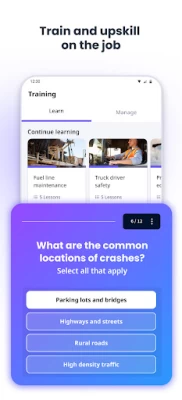

More About SafetyCulture (iAuditor)
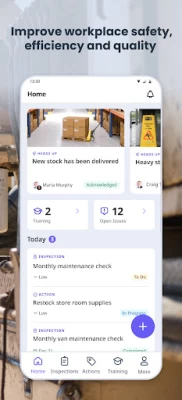
SafetyCulture (iAuditor) powers over 600 million checks per year, approximately 70,000 lessons per day and millions of corrective actions. Some of the world's largest businesses use the platform to digitally transform their operations and drive a culture of continuous improvement.
INSPECTIONS
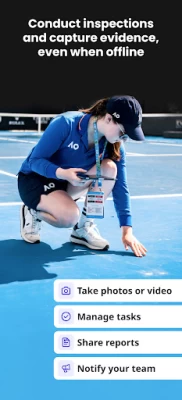
•Conduct inspections and audits on the job, even when offline
•Schedule future inspections and set reminders for upcoming inspections
•Capture incidents and issues with photo and video evidence
•Create and customize dynamic inspection templates and checklists
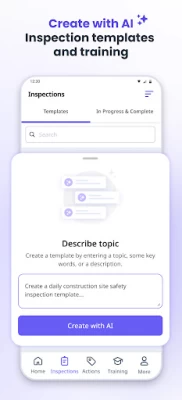
•Create inspection templates using AI, describe your template’s purpose in a few words to generate suggested questions as a starting point for your template
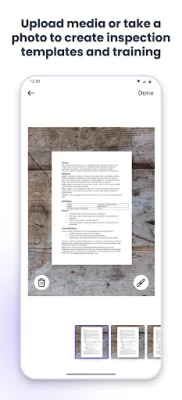
•Import existing checklists and inspection templates from PDF, Word or Excel
•Digitize paper inspection templates, checklists and other forms
•Choose from thousands of customizable inspection templates created by global brands and industry experts
REPORTS
•Generate and share professional reports after completing checklists, inspections and audits
•Personalize your inspection reports
•Share reports with anyone instantly
•Store all your reports securely in the cloud and offline
TRAINING
•Create, edit and deploy engaging training and operating manuals in minutes
•Get training and work instructions you need to do the job right
•Conduct mobile-first training, that fits into the flow of your work without disruption
•Receive bite-sized training that doesn’t interrupt your workday
•Choose from over 1,000 editable library courses
ASSETS
•Maintain a digital register with a detailed overview of your assets
•View an up-to-date audit trail of all inspections completed on your assets
•Create customizable inspection forms for your assets
•Schedule inspections and recurring maintenance actions for your assets
•Create follow-up actions for your assets
TASK MANAGEMENT
•Easily create tasks and assign actions to individuals, groups or teams
•Receive alerts and reminders instantly when you’re assigned an action
•Provide context by attaching photos or PDFs
ISSUE REPORTING
•Raise incidents and issues as they arise
•Report observations, hazards, near misses, and more
•Share what’s happening in detail by capturing critical information with video, photos, weather forecast and location in seconds
BACKGROUND SYNCING
• Ensure your data is always up to date and securely accessible across all your devices
• Seamlessly sync your data in real time, guaranteeing that your critical information is never lost
• Trust that your data is safeguarded and accessible anytime, whether online or offline
SafetyCulture (iAuditor) is completely free for working teams of up to 10. Digitize checklist forms, conduct inspections, complete audits, generate reports, manage assets, conduct training.
You can use SafetyCulture (iAuditor) for:
Safety inspections - risk assessments, incident reports, Job Safety Analysis (JSA), Health and Safety audits (HSE), Safety Data Sheets (SDS) Quality Health Safety Environment (QHSE) audits, Personal Protective Equipment (PPE) inspections, vehicle inspections, fire safety risk assessments
Quality control checks - quality assurance, food safety Inspections, cleaning checklists, maintenance inspections, site audits, construction audits, control checklists
Work management - business checklists, work order checklists, Six Sigma (6s), toolbox talks
Latest Version
25.14
April 17, 2025
SafetyCulture
Finance
Android
1,303,748
Free
com.safetyculture.iauditor
Report a Problem
User Reviews

Atar Singh
2 years ago
Its not a userfriendly app, if we try to attachech any photo its not showing list of directories, just scans photos from device and not even sorting order, just some random order. So annoying when you have to attach picture from backdated. Can anything done please. Hey mate thanks for your answer, you have seen my issue here, you can also forward to your team.

Balancing Life
11 months ago
Absolute life saver! The team that made this deserves a raise. Works well both on mobile and desktop. Will be recommending this app to others. Its very intuitive.

Simon Hart
4 years ago
Issues i have veen experiencing, sometimes templates disappear, i assume this is because there in the cloud. When completing an Audit, if you exit the app you have to go vack into your Audit and find where you left off. Why doesn't it just automatically return you to the last option selected within the audit? Same issue while adding photos you are automatically moved back to the top of the page after adding a photo and have to scroll down to where you were last.

A Google user
6 years ago
App was good before the recent updates. You can no longer export reports even if they are store locally on device on free accounts if you exceed your 20mb limit. I see in the replies below they claim you can, but when selecting to send or download the PDF, nothing happens. This is basically a pay to use app now. Once again, it was great until the recent updates which broke it.

Jarrod Lee
8 months ago
Great product, Easy to setup and professional quality reports

Greg Karczewski
10 months ago
Contacted them months ago about much needed feature, but nobody bothered to even get back to mel.

Eli Rickard
3 years ago
Still no update to fix the android version...... Waiting 2 weeks now... Was told it would be fixed on the 7th Edit: update now released after my review However the usability of the app is still not fantastic, it could be easier to use if you didn't have to reach for the top of the screen to select most of the things you need for an inspection. 3 stars as this is all I use it for.

john gamble
2 years ago
Having major issues and although this has been raised and there is an escalated compliant in place the resolution is not there yet. It involves media not syncing and has been going on for quite some time. The issues is when taking images in the field when doing what it says on the tin and undertaking an actual audit. Either the media is not syncing on the mobile (purple icon with a cross) or not from the device to the web platform. This is now and has been an issue for 9 months. CS help is luck

CES
5 years ago
Great idea but needs significant improvement in how reports are generated. You can generate word reports but doing any editing is bound to mess up the formatting and positioning of report items. The pictures sometimes don't pull through and they're not placed in the document the same way so they move around a lot! Tables for text are also not uniform which also causes issues with editing. Have discussed with support several times over the last year but haven't seen any improvement.

Burezu Blaze
4 years ago
My company used this app for work. Only need couple of feature to perfection. 1. Dark Mode! How lovely would the interface looked like if it has Dark Mode. 2. Definition/Instructions edit of an ongoing inspections. Because you can't change it if you already started, it would be great if we can somehow edit it for working adaptability. 3. Clear all media in a tab, iOS has this. I couldn't find it in Android.

Brian Hutchins
4 years ago
Full of interface bugs and a highly annoying app to use. Annotations are very poorly thought out, try annotating 5 pictures with text, every time you have to go through on every photo selecting the text tool, changing the size and then if your lucky text appears. If not you have to try again with the text tool. Awful. Whoever designed that deserves an eternity of annotation photos to do. Also after it's been installed for a month its taking over a gig of storage!

Samuel Palmer
3 years ago
The idea of the app is good but I regularly have issues with using it on site. Often, photos and comments won't properly save, leaving me with no record of my observations. Also, menus don't always reliably load, preventing me from selecting a site from the list, etc. I had these issues on my old phone but upgrading to a brand new model with the latest version of Android hasn't resolved them. This also means I can't see Failures from past audits, so don't get as much value from the subscription.

Lee Marshall
11 months ago
GREAT APP!! Really like the connectivity between mobiles and desktop. I've not had a single problem with it. It's brilliant. Thank you aswell for making it a free for wider use it really helps small businesses.

WhistlRobert Debont
7 months ago
worded used not correct and can be miss leading . ie is the case damaged yes to say no damage when none no damage / or damage found / yes Damage found these check are going to be done by general staff with first aider training so could be comfusing and audit could see this as a check not clear due to these points location not comfirmed as well

Sean Todd
8 months ago
I'm struggling with syncing, sometimes it's straight away and other times can take hours with or without WiFi, my boss is pushing for reports but struggling to provide in time, any advice would be greatly appreciated

Daniel Ross
8 months ago
Really like this application! Very user friendly, mobile app works great, doing reports in the field is a breeze! I have created my own templates and Inspection reports and all works very well. Great support from the developer as well, any questions or troubles are answered in a timely manner.

Mick McGoldrick
8 months ago
When it works, it is quite good. The problem is that happens rarely. Issues with random white band on photos, photos disappearing from reports and photos that won't synch no mater how long you wait. The company say we are working on the issues but more than 6 months on, no change. I am currently looking for a different platform as I cannot afford to have a reporting platform with so many issues.

Karen S
4 years ago
While following instructions, I'm unable to change the time zone. There's really no option where they say there is. Barely getting started, and stopped by a little thing like this. Hoping to figure this all out because I like the concept. Edit: The option is not available in the area the support team sent, however when I logged in again, I received a notice that my (GPS) location had changed and asked me to accept. So, I'm raising my rating to 5 stars, excellent app! You should add to FAQs.

Matthew Sitzberger
1 year ago
Bookmark function on the templates page is broken and super un-user friendly. If you want something bookmarked so you don't have to scroll through an endless page of templates, you'll have to bookmark it every single day. THIS PROGRAM DOES NOT SAVE TOUR BOOKMARKED TEMPLATES. I have gone back and forth with their support countless times and evertime, all I get is clear your cache media in the setting menu, WHICH DOES NOTHING BUT DELETE PICTURES YOUVE TAKEN!!! 100/100 would NOT recommend!!!!

Ben Jenkins
1 year ago
Very slow to load templates. 30sec - 1 minute. Agonizingly slow. Especially when back button ( < on my android) takes me all the way out of editing a template, instead of to the previous screen. Because then I have to select it and wait again Also: world be helpful if inspections had a way to shrink the selectable bubbles. Really annoying to have to scroll down to an option when all options could easily fit on the screen. Same thing with print-outs. So much white space = a lot of wasted paper









