

Seesaw
November 09, 2025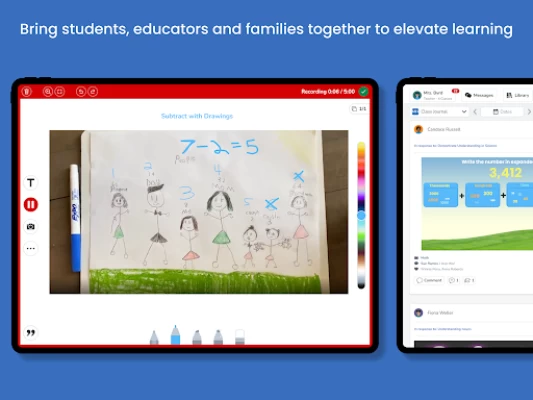
More About Seesaw
Teachers love Seesaw—out of 1000 teachers surveyed, 92% said Seesaw makes their lives easier.
Built on extensive educational research, Seesaw is validated by industry-leading third-party LearnPlatform as a designated evidence-based intervention, eligible for ESSA Federal Funding with Tier IV designation.
Awarded the ISTE Seal of Alignment. Grounded in learning science research and based on practitioner experience, the ISTE Standards ensure that using technology for learning can create high-impact, sustainable, scalable and equitable learning experiences for all learners.
High Quality Instruction
- Enable teachers to deliver high-quality, standards-aligned instruction that encourages student voice and choice
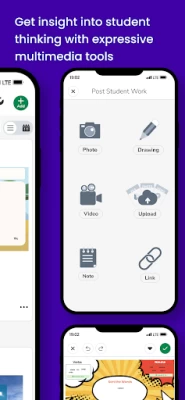
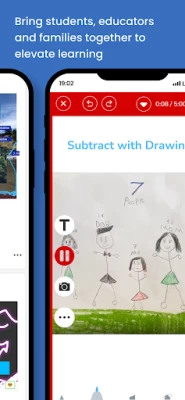
- Multimodal tools make learning accessible and engaging. Tools include video, voice, screen recording, photos, drawing, labeling and more!
- Present to Class mode designed for front of class modeling, whole class instruction and discussions
- Assign activities to all students for center/stations work or whole class independent work. Use student groups to easily differentiate assignments
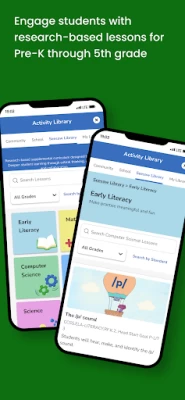
- Over 1600 research-based and ready-to-teach lessons created by Seesaw’s curriculum experts with whole group instruction videos, 1:1 or small group practice activities and formative assessments. Includes robust lesson plans to support teacher implementation.
- 100k ready-to-assign activities created by our community of educators and 1600+ ready-to-teach scaffolded lessons
Inclusive Family Engagement
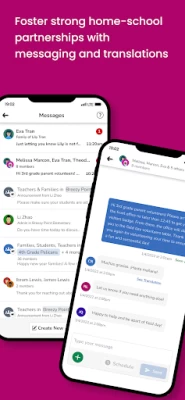
- Engage families as partners in the learning process through inclusive two-way communication through portfolios and messages
- Provide a window into the classroom and insight into their child's progress with frequent sharing of student posts and assignments
- Robust messaging with built-in translation into over 100 home languages
- Message Progress Reports to families to keep them informed
Digital Portfolios
- Capture learning completed within and outside of Seesaw through digital portfolios that showcase student growth.
- Organize student work by folder and skill
- Simplify parent-teacher conferences and report cards
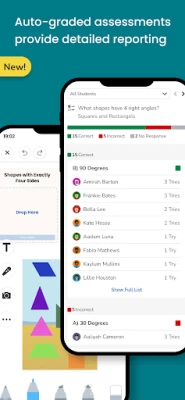
Assessment to Support Data-Driven Decisions
- Routinely assess student learning to glean meaningful insights into their understanding and make data-informed instructional decisions
- Formative assessments with auto-graded questions provided detailed and actionable reporting
- Tie skills and standards to activities for easy progress monitoring of key learning objectives
Accessible and Differentiated Learning
- Enable developmentally appropriate, accessible, and differentiated instruction to reach and engage all learners
Seesaw is COPPA, FERPA and GDPR compliant. Learn more at web.seesaw.me/privacy.
Need help? Visit our Help Center at help.seesaw.me.
Latest Version
10.101.0
November 09, 2025
Seesaw Learning
Education
Android
7,585,209
Free
seesaw.shadowpuppet.co.classroom
Report a Problem
User Reviews

Simon Edgar
1 month ago
Lucky to get one star , UI is clunky doesn't work on back, parents should be able to comment on their child alone without it being 'ok'd' by admin only to share to everyone. I get what the app is about but it could be used in more functional way with 1 way class photos to be uploaded, 1 way msg are recieved, an easy way to save pic to phone or share with family members without having to screenshot then send All in all you're an educational assistant for teachers n parents why is the standard low

A Morrison
2 months ago
I'm having a lot of trouble using the Seesaw app on my phone. The screen is distorted, and I can't adjust or resize anything to fit properly. I really love using Seesaw, but the app has been very inconvenient lately. Every time I get a message, I have to switch to my computer just to respond or add something. At this point, the app is pretty much unusable for me, and I’m considering uninstalling it unless the issues are resolved soon.

Raymond Celeste
1 month ago
I like some things about the app, but it lags and I went to see if an update is needed and there isn't one available. I'll get the email way before the message on the app shows up sometimes.

nmeister67
1 month ago
No implementation of universal back button/gesture. App just about does the job, but is unrefined. Feels like a poor ios port from 10 years ago. I'm not raising this with support as I dont require support. Just pass this on to the dev team that they need to pick up a phone and compare with almost any other app.

Vishal Mori
2 months ago
Pathetic app. West of time in formatting. Portrait prints (pdf download) are coming out in landscape formats. Give option to upload scan copy of printed pdf as completed homework. Also, please ensure that homework given from school is visible to parents (may be you can control by read only version but should be visible). Currently it is not visible to parents.

Zoe Thomas
1 month ago
very slow and does not work with mobile data just says error code, so if I'm not home I won't get messages about my children and even when I'm home I won't get updates until hours after the teacher has done them. even now with WiFi it's not loading properly.

Tim Hough
2 months ago
[Sept 2025 - Another update, another disappointment. All the negative reviews still applicable. Bizarre. ] I am flabbergasted that it STILL doesn't use the Android back button! EVERY OTHER APP I HAVE DOES! Please, this app is such a pain to use because of this(in addition to other issues like zooming on photos) this should be a basic feature that should have been there from the start. Do not tell me to contact support; just pass this on please and let users know you're going to add it.

Adam KohSweeney
2 months ago
This app is so ridiculously terrible it's hard to know where to start. But, since I only have 500 characters, I'll start with the fact that it's now 2024 and basic navigation is impossible because the app doesn't obey back commands. I guess it must be too new a concept, seeing that the back command was only just introduced in 2008. September 2025 Update: Basic navigation still impossible. App deserves zero stars.

RB30T
3 weeks ago
I'm not a fan of the app, the whole layout is just confusing and a lot of it doesn't make sense. the instructions don't tell you anything about the work. If you accidentally select the submit button you can't go back and edit it you have to ask the teacher to resend it. when you view photos it should be in an album style not go through every individual photo to find the one your looking for. I miss the old paper homework this is just rubbish. I hope schools don't pay good money for this.

Marcy Harbut
5 years ago
I hate hate hate hate HATE this app!! The entire right side of the screen is taken up by static and semi-static content that doesn't need nearly as much space as it's given. I mean really -- do you need an entire quarter of the page to display the teacher's name and class name, and another quarter pane to list three or fewer submenus for Inbox and Activities? What a colossal waste of useful space, especially when there are so many worksheets, etc. that need to be displayed on the left side of the screen. It's also not apparent what is the difference between items in the Journal vs. items in Activities that are marked "Done" or "In Progress." I wish the app allowed us to categorize and show/hide the items ourselves. Not every assignment requires a response to the teacher, so they sit and clutter up the Activities panel indefinitely. Printing from this app is a nightmare, even when you use the Print Activity option. It has to add the Seesaw branding to the worksheets, which shrinks the overall content of the worksheet and makes it more challenging to the student, especially younger ones (K-2nd) who are developing their handwriting. The teachers have had to email us the worksheets separately as PDFs because the app is so crappy. One good thing: it updates quickly on all of the other platforms when you update the status of an assignment. I'm accessing Seesaw from an iPad, laptop, Android phone and desktop and the cloud-based storage is very responsive.

Amanda Heggestad
4 years ago
I love this app, it is so great for the younger kids to keep track of what they need to do. My only wish is that the kids account had an option to click on an activity and hide it or move it to complete. Some days the activity tab has 25+ items, but only 6 for the day and the rest are old but we can't move/hide them so it takes time going through them every time you click an activity and go back to the tab. Also my camera is zoomed in when I take a pic to add and I can't zoom out. NEED HELP!!!

Mary Katherine Stahura
5 years ago
I love Seesaw because it is a journal where students can upload their work, manipulate their work, add voice overs to their work and so much more. I love the activities library where I can search thousands of pre made activities on any subject, or I can create my own, and upload for my students to complete. It is a great way to communicate with parents and families. This app is essential to any teacher at any grade level!

Daniel H
3 years ago
I've not seen the full potential of this app while communicating with our teachers and other fellow parents but I look forward to it! Also, wanted to mention I noticed a bug. When the conversation between teacher and parents (group chat) gets to a certain point, in am unable to respond to the group chat myself. I'm sure by other parents are noticing this too. Would greatly appreciate it if your dev team looked into this issue. Thanks!

J Rider
5 years ago
Not easy to navigate AT ALL!! I uploaded something in response to an activity and it put it in as an individual journal post. No option to edit or delete to try and redo it correctly. I am unable to find any kind of settings for the app regarding notifications or anything else. Very frustrating!! Would not recommend!!

Joyce Wahl
3 years ago
This year this app has been a nightmare! Can't close the app, it runs extremely slow, and I couldn't send a message to the teacher, she had to message me first. Last year you could click on the post and it would open in another page so that you could zoom it on and out. I can zoom it this year but as the post gets bigger it cuts the sides off and you can't slide it from side to side anymore to read it. Please, Please fix the issues!!

Hun Il Lee
5 years ago
First I would like to say, I appreciate the concept that the devs made to allow students and teachers interact with each other and allow the students to have fun uploading homework. However, it is a very inefficient platform. What could be done on paper in 5-10 minutes, it takes over 25-45 minutes for my kid to do the work. We ended up just printing everything out, making them do it on paper, then uploading the picture of their work instead of doing the work in the app, because it was just taking too long. Here are some of my chief complaints and improvements desired: 1. While I understand why the worksheet uploaded by the teachers are an image file (so that the kids can't edit it) because of this feature, they are forced to draw text boxes to fill in the blanks. because the text boxes automatically come in a larger size, students are forced to type everything up, close the text option, use the select option, then resize the text. Would it not be easier for the teacher to be able to upload a pdf version and then convert the platform into a pdf writer with drawing capabilities? 2. The app and website are both buggy. The website lags terribly and it is impossible to do any work on it. The app crashes every so often, doesn't save frequently (its a kids app, it should save automatically after every change), so students are forced to do the work over and over again. 3. The text box function. I am sorry to bring this up again, but it is terrible. It's worse than paint. It should have an option of selecting text size, but instead the default text size is a poster size. navigating the text box in itself is a challenge. It isn't intuitive for a tech savvy parent, let alone a grade-schooler. 4. There is a constant pop-up that comes out that tells you to update your app, when I have the most updated version. Seems like other people are having this issue, so hopefully it will get ironed out. All in all, I appreciate the concept, but it definitely needs work.

A Google user
6 years ago
1. I need to be able to add multiple photos at once. 2. I need the notifications and inbox to be separate. 3. I need do not disturb/out of the office hours. 4. I need captions to go back to how they used to be. It's harder to add them now. 5. I need add a photo to go back to go it used to be. You added one additional step to add a photo from device which is time consuming. Please separate add from drive/device/etc. again. 6. There are numerous other things I'd change about Seesaw itself.

Megan Nejjari
9 months ago
This app is so clunky and slow to use on a phone. It being the preferred way to communicate with my child's teacher makes it a very frustrating experience. It's slow to load, slow to respond to the selection to reply to a message, won't attach media (photos, etc). I also can't use the back button to get out of the app. Honestly I wish our school district would use another method. Seesaw is awful.

Kristina Grace
5 years ago
Great app to use for scool, but it is so hard to make the scroll up or down icon pop up. It keeps disappearing and we aren't able to scroll through what is in the journal. Can you please fix and make it always accessible? My children and I both struggle moving the mouse to make it show up and when it does we can't get to it fast enough before it dissapears again. So frustrating.

Eudora April
8 months ago
Update: I just updated the app and I still am unable to use the back button with the app. I initially loved the app. It's a great way to communicate with my son's teacher. However, I am unable to use the back button on my device anymore, I agree with others about being able to add more than one picture, and can you put teacher image announcements back in the main feed as well that was helpful for me to keep track of important information without searching for it in messages.









