

Sidus Link
December 04, 2025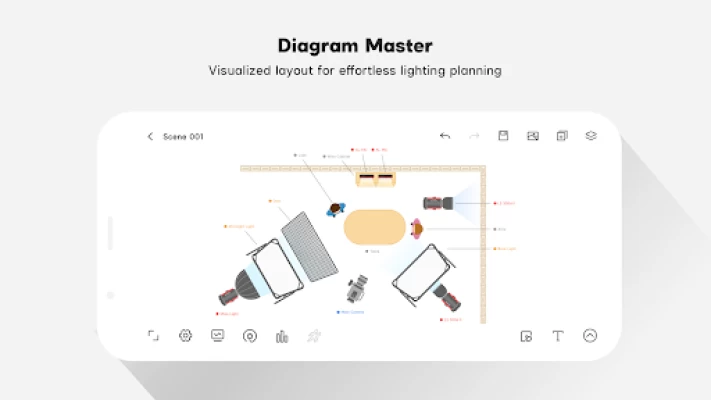


More About Sidus Link
Language Support:
English
Simplified Chinese
Traditional Chinese
Japanese
Portuguese
French
Russian
Vietnamese
German
1. Sidus Mesh Intelligent Lighting Network
1.Decentralized film lighting network – No additional network equipment (gateways or routers) required; connect and control lighting fixtures directly via smartphones or other smart devices.
2.Multi-layer encryption ensures a secure and reliable lighting network, preventing interference and misoperation.
3.Supports 100+ professional lighting fixtures.
4.Multiple control devices (smartphones or other smart devices) can simultaneously control the same lighting network.
2. Basic Functions
Supports four major control modes: White / Gel / Color / Effect.
2.1. White Light
1.CCT – Supports quick adjustment and touchpad-based control.
2.Source Type – Built-in common white light source library for fast selection.
3.Source Match – Quickly match any scene or cct
2.2. Gel Mode
1.Supports traditional CTO/CTB adjustments used in the film industry.
2.300+ Rosco® & Lee® lighting gels.Rosco® and Lee® trademarks and copyrights belong to their respective owners.
2.3. Color Mode
1.HSI & RGB modes for quick color adjustments.
2.XY Chromaticity Mode supports A Gamut (similar to BT.2020), DCI-P3, and BT.709 color spaces.
3.Color Picker – Instantly sample any visible color.
2.4. Effects
Supports fine-tuning and control of all built-in lighting effects in Aputure fixtures.
2.5. Presets & QuickShots
1.Unlimited local presets.
2.QuickShot Scene Snapshots – Save and recall lighting setups instantly.
3. Advanced Effects
Sidus Link App supports:
PICKER FX
MANUAL
MUSIC FX
Magic Program Pro/Go
Magic Infinity FX
4. Compatibility
1.Sidus Link App supports connection and control of all new Aputure film lights, such as LS 300d II, MC, etc.
2.Legacy Aputure lights will require additional accessories for app connectivity and control.*
3.Supports OTA management – Network firmware and lighting updates for continuous optimization.
5. Sidus On-Set Lighting Workflow
On-set workflow management – Create scenes, add devices, and quickly complete lighting setups.
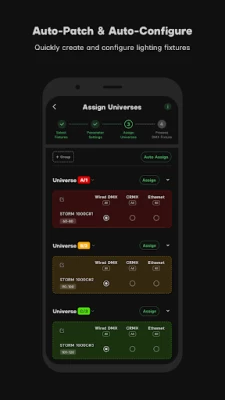
Console Workspace Mode – Quickly configure scenes and lighting.
Group Management – Fast grouping and control of multiple fixtures.
Power Management – Real-time monitoring of battery levels and remaining runtime.
Device-Controller Parameter Sync – Instantly retrieve detailed device status and settings.
QuickShot Scene Snapshots – Save and recall lighting setups.
CC Collaboration Group Workflow
Supports multi-user collaboration for controlling and adjusting lighting setups.
6. Sidus Cloud Services
Free cloud storage for presets, scenes, and effects (requires compatible hardware/software; existing devices will be supported via firmware updates).
CC Collaboration Group Workflow
Share lighting networks with group members.
Supports quick sharing via temporary verification codes.
7. UX Design
Dual UI modes – Precise parameter control & WYSIWYG
Fixture Locator Button – Added to device lists and group management for quick identification.
Onboarding guides – Clear instructions on adding/resetting devices.
Latest Version
2.0.12
December 04, 2025
Sidus Link Ltd.
Tools
Android
227,080
Free
creativity.intelligence.application.sidus.link
Report a Problem
User Reviews

Justin SnyderDay
4 years ago
Alright app when it works. As others have mentioned what's the need for an account? Moved app to new phone, signed in, saw the light network, no lights and had to readd them. Just used the app today after not using it for a while. See the light network and select it. Bam login session expired after I already saw it connected to the lights. Had to sign in again to use the app. When it works, decent app that offers everything as promised. You get two stars for that. Update 1. Signed out again.

Chris Hoffman
4 years ago
I freakin'love this app and the Aputure series lights that work with it. No need to move the lights up and down to adjust or ask the gaffer to adjust - you can watch the monitor and tweak away. The built-in FX are great, even better is making your own. Want a real fire effect? Use the app to record a fire - now you have a real fire FX. Since this app has been upgraded, I want to change all lights to Aputure. The speed alone makes this invaluable on indie film where there is NEVER enough time!

Stephen Taylor
5 years ago
The app works... fine. While I personally don't mind the permissions it needs for all of the features to work, the instructions on how to connect your lights aren't clear. After contacting the help team, they made it clear that you need to turn on your location settings for the lights to connect to the app. I wish this was written in the app's instructions, but after doing this, everything connects and works as expected.

A Google user
5 years ago
Can't connect to my light spent 1 hours trying still not working!! So I finally made it work since there no info or anything on their website. You have to share your location with the app for some reason I don't understand why the security is so high for a light but yeah they ask you if you want to share your photo album acces to camera and location and a bunch of questions to be able to register your account. It shouldn't be like that and I'll give this app 1 star nothing more.

Jon Purkis
3 years ago
This app is so bad and my Aputure B7C is useless without it. It is hardly ever able to connect, even after resetting the Bluetooth on the light. There is no explanation why it's not connecting or what I can do differently. It's just so inconsistent. I want to buy more aputure lights but what's the point if the app to control them doesn't work?? Bring back remote controls, they are so much more reliable.

Terrell Williams
5 years ago
Ok so I had to use the sidus link for a live lighting switch in my most recent shortfilm. Before finding out about this app I was thinking about doing dmx which is expensive and the lights I would need to use, wasn't right for the small space The shortfilm took place in, so I got my hands on a couple MC lights to use and paired them with the app... wow it was so simple and effective to be able to do, what you can from your phone on set! The ability to control multiple lights is just ♥️♥️♥️♥️♥️
A Google user
5 years ago
Creepy amount of information and access to your files and your location (why?!?) Just to be able to connect bluetooth light (which was not very clear on a Samsung phone. My phone can detect the light but if I don't show my location to the developers I can't connect to my product? Frankly worrying. I think I will buy other lighting options when our business is fully up and running, I'm glad I bought this as a test only.

Paulius Valinskas
4 years ago
Overall great app, but there are quite a few things that need improvement. The G/M slider in CCT mode for an MC isn't doing anything. I feel Sourcematch should be a tool that sets the CCT mode settings instead of a stand-alone mode. A 3200K (other CCTs are also welcome but baby steps...) base whitepoint option for HSI would be massively appreciated. It's extremely annoying to desaturate and have the color become colder (on camera).

JH Quah
4 years ago
Sidus Link is absolutely a great app for a videographer and even photographer. This app provides lighting control system, virtual scene, script roll and shooting schedule. There are also some shooting tools, optics calculator and light meter. As a videographer, I would highly recommend this app to all of you, as this brings much more convinient when shooting.

MPRAPM Productions
1 month ago
the app crashes on startup after update. can't get it to work at all

Slobodan Vasic
5 years ago
Works like a charm with my new lights Nova p300c. Quick connect, quick response, full of features, gels, presets, effects..... Great job guys, keep up the good work. It would be nice that we could change color of inactive items to some brighter color. It is very difficult to read gray letters on black background. It looks good but it is hard to read.

Nick Hall
4 years ago
Eventually connected my S8 to the fixtures. Location services must be on (they were all along!) to find the fixtures. Once in the app, there's quite a learning curve with a sightly odd combination of icons and menu like screens. It's easy to end up in an unexpected area. Presets and "quickshots" are useful but the presets are often well hidden.

Leon Silavant
5 years ago
Very useful app for my Aputure MCs! I often attach my lights to the ceiling or in a space where it's not easy to reach the dial on the side to adjust the settings. It means I can sit behind the camera monitor and adjust my light settings all in real time. The interface is also really well designed with easy access to all the effects and picking the desired colour or temperature setting. The only issue I find is sometimes the lights don't connect and I have to re-sync them.

Steve Falcon
3 years ago
App is powerful but could be better designed for intuitive use. One shortcoming is that when you enter the settings for an individual bulb, it is not identified in that UI. So if after a while you come back to the settings and don't remember which it's for, you have no choice but to exit/reenter, or just adjust settings and hope you're on the bulb you want. There's a bug in renaming Aputure BC7 bulbs. It often simply does not work. I haven't found a fix.

Sammie
4 years ago
I love how this app is has enough settings to accommodate each user whether that be a professional or a random teen who's very passionate and is excited to create (me- haha). It's simple interface left no confusion of the sorts and no ads? Lovely! However, I didn't give five stars, because the lack of country selections. I know that's something that the company will work on as it continues to expands. I just felt left out, it probably doesn't matter anyway. Besides that, keep up the great work!

Samuel Yamoah
4 years ago
Love the simplicity and the level of customization you can do with the lights and scenes. Changing the light settings when the lights are setup in hard to reach places, this app is the prefect remote to be able to adjust light settings. The only thing I could think of that would make it better is being able to add lights to multiple scenes so that way its faster to switch between lighting presets

Daniel Sarli
2 years ago
TLDR: easy and well designed but unreliable. I love the design and the ease of use, but it constantly asks for login if I lock and unlock the phone and makes me lose a lot of time. Once logged in, it has to reconnect the lights and sometimes it doesn't. And when it reconnects sometimes it changes the values of the light, so I cannot use it while recording because I don't know if it's gonna do something unexpected. It is totally ridiculous that the app logs me out just for locking the phone.

Brett Weidmann
4 years ago
Honestly a great app. My 2 gripes are the fact that you can't use it without logging in (sometimes I'm at a location without wifi or cellular service) and having to juggle all of the "serial number"-type names when pairing with a device quickly becomes overwhelming. Being able to permanently name a device would be amazing.

Ryan Agrimson
5 years ago
Was able to connect right away. Just need to turn on the lights, click and hold the "selection wheel" on the side of the light, select BT, and reset while the app is running. It takes a moment for the Bluetooth to recognize and voila! I connected 2 lights to my phone and the lights instantly respond to changes from the app! Beyond the most useful product for any lighting project for creatives.

Nate
4 years ago
This app is really cool! Was on set a few times where the gaffer wanted to do a spotlight fade in and we had an aputure light about 15 feet in the air. I used the app to change the intensity of the light and adjust settings if needed without needing to take the light down. It saves a lot of time and I just love how convenient it is to use! Definitely would recommend for film sets due to the efficiency of it! It's also super easy to use as well!









