

Square Invoices: Invoice Maker
May 31, 2024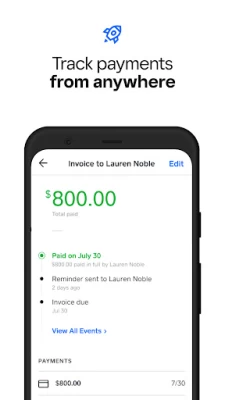

More About Square Invoices: Invoice Maker
► Home & Repair: Contractors, Landscaping, Cleaning, Plumbing
► Food & Drink: Catering, Bakeries, Wholesale Stores
► Professional Services: Web Designers, Photographers, Consultants, Accountants
All the tools you need to run your business from one place.
► Estimates, invoices, contracts, receipts, and bills with just a few taps
► Create and send professional invoices from simple templates.
► Customize estimates and invoices with logos, line items, attachments, messages, and color schemes
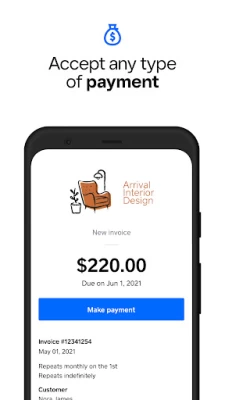
► Accept any payment: credit and debit cards, Google Pay, cash, check, or ACH payment.
► Send invoices wherever your customers prefer—email, URL, or text message
► Track online invoice status: viewed, paid, unpaid, or overdue.
► Save time with auto-reminders, or set up recurring billing and keep debit or credit cards on file
► Set taxes automatically apply when you add items to your invoice
► Collect customer information, take deposits, and view payment insights instantly
► Edit, save, and reuse digital contract templates with digital signatures and payments
► Easily convert estimates to invoices
ESTIMATE AND INVOICE MAKER
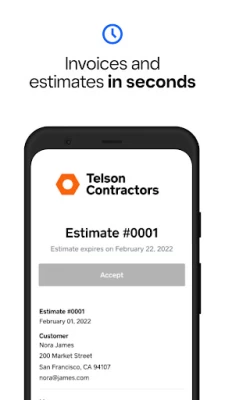
Book your next job by sending an estimate your clients can approve with one click. Easily convert an approved estimate into an invoice from the app. Create and send professional invoices and estimates easily with simple-to-use invoice templates. Enter the customer's email and payment amount, and click "Send invoice" to finish.
ACCEPT ANY KIND OF PAYMENT
Customers can pay their invoices online or make payments in person with any major debit or credit card, Apple Pay, Google Pay, cash, check, or ACH payment.
NO MONTHLY FEES WITH UNLIMITED INVOICES
Send unlimited invoices and estimates free with no monthly fees. Only pay when you take a payment. 3.3% + $0.30 for card payments, and for ACH payments only 1% per transaction with a minimum fee. There are no fees for checks or cash payments.
AUTOMATIC REMINDERS AND INVOICE TRACKING
Stop chasing down payments. Set automatic payment reminders before, on, or after the due date of an invoice or send one-time payment reminders as needed. Manage your receivables and improve accounting and finance with this software.
FLEXIBLE BILLING & INVOICING
Get paid on your schedule. Request deposits from your clients, schedule multi-payment schedules from a single invoice, or set up recurring invoices for weekly or monthly billing.
MANAGE BUSINESS FROM ONE SOLUTION
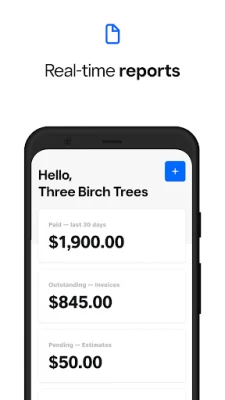
Say goodbye to complex accounting. Easily monitor your finances with built-in reporting that automatically syncs across all your devices. Save time with cards on file for auto-billing and keep your information organized in one place, including receipts and finance records.
INSTANT ACCESS TO FUNDS
Access your funds in real-time with the Square Card or instantly transfer funds to your bank account for 1.75% of the deposit amount. Next business day deposits come standard.
Square Invoices is an all-in-one app for your payments and business needs.
Reach Support by calling 1-855-700-6000 or reach us by mail at:
Block, Inc.
1955 Broadway, Suite 600
Oakland, CA 94612
Latest Version
May 31, 2024
Block, Inc.
Finance
Android
1,161,958
Free
com.squareup.invoicesapp
Report a Problem
User Reviews

Mary C. S.
2 years ago
Unable to open! Installed and keep getting stuck in a loop wanting access Device storage systems. When I click on "enable" it brings me to a screen, with data, device, storage, etc., but no idea as to click. I tried clicking on 'storage' and it just shows "app, data, cache and total amount used. At the bottom it has a button for "clear data" and another for "clear cache". Now what? I really need to send an invoice "asap - do I really need some stupid app for this??

Pedro Franco
4 years ago
I've been using it for almost 3 years now and it's really good makes your life easier invoicing clients on-the-go send the link to them through email or simply copy the invoice link to send to them through whatever you want (text, whatsapp, messenger etc) to them securely pay online. They also have other services like square appointments which I'm about to try. Plus if you invoice someone and they don't pay through their system (ex the customer gives you a check or cash) you can mark as payed!

Alicia Prieur
4 years ago
Great for small businesses. Needs improvement in the text & email notifications and default prompts on delivering notifications to the customer. Another issue that causes a lot of embarrassment to your customers is if you don't immediately close out the invoice as paid etc the default is to continuously resend to customer as an overdue bill. I feel users should be responsible for setting certain "perks" / notifications. Not but picking I use it everyday

Jason Pellegrino
5 years ago
Square is by far the best invoicing app I have ever used. So user friendly on both ends. Easy customization, never an issue with a customer having an issue with receiving or payment. Management side is cake. Witb instant transfer of funds and none of the micro managing I found with sites like PayPal, never had a single issue. I would give 10 stars if I could. Absolutely seemless. Great experience for user and consumer. I couldn't ask for a better app/processor.

Ralph Chapel
4 years ago
So far so good. It could be simplified though. You actually have to watch a video to learn how to get to anything. For contracts put a contract button and it pulls them all up. Pick one out, fill it out, add button do you have the choice to make invoice a part of contract and send it all at once. It was pretty complicated. Took me hours to figure it out. LOL. That's just me though.🤷♂️

Caroline Dobay
4 years ago
Love it, This app does everything I need it to do and more. Fees are somewhat reasonable and I love the fact that I can actually choose when I will receive my money by transferring whenever I would like. I also like the fact that instead of waiting for my money to hit bank there is a debit card where the money is available instantly and without a fee.The only thing that needs to be fixed the ability to change account holders name if all the business documents are in that persons name. 😊😊

A Google user
5 years ago
To be honest, this opened up my business and made it so simple to stay mobile and competitive. The ability to run all my invoicing and estimates right from a phone or tablet, plus allowing easy online payments for customers has simplified so much of my business. Does it have some shortcomings? Of course. Nothing is perfect, but if having to a couple things manually is the price for the freedom of square then I'll take it.
A Google user
6 years ago
Excellent app for freelancing. Makes it so easy to accept payments online. No more chasing down or waiting for clients to deliver payments. The only issue that should be closely watched is the per transaction fee. It doesn't sound like much but if you do alot of business through the app the fees really add up. Seems like Square could lower there rates considering there are companies providing almost the same service for free to the clients. I assume they make profit from banks who can afford it.

Andrea Minert
4 years ago
Easy and very basic, which is exactly what I need. Only 3 stars, however, because there is no way to charge the customer for the transaction fee, which is completely inexcusable, in my opinion. For 2 transactions totaling $1599, I was charged just a little under $48 in fees. It is standard practice to pass at least some of those charges on to the customer, but no option here. I am looking for another platform to use, which won't cost me 100's of unnecessary $'s per month

James Klippel
3 years ago
I think there are a lot of pretty frustrating limitations as far as this app and Appointments go... if someone books an appointment using their card to reserve, you cannot later use that card on file to charge for recurring payments. Also, you can't set several appointments to appear on one invoice and you have to use duplicate items to charge through invoice for monthly payments, so reporting gets all messed up... not ideal... hope they add some functionality here.

David Timmons
3 years ago
I ran my pool company for 2 years exclusively on Square's business apps (Invoices, Appointments, main Square app). it's hard to adequately describe, but the user friendliness and seamless integration with my Samsung phone saved me more headaches than I can count, and allowed me to focus on the details of running a new business and accelerating growth quickly. if you're looking for simple to use business apps with a plethora of options and features, you literally cannot do better (for free).
A Google user
5 years ago
I run a service business and this invoice app is great I can do a service call write up the customer as soon as I'm done and email it directly to them. It also works great for my installation invoices They have a very nice look and professional feel. The problem I have with the app is That if you have to edit or change something on an invoice I've had to delete an entire invoice and make a new one with the changes cuz there's no way to edit it.

Emerald Kroeker
3 years ago
I love square, so rating a three is a little sad for me, but I noticed a pretty big glitch today. If you are using the split balance feature to collect a deposit, it removes the ability for customers to leave a tip regardless of the "request a tip" box being checked. I do a lot of catering and leave gratuity to customers discretion so extremely disappointed to learn that this is how it works. There are a few other things that make it feel a little clunky but nothing so bothersome as this.

Michael Hebner
2 years ago
Great app & service features. Variable calculations (quantity, weight, time, etc), recurring payments/subscriptions, POS, easy website integration & more. My only complaints are its hard to reach anyone in customer service if there's any issue and the fees are a little high for larger transactions. But it seems thats most providers in general. Other than that it's the best service I've tried and I think I've tried most of them. I've been a customer for over 5 yrs now and have no plans to change.
A Google user
6 years ago
BEST. APP. EVER. for making billing and getting paid super fast and easy... Always know how much you're making and who owes you what. The auto-reminders take the awkward "follow-up for payment" conversation off your list. This app allows me to focus on my business, and minimizes the amount of time I need to spend on invoicing and follow-up. Very easy to set up and use with lots of flexibility. Thank you Square!

John Johnson
5 years ago
The best invoicing & credit card processing app, period! I've used them all & this is by far the best out there. I started with Joist, which was great at the time. Joist started charging for every little thing, so I moved to Wave. It had a ton more features than Joist, which was exciting as hell. But, after awhile, I found Wave to be lacking in a few areas. If it was going to be difficult to move away from Wave, I wouldn't have done so, but I found Square and I am finally, completely satisfied.

Matt S
3 years ago
The free version is pretty great, there are some bugs and they really need to update the software. One of the bugs I'm experiencing right now, I'm not able to attach attachments such as pictures to invoices. Every time I try, and this is a new thing, it closes down the entire app and it bugs out. Something else that bugs me, is you can't put variable surcharges in through the invoice. It has to be done through regular square. Just a couple things keeping it from being a five star.

Tj Novak
5 years ago
Been using Square for a few years and I'm not happy at all. The fees for transferring money are ridiculous! Especially if you own a business like I do an are continually transferring large amounts. On top of the outrageous fees, the app doesn't like to recognize certain email addresses, valid or not, and you have to end up using a different app to send your invoice or estimate. Very inconvenient, overpriced, not very user friendly, generic, and customer service is pretty bad too.

Eric
1 year ago
I was having some difficulties with quickbooks, so i switched to Square and life has been alot better! Square is way simpler and quick and easy to learn! I'm still not sure if it's quite for bookkeeping, but it does a great job of taking payments and writing professional estimates & invoices. And i believe if pay for it there are a ton of marketing features as well. Also some free ones.

Dustin Quirion
1 year ago
Multiple glitches with the app. First off, the app randomly shuts off in the middle of working on a document. If you don't save them often, you lose everything. And the ones that you do save properly, when you return, you get a message up top saying I'm in the middle of working on a document. And now a new glitch, when I'm working on estimates, I can not add a line item in two different projects. It just seems like there's too many issues recently. Not reliable. Square support is horrible.









