
Square Team
June 05, 2024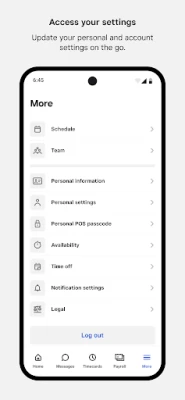
More About Square Team
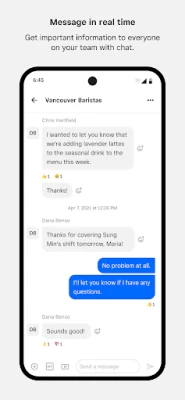
Your whole team can chat using real-time messaging and employers can send out important updates and announcements so the whole team stays in the know.
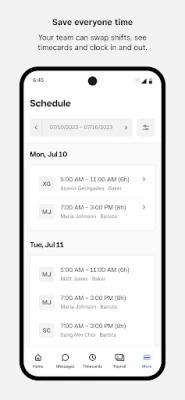
Team members can see when and where they’re scheduled to work, pick up open hours, and make sure their work schedule fits with their personal one. It also allows them to see their hours worked, breaks, overtime, and estimated pay. And if team members are paid through Square Payroll, they have access to their pay stubs and tax forms right on their mobile phones.
Home Screen
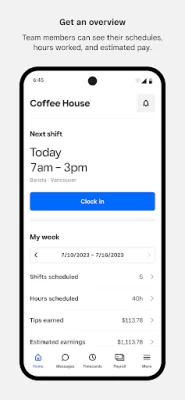
• Clock-in: Team members can clock in for an upcoming shift directly through Team app
• Weekly Snapshot: Team members can get a quick snapshot of when and where they’re scheduled to work
• Estimated pay: Team members can also see hours worked, breaks, overtime, tips and estimated pay
Messages and Announcements
• Messaging: Real-time messaging for the whole team, eliminating the need to share phone numbers.
• Announcements: Easily broadcast important announcements, news, and updates to everyone on the team.
Shifts
• Team-initiated scheduling: Empower your team to request time off, swap shifts, and claim open shifts directly from the Square Team app.
• Timecards, schedules and estimated pay: Team members can view timecards, scheduled hours, and view estimated pay.
• Clock in and out: Enable team members to clock in and out, take breaks, and get notifications.
Payroll
• Owners using Square Payroll can easily pay W2 employees and 1099 contractors, automatically importing timecards, tips, and commissions
• Our team of specialists will take care of the rest—we pay your team, file your payroll taxes, and send your tax payments to federal and state tax agencies.
My Pay
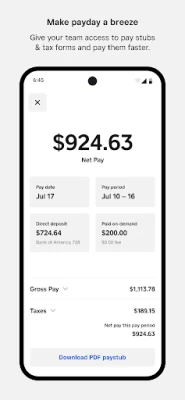
• If team members get paid through Square Payroll, they can:
• See estimated earnings, even before they get paid
• Get paid faster via Cash App
• Download tax forms
• Update their bank account or personal details
• And all staff information is stored securely
Team Management
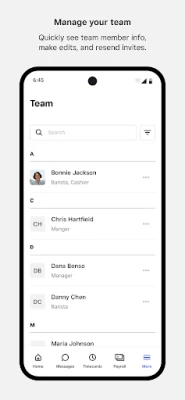
• Quickly see all of the team members at your location, edit team member information directly in the app, or resend invites to the team.
More
• Team members can update personal and account settings on the go.
Download the Square Team app and invite your team members now.
Latest Version
6.14.0
June 05, 2024
Block, Inc.
Finance
Android
644,374
Free
com.squareup.payroll.team
Report a Problem
User Reviews

Kyree Kaye
2 years ago
When it works, it works. When it doesn't... your hours get all screwed up. At 1st I thought it was just me but I started to realize that the app would Sign me out at random times so when I had to take a break I would hit the break button but it reloaded and then I'd be locked out and when I log backin it would never was counted. Same thing for starting and ending shifts. This app is playing Russian roulette with my money.

Tavian Bell
2 years ago
The app worked fine when I started using it, recent updates has the Clock In page constantly refresh not reading button presses until you close the app and reopen it hoping that when you do manage to Clock In the app won't Clock Out on you while you're busy working which has happened to me before! Yes I uninstalled and reinstalled it, I noticed little to no difference! P.S. I'm using an Android 11 phone and they recommend 7 or higher.

Matt Bergin Jr
2 years ago
This app sucks. The new update makes it even more unusable than it was before. Before after you got it to load on your 5th try, you could usually click around for a minute before it crashed. Well now when you get in, you can't scroll down your schedule at all because it interprets everything as a left-right swipe. The app is now completely unusable garbage. I literally can't view my schedule anymore

Jordan Laird
3 years ago
Impressively bad... Thought my 3 year old Motorola was just not cutting it. Got a Samsung with double the RAM now, app is no less irritating. Sometimes it wants my finger print, sometimes it wants my login, sometimes it'll ask for both in succession. Very rarely will the first attempt work, I can watch the loading circle run for minutes at a time. Usually can get in under 3 attempts, today took 6. Not even mad anymore, it's kinda funny that the app I depend on to live is the least functional

Tyler Black
2 years ago
Crash, crash....crash, failed to connect *endless loading screen...crash*. Also, every few weeks it forgets my biometric login. Having an app that has the purpose of keep track of my time on the job, yet it can take me 5-10 minutes to troubleshoot this horribly optimized app. Update: I can't clock in. I just press the button repeatedly, and nothing happens... I would be embarrassed if I worked for this company.

Donald Porter
2 years ago
Works well for the most part, when there is a slight hiccup in connectivity, everything tries to refresh though, which is annoying when I am just trying to see my schedule or clock in/out. Also, could you please make the time off requests that are approved appear in chronological order or at the very least, searchable? This seems like a no brainier.

BJ Talbot
2 years ago
Had no issues really until the recent update. Now, if I'm on break, watching the timer, I have to exit out and back in to end my break, and that's when it will even load. This morning I'm trying to look at my schedule and the only thing that is loading is the "Home" or "schedule" banner at the top. Nothing else. PLEASE fix!!!! Got to work this morning and now I can't log in at all! Says that my account is inactive! What's weird is I actually got a notification to clock in!?!?!🤬

Drew Tomlinson
2 years ago
This is one of the worst apps/POS systems I've used in my career. Unintuitive, unresponsive, and support is borderline non-existent. Constant loading failures, freezes, crashes, and de-syncs across devices. The dashboard is a joke on the main app and constantly gives un-removable notifications such as import your inventory, failure to actually update items, unintuitive search functions, editing problems and the list just goes on and on. There are better options out there.

Cam Wright
2 years ago
Plain and simple, this app does not work. I've used it for going on 3 years now, and I never had any problems with it until this year. Every new update that is pushed breaks the app more. If you're lucky enough to get a page that isn't a blank screen, you get the loading wheel that never stops spinning or an error message. If you get the app to launch, you're greeted with error messages and refresh prompts that never take you anywhere. Please fix this app

Jonelle Dawkins
2 years ago
This app is not intuitive. The update is less user friendly, and the clock-in button is constantly disappearing. The schedule appearance doesnt make sense. It would look better if we could see the times when everyone worked in a better visual setting, so we can see where shifts overlap. The current schedule view isn't great for quick glances and often doesn't load.

Richard Puentes
4 years ago
Works for a couple of weeks perfectly. All of a sudden my employees cannot apply for available shifts. They get an error message stating that there is something wrong on the apps end. I called square customer service for two days straight and all they did was create a ticket. We deleted the app, reinstalled it, looked for updates, signed out signed back in to no avail. As an owner scheduling is one of the most important aspects of running a restaurant/bar business. Very inconvenient.

Jonathan Bradford
2 years ago
This app worked great for me for the first half of this year. Never even had even a glitch. As of the past update, I've seemed to have lost the availability to gain any earnings available early, and doubt i can still get my paycheck 2 days early. Before that when I was still able to use that, and might I add the option was the first to pop up of all the options aside from clock in. So that is a huge drawback and inconvenience to using the new app. Not to mention the clock in glitching out.

Hannah Tobin
2 years ago
App is really glitchy, frequently doesn't load or start. Often have to restart the app for it to work. New updates make it less user friendly. The main problem is that it just isn't easy or quick to use due to how slow it is to load New updates don't do anything to fix the problems. If anything the app is even slower then before. Always takes several minutes to clock in and out. Never loads the first time without an error message even when connected to wifi. Doesn't work 99% of the time

Nerve Salad
2 years ago
Does not show everything it's supposed to. I can't see most features, and the screen will not flip around. I get two options, and everybody else can use more of the app. I have made changes to the settings on my phone, and I have reset, uninstalled, re-installed, messed with settings again. Nothing makes this app work for me. I have missed scheduled appointments due to this serious malfunction.

William Fischer
1 year ago
The new update doesn't let me see my schedule. If I go to the schedule tab it shows me what week but not my shifts. The most key part to the app doesn't work. How am I meant to work without knowing when I'm scheduled. This is a common issue with this app. They are always updating the looks, how pretty it is, but it is functionally terrible. Always buggy and failing when we need it.

Jonsey McFly
1 year ago
I never wanted to have to deal with this app. But Square decided it was going to buy crew the app that my store actually used. So now I'm losing a whole bunch of useful functionality, I'm losing the ability to give my crew rewards through the app, we're losing dark mode, the easy organization of chats on the front screen. Honestly Square team is just a worst app overall than crew. Stop trying to do the Monopoly thing and buy up all your competitors and just let us have the app that we liked

Cathy Muir
1 year ago
When I first loaded this app in Jan 2024, as per my employer, it worked fine. For the past couple of months, it has consistently been crashing. I lose messages and announcements every couple of weeks. It's very frustrating! I have to uninstall then reinstall, and even then, the only part that comes back is the announcements. I lose messages back to February! I've emailed and called to no avail because I use the app through my employer. Very poor experience!

Jimmie Dubose
1 year ago
migrated from the crew app and this is a total mess. Actually thinking of finding another solution. Customer service to aid in this migration is nonexistent. Some team members get messages some don't. Can't add nor negate anyone from the app. Not user friendly and the list goes on. I will continue to try to see if something comes of this and if it does I am willing to change my thoughts. But I seriously urge others to THINK BEFORE USING THIS AT ALL!!!

Dean Mandia
1 year ago
Horrible app. So disappointed that the Crew App was brought out by this commpany and my team is forced to use it while we find an alternative. Almost all the functionality that Crew had is gone. This App is less then bare bones and it isn't the least bit user friendly. I'd recommend staying far away. Some advice to Square Team, ditch this platform and build off of the Crew platform. It was way better.

Hannah Buchanan
1 year ago
Crew was much better visually. There is no option to change to dark mode on this app. Also cannot see images, which is very inconvenient. UPDATE My workplace just found a new app to use instead of Square Team due to a shared dislike. Some complaints included an inability to send images, losing group messages after they have been created, and no way to go to dark mode. The new app is much better than this..









