

Synchrony Bank
July 14, 2024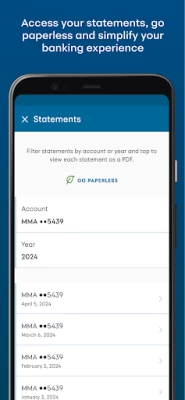
More About Synchrony Bank
- Paul, saving smart with Synchrony Bank
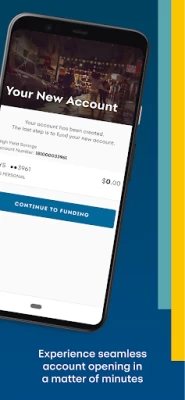
Open a new account in minutes and manage your existing ones with account management tools and more wherever, whenever in the app.
With the Synchrony Bank app, you can:
• Open a new account seamlessly in just a few minutes
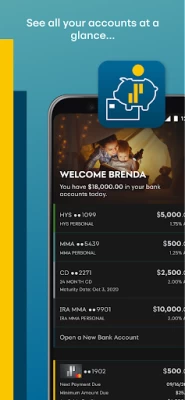
• Track all your account activity anytime, anywhere
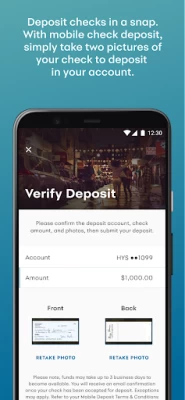
• Deposit checks easily with mobile check deposit
• Confirm balances at a glance with convenient widgets to highlight key data
• Connect with our award-winning customer service team, and chat live during business hours for immediate answers and help
• Link your Synchrony Bank account to external bank accounts for secured transfers
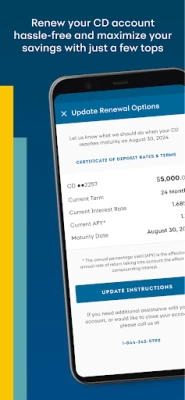
• Renew your CD accounts to keep your savings growing in just a few taps
• Manage beneficiaries, view statements, and even go paperless in a snap
• Link and manage your Synchrony-branded Mastercard
We’ve built every feature of the Synchrony Bank app with accessibility for all in mind: the app is screen reader-friendly, supports variable font sizes, and uses optimal colors for readability so whatever your needs are, you’ll be able to review critical information wherever you are and whenever you need it.
With the app, you’ll have the power of easy-to-use Synchrony service wherever your next adventure takes you.
CONNECT WITH US
Facebook: facebook.com/SynchronyBank/
Instagram: @SynchronyBank
Pinterest: pinterest.com/Synchrony
Have a question, comment, or concern? Let us know at appsupport@synchronybank.com.
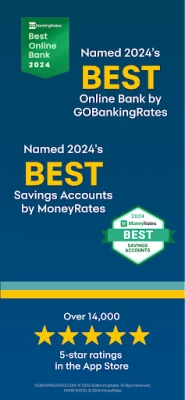
It’s not just our customers that love what we offer. We’ve received awards from Forbes Advisor, Nerdwallet, GOBankingRates and many others, recently including:
GOBankingRates' Best Online Bank in 2024*
Forbes Advisor 2024 Review of Synchrony Bank**
MoneyRates names Synchrony Best Savings Accounts***
MyBank Tracker's Best CDs for 2024****
GOBankingRates' Best CD Accounts in 2024*****
MoneyRates names Synchrony Best CD Accounts in 2024******
GOBankingRates' Best Money Market Accounts*******
ABOUT SYNCHRONY BANK
We’re not your average bank—you can expect more from Synchrony Bank, where we’re proud to have helped customers for more than 80 years. Today, we combine the stability of FDIC insurance with smart digital tools and consistently great rates. Learn more about banking smart with us at synchronybank.com or reach out to our highly-rated customer service team at 1-866-226-5638 for banking in sync with you.
*GOBANKINGRATES.COM: © 2024 GOBankingRates. All Right Reserved.
**FORBES: © 2024 Forbes Media LLC. All Rights Reserved.
***MONEYRATES: © 2024 MoneyRates
****MYBANKTRACKER.COM:© 2024 MoneyRates
*****GOBANKINGRATES.COM: © 2023 GOBankingRates. All Right Reserved.
******MONEYRATES: © 2024 MoneyRates
*******GOBANKINGRATES.COM: © 2023 GOBankingRates. All Right Reserved.
********NERDWALLET: ©2024 NerdWallet, Inc. All Rights Reserved.
Latest Version
2.31.0
July 14, 2024
Synchrony
Finance
Android
386,514
Free
com.syf.synchronybank
Report a Problem
User Reviews

CaracolitoDeLaMar Cuba
1 year ago
Non Functional App Can't get it registered, gives me an error all the time. Worthless App. Will be uninstalling it.

Merrillee Parks
1 year ago
Easy to navigate. Pay bill. Check balance. See purchases. See credit score.

Brenda Greis
1 year ago
I just downloaded the app and open an account and now I cannot get into it. I am locked out. This is so convenient for seeing my bank statement now I can't use it.

Low Down
1 year ago
Careful...... When U make transfers with this Synchrony Bank App, once U tap "Make Transfer" , it's a done deal. There is no confirmation step !

Richard Leonard
1 year ago
Synchrony Bank offers a very competitive HY rate, a sufficient suite of online banking features/tools, and an account that is easily accessible from other banking applications (including Cash App) via ACH/EFT. The debit card is great to have for those rare times when you do need cash in hand. I'll give Synchrony Bank a five star rating when they support Zelle as their native peer-to-peer mobile payment application (like most every other bank hint . . . hint . . . ).

jed coons
1 year ago
System required I install new Synchrony app. New version does not allow me to directly link my card account. App only provides a link to a browser access. Why take a step backwards in convenience? If I wanted to view account on browser I wouldn't need the app.

The Goddess Shop
1 year ago
My deposits are slow moving. It takes up to 5 days to post deposits. My other accounts post the same day or at the very least the next day. The HYSA is great and I will continue to use them but at a much slower rate. The point of having the HYSAs is to earn the interest. I want as many days in one interest period as possible. But overall, Synchrony Bank is no better or worse, and I recommend them for people that need these accounts.

J Biermanoski
1 year ago
Pro US based support but they're not familiar with the app. Con app is basic omitting some of the website categories. Con Some transactions are shown as P2P when you haven't used Zelle or Venmo. Con Each transaction always has 2 banks. But here the other bank's name is usually not shown. "they're not going to change it that's the way it's always been." So lots of luck months from now if your trying to remember which bank did that transfer come from? Omitted bank names indigenous to Synchrony.

Dena Baldwin
2 years ago
I would absolutely give 5 Stars, if all credit cards thru Synchrony could be accessed with 1 user name & password. I have several cards & have to go thru each one till I hit on the right one everytime I want to pay bills. I realize I could use the same on each card, but that's what we're told not to do...if I were younger & had begun life in the internet world I would imagine it would be much simpler, & there probably is an easy way to connect them. I just haven't found it yet!

John C
2 years ago
Can't log in. Every time it says "Unable to Connect Please check your network connection and try again" I've tried it on wifi , both with and without a VPN; tried it on mobile data; cleared data storage and cache: and, finally, a full uninstall/reinstall. It still does not work. The website works fine, however.

Chris Charbonneau
3 years ago
I have a Google Pixel 6 Pro. App worked fine for about a month, now it won't even let me log in. It keeps telling me that the bank is having server issues. I uninstalled it and reinstalled it, nothing. I deleted the cash, cleared. Save files, nothing. I have to open up a browser and log in that way... My Amazon synchrony app works just fine.

Greg D
2 years ago
Same problem as others with failure to login, but I found a "solution". If you have access to a U.S.-based VPN server, use it. That's right, it won't take your honest foreign IP address or a foreign-based VPN server, but it will take a U.S.-based server -- from the same VPN company! Another ignorant-as-rocks, 20th Century-based IT department, using a useless, feels-good (to them), security solution. The bank itself Is fine, and the website Is better, if not quite perfect.

Vincent Ng
2 years ago
The latest update (as of 10/8/2023) is buggy. Biometric authentication no longer works consistently and the entire app is extremely jittery and laggy. Busy / loading animations run at only a few frames per second, screen changes have considerable lag in response to user input, etc. The errant behavior seems to be triggered after using mobile check deposit. Clearing app storage appears to resolve the issue, but the issues resume once another check is deposited.

A Google user
6 years ago
First off, glad Synchrony FINALLY has an app! long overdue. However the check deposit feature is poor compared to other banks' apps. i deposited a check via the app 4 days ago, and it STILL shows as pending. It took one day to even show as pending, such that I wondered if it even had registered my deposit. Other banks like Chase, the deposit shows up immediately, and the funds are available next day in full. Synchrony is far too slow!

Ron Mac
5 years ago
I used to get a one time text code with a security number everytime I logged on. That abruptly stopped. Call synchrony bank and was told I should clear the cache. I did this and it still didn't work. I uninstalled and re-installed the Synchrony app. It still didn't work. What happened? Why did the security code stopped being sent? I like the 2 factor authentication feature. I did call number. They had no answer for the issue I raised.

Mike Sterrett
1 year ago
This app has worked fine for me previously, but won't start today. I keep getting "app keeps stopping" message, or the app looks like it is starting, then "goes back to the icon". I have cleared the cache. I have restarted my device. But issue continues. I have checked to make sure app is up to date. Resolution from app support is appreciated.
A Google user
6 years ago
Finally Synchrony! So enthused that Synchrony has an app now. With Synchrony's wide reach, I was shocked that they didn't. So far, the app looks and functions smoothly. The only reason I'm not giving 5 stars is that you can't see check images of checks deposited to your account. I have recurrent transfers to Synchrony from external banks, one of which, sends checks. But, I can never see the image of the check on the app or the website. 5 stars IF that functionality worked. :)
A Google user
6 years ago
App doesn't show all my accounts. Then when I scroll, it shows me fewer accounts than I have. Seems like when you scroll, it adds and deletes accounts from the screen at random. Some accounts show the last 4 digits of my account while some doesn't show anything. Very scary. UPDATE: I upgraded my review from 2 to 5 stars because the development team was able to fix the issue expeditiously. Kudos to Synchrony for listening to a customer's issue and handling it right away.

Denise Brauner
3 years ago
After having repeated issues with the Synchrony website refusing to let me set up text alerts and notifications, I decided to download the app. I've tried repeatedly to just LOG IN, only to get a "technical difficulties" pop-up EVERY. SINGLE. TIME. I just got this Mastercard, but am considering paying it off and closing it, given how they can't seem to function at keeping customers informed.

Steve Kukulka
1 year ago
Used to love the app, but can't even login on my tablet, and I keep getting a message that "something went wrong" when trying to login on my phone. I CAN actually login on my phone, but can't really do anything, so it's rendered useless. I get a "please check your network connection and try again" message on the tablet. Frustrating to say the least









