

Teamup Calendar
July 30, 2024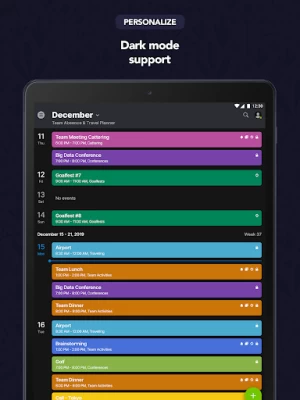
More About Teamup Calendar
Important: The Teamup app is a companion app of the browser-based version. The full administration interface is available in the web browser only. If you don't have a Teamup calendar already, go to https://www.teamup.com and create your free calendar. Configure it and then invite users to connect to your calendar using the Teamup app.
Check out the tutorial and learn more at https://www.teamup.com/android/
Key features
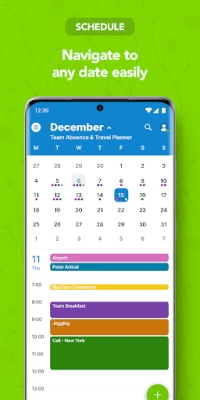
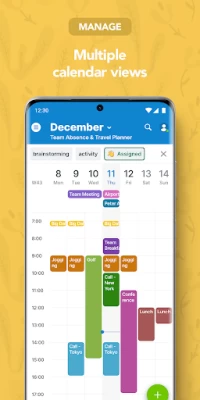
• 11 different ways to view your calendar: Daily view, weekly view, monthly view, yearly view, scheduler view, timeline view, year view, agenda view, and more
• 9 levels of access permissions give you fine-granular control of what users can see and do
• Centrally manage the calendar in the browser-based administration interface
• Add custom fields to events (text, numbers, choice fields)
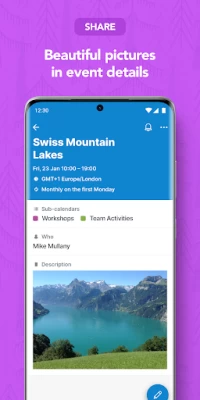
• Attach images and documents to calendar events
• Ask your users to sign up for events
• Assign one event to multiple sub-calendars
• Have discussions around calendar events using comments
• Powerful timezone support makes collaboration with users in different timezones painless
• Manage multiple calendars from a central dashboard
• Prevent double-bookings
• Integration with maps
• Widget for home screen
• Offline read access
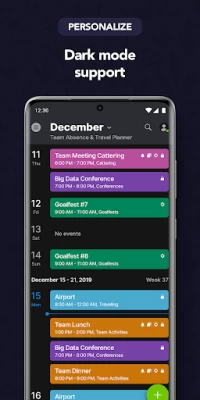
• Dark mode
• Teamup is available in more than 20 languages
Enterprise features
• Single-sign on
More information: https://www.teamup.com
Support: support@teamup.com
Latest Version
1.18.04 (679)
July 30, 2024
Teamup Solutions AG
Finance
Android
1,062,932
Free
com.teamup.teamup
Report a Problem
User Reviews

Nick Coldham
5 years ago
This is an amazingly useful app! Easy to use and allows everyone I want to have access selected calendars. In summary, it's been a game changer for me! Note that you need to use the Web version to set all the sharing up (again, a great interface).

A Google user
6 years ago
I recently had a problem with the app, but after a very quick response from the developers, they have helped make the app great again! I've been using this app for nearly a year now, and has made scheduling jobs so simple. Would definitely recommend.
A Google user
6 years ago
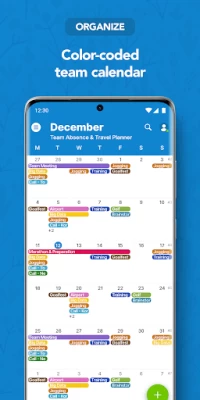
Best group calendar I've used yet. I create the calendar on the Teamup website via my PC, then send my staff the custom link to use on their Teamup phone app. Works like a dream, fast and easy, updates I make are immediate. I can colour code the jobs so my staff know how what they are, and I can have more than 1 per day making it easy to tell them apart. This app does everything I need it to do!
A Google user
6 years ago
Much much improved over a couple of years ago. No syncing hassles like I get with other apps. One slight niggle - it would be nice if pressing the address could bring up other navigation apps other than just Google Maps.

Martin Smith
3 years ago
Great product, my wife and I have a synced calendar for years (for when she books stuff, tells me and I forget) Definitely saves some hassle. One suggestion: could you guys add the option of being able to add a screenshot to a new calender entry so you could attach a booking email, map or photo. Other than that, love the service

David Mackey
1 year ago
We've been using this system for 5 years or more. It's capable and reliable when it comes to coordinating team schedules. Lacks features if looking for project management though.

keith sena
1 year ago
Teamup has been great for my business. I've been using it for 6 years. The one think I wish teamup would fix is the ability to search previous appointments better. It rarely finds them when I search. Great app otherwise.

Shiquan Xie
5 years ago
Nice app! Works great as a family/couple scheduling tool too. However, the app is missing phone notifications (unless I'm missing something). Perhaps the calendar could be assigned to a user and the user could receive notifications for events in their calendar. Just need this final touch to make this equivalent to gCalendar!

Piotr Łacwik
5 years ago
The app works well, but it is missing one of the crucial options, at least for me: Copying events, which is available in web browser view after right click. Without it, it's more convenient to just use the web browser, even on the phone Please add the the functionality, I can't imagine it's too difficult

Carlos Vargas
1 year ago
Simple calendar with some options, events with a lot of tools, requires account. Website main.

Erica Jazmyn Beattie
2 years ago
I love the app. The ability to group events and color code them is very useful. It works great on my laptop, computer and iPhone but I recently got a new Samsung phone and apart from a couple here and there, all my events are nameless in the month view. I have to click on them individually to see what they actually are.

mazacatra
1 year ago
Have been using Teamup for years, easy to use, reliable and customisable. Highly recommend.

Mary Hawko
1 year ago
Terrific! This works really well for our group and even the free version allows for posting event flyers which is fantastic!
A Google user
6 years ago
Love the flexibility of it. Love how I can have the app on multiple devices and update from any one of them with in seconds of each other. Love the colour coding. Love the ability to do repeat. Would love for weekly repeat events to automatically include an editable sequential number but not a big issue. Thanks Teamup! You make planning for my business seamless & streamlined.

Zahid
3 years ago
Room for improvement I have been using this app for few yeas. Pros: 1. very good layout, easy on the eye 2. Effortless sync between devices 3. Category colours, with editable categories and its colours 4. Easy to add new Appointments, duplicate and create recurring appointments 5. Very extensive sharing options CONS: 1. Data on the free version is kept only for a year. This is a big downside for me. One star lost due to that 2. Paid versions are very pricey. considering a competitor SOFTWARE

Calum Burrell
1 year ago
It is very useful as a shared calendar. Teamup allows the categorisation of different activities to highlight what is happening on each day at what time. Would recommend 👌

Pádraig Lohan
1 year ago
Excellent for handling collaborative scheduling across several workers and clients. The only drawback is the lack of notification options. A tool like this would benefit hugely from the option to turn on notifications for new bookings.
A Google user
7 years ago
Enjoying the app so far! Looking forward to some of the features only available in Beta, being added to the mobile app. That will make it even better. Right now, the feature I'm really missing on the Android version, is being able to search by keyword within the calendar. It is a feature in iOS. Hopefully being added for the rest of us!

Karolina
4 years ago
I have found the perfect app. I actually use this mostly on desktop and it has been the one application that keeps me the most organized. It's s combination of the simple calendar layout + the surprising amount of simple yet useful functionality (adding images, color coding, being able to easily copy or drag and drop, right clicking to bring up more options). I know what's coming up. I can make notes. I love it. And I will never stop using it. Calendars, people. Calendars are the secret! 😂

Daniel Shepherd
1 year ago
Way too complicated for what I need. Just wanted a simple shared calendar app. It looks like you can only really share and make changes in the web version, but if you click on stuff it takes you to the app. Weird. Anyhow it seems way too complicated. Had to delete the app to access the web page from my phone to be able to share the created calendar. Kinda wack.









