

thinkorswim Mobile: Trading
July 16, 2024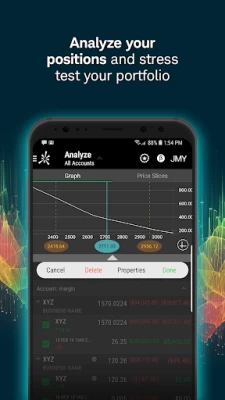
More About thinkorswim Mobile: Trading
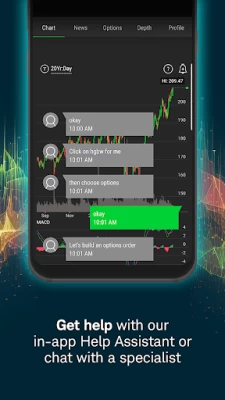
• Live chat with a trading specialist during support hours—even share your screen without ever leaving the app.
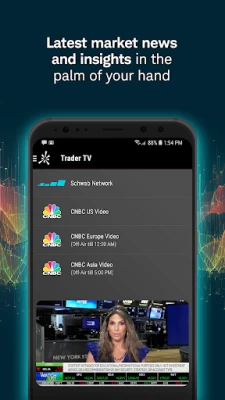
• Live stream programming from our media affiliate, Schwab NetworkTM, and CNBC (U.S., Asia, and Europe), and get in-depth company profiles from Trefis to uncover key insights.
• Practice your trading strategies with real market data, using paperMoney—without risking a dime.
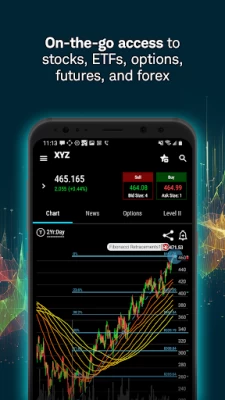
• Scan multi-touch charts with hundreds of studies. Chart drawings will sync within the thinkorswim suite of platforms. Glance at the past, take a look at the present, and model the future when you overlay company and economic events.
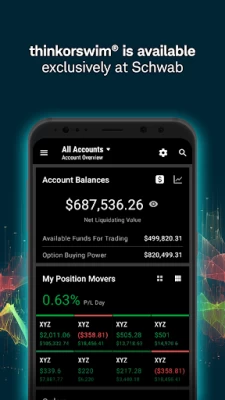
• Manage and analyze your positions and view your account balances on all your accounts.
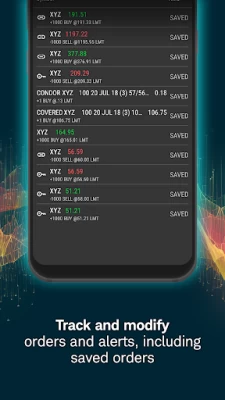
• Track and modify your watchlists, orders, and alerts, including saved orders.
• Check out our expanding library of educational videos.
So what are you waiting for? Level up and download the thinkorswim mobile app and hold the markets in your hands.
Content intended for educational/informational purposes only. Not investment advice, or a recommendation of any security, strategy, or account type.
thinkorswim mobile requires a wireless signal or mobile connection. System availability and response times are subject to market conditions and your mobile connection limitations. Functionality may vary by operating system and/or device.
Investing involves risk, including loss of principal.
The paperMoney® software application is provided for educational purposes only, and allows users to engage in simulated trading with hypothetical funds using live market data. Market activity, trade executions, transaction costs, and other elements presented in paperMoney are simulations only. Simulated performance does not ensure success in a live environment.
Schwab Network is brought to you by Charles Schwab Media Productions Company ("CSMPC"). CSMPC and Charles Schwab & Co., Inc. are separate but affiliated subsidiaries of The Charles Schwab Corporation. CSMPC is not a financial advisor, registered investment advisor, broker-dealer, or futures commission merchant.
Trefis information provided by Insight Guru, a separate, unaffiliated firm. Stock prices are impacted by numerous factors, and estimates of prices in the future are not guaranteed.
Past performance is no guarantee of future results.
Futures, futures options, and forex trading services provided by Charles Schwab Futures and Forex LLC. Trading privileges subject to review and approval. Not all clients will qualify. Forex accounts are not available to residents of Ohio or Arizona.
Charles Schwab & Co., Inc. ("Schwab"), Charles Schwab Futures and Forex LLC ("Schwab Futures and Forex"), and Charles Schwab Bank ("Schwab Bank”") are separate but affiliated companies and subsidiaries of The Charles Schwab Corporation. Securities brokerage products are offered by Charles Schwab & Co., Inc. (Member SIPC). Schwab Futures and Forex is a CFTC-registered Futures Commission Merchant and a NFA Forex Dealer Member and offers brokerage services for futures, commodities and forex interests. Deposit and lending products and services are offered by Schwab Bank, Member FDIC and an Equal Housing Lender.
Charles Schwab & Co., Inc. ("Schwab") and TD Ameritrade, Inc., members SIPC, are separate but affiliated subsidiaries of The Charles Schwab Corporation.
©2024 Charles Schwab & Co., Inc. All rights reserved. 0524-30NG
Latest Version
109.0
July 16, 2024
The Charles Schwab Corporation
Finance
Android
1,861,608
Free
com.devexperts.tdmobile.platform.android.thinkorswim
Report a Problem
User Reviews

Paul Hoag
2 years ago
Been using it for over 2 years now been great. Never had a problem with it till this resent update after the merge with schwab. When I have TOS open and looking at a chart, go to a different app, then back to TOS, the screen will randomly start shaking/freeze. The only way to fix it is to close the app. Not a big nuisance unless you're actually in a trade. Plus on occasion when you close the app you have to fully reenter your password instead of it using the facial/finger print recognition

Nilesh Patel
2 years ago
Update - You updated the +/-, thank you. The one click trade on options needs to be brought back. I have to jump through hoops to enter an option order. New update is horrible, they need to go back to prior version where you can click to trade and change the price easy. New version it is very difficult to place a trade, especially options.

Joseph Knorr
2 years ago
I am disappointed in the new update (8/17). It takes more clicks to place an order! TOS desktop works well and can be configured for a 1 click trade. TOS mobile takes several clicks. The old version had plus/minus buttons for easy price & share adjustments. The new version got rid of these. It took 30 clicks/touches to place one OCO trade. And it is easier to touch the wrong setting and add more clicks. TOS mobile may look nice, but it is headed in the wrong direction.

L Shao
2 years ago
The new update is good. 5 Star. -----old comment---- The upgraded version (August 2023) is very bad. The previous version allows me to select bidding or asking price by a single touch, the updated version no longer has the function. In a rapidly changing market, quickly send an order is critically important. The new GUI in general looks more colorful but less user-friendly. The older version is one of the best on the market.

Vadim Garibyan
2 years ago
Why did you make the buy/sell and alert interfaces harder and slower to use? All that manual typing is ridiculous. Bring back the up/down buttons. Why make the app inconvenient for us to use, are you trying to get us to stop using it and use the desktop version? Update: They added plus and minus buttons back to the alerts and buy/sell screen. Back to 5 stars for me. Thank you for listening to us and updating the app.

Andres Hernandez
2 years ago
New update isn't just a step backwards... more like tumbling down the stairs backwards. Order entry is super clunky and requires too many clicks. It also asks me to enter my password every time I look away from the app (like every 75 seconds, regardless of my timeout settings), and the fingerprint bypass only comes up 5% of the time. Yet, instead of entering my password, I can close down the app and open it back up without needing the password half the time.

816536374
2 years ago
Overall the app is pretty good. However, in the option chain it shows your current position (strike price) with a red mark. It would make sense if you could click that red indicator so it would show your contracts etc and then give you the ability to close or roll your position. The desktop has this feature, however mobile does not. Also, it does NOT show if a stock has Earnings. An earnings indicator would be nice. It does allow to customize if a stock has dividend and the ex dividend date.

Greg Cole
2 years ago
I really like the ability to set order conditions, when trading options, based on the underlying stock. That's fantastic! A couple minor glitches: if you make an advanced option order, with one triggers second, it will, by default, try to make the second order an open, rather than a close. Second, if you make a one cancels other advanced order, and use a market condition trigger in the first side, that same condition will automatically be in effect on second unless youmanually turn it off.

Will Morrissey
2 years ago
I'm a big fan of thinkorswim on desktop. Sadly, this mobile app is no where near as satisfying to use. Performance is subpar at best. Scrolling thru my Account Overview page is very jittery and often unresponsive. The overall UI presentation is undeniably dated as well. It simply looks and feels old. It gets the job done if I need to quickly trade on the go, but overall a very disappointing experience given how advanced the desktop platform is.

Brion Ebert
1 year ago
App has major problems after last update. Now it constantly freezes and closes every 5 min. Please fix. This app used to be great. UPDATE 6/4/2024: The transition of the ToS app to Schwab has been fairly seamless, except for 2 areas: - transaction history is no longer available under transfers. Please bring it back! - also under transfers - can no longer complete/track transfers between existing accounts. This used to be very convenient... Please fix to allow again!

Shawn Adamson
1 year ago
Wanted to test out the app and paper trade, but can't get past the login. Edit: have logged into windows app on computer and web on PC and phone. Same credentials. No luck on phone app. Uninstalling. Makes me want to look elsewhere. If I can't even log in then what else isn't going to work?? UPDATE: talking about the guest pass. Don't have an acct. at either firm. Can log in as guest everywhere but app. So, nope. Doesn't help.

Brian Johnson
1 year ago
It's completely worthless when traveling. Every time you switch windows, it wants to reload the positions page (not update in place). That's assuming you can log in. Over-aggressive security (I assume prevented login and the worthless app can't recover. "Unable to load your data." "Check connection" with no ability to recover. It's pathetic this is the best that Schwab can offer. It's already better app than the Schwab app, so look elsewhere for a world-class broker.

Paul
1 year ago
Why isn't there a method for reviewing my transaction history? Lacks other information I typically use for trading, like position lot details. It would also be great to see the amount gain/loss on the account overview screen instead of just the percentage. Seems like an easy addition to be able to toggle between the two options.

P Nateco
1 year ago
Why does this app take soooooo long to open every time? The spinning loading circle is on the screen for a minimum of 20 seconds. And there are times when you can sit there for minutes waiting. Only a force close and reopen will get it to move. Same thing for switching from one ticker to the next. It's been slow and clunky since Schwab took over.

P B
1 year ago
I wished that the overview screen had the portfolio performance trend. The TD Ameritrade web account has it. So do some of the other competitors. Update: After last review, an update made. Since then, when I step away from the mobile app for a couple of minutes and then come back, it doesn't get stuck trying to reopen. and I don't have to close the app just to reopen it. I will move the stars from 2 to 4 for that. Much better. Add a performance trend of the portfolio, and it's 5 stars.

Ishak Harjono
1 year ago
This app is in serious need of a revamp. Very hard to use, especially if you're trading options. For example, if you have multiple positions open, the platform would just lump all your contracts into a list rather than grouping them by position. Rolling your position or closing out a position is also very hard. I'd recommend using other platform like Robinhood. Much more user friendly.

Chao Mane
1 year ago
Normally i would rate this 5 stars, but ever since the full merger of schwab and TD, but now the app gives a "not responding" window that keeps popping up endlessly even though the app is working fine. The popup only goes away forever if you hit force stop on the app. Logging into the app takes way longer now and thats the reason why my phone thinks its not responding. It takes about a minute and a half of screentime now just to load up the app and login now 😂

Ed Wardo
1 year ago
***Update-app not working at all currently. No access to my account. Stay away from schwab.*** Since the switch to schwab, I no longer receive alerts. They trigger, but I receive no push notifications. Push notifications are turned on in the app. Kind of an important function to not be working. I've had the issue for over 6 months.

Greg Thornton
1 year ago
Obviously, this is only ToS lite, but it is still more useful than the Schwab app, which was not true of the TDA app. Also, there is a bug that somehow prevents the passcode feature added by Schwab from working. I set it up but the app still asks for my password instead. UPDATE: This only happens when the app times out while still logged in. If I log out completely, then log back in, I can do so with my passcode. This is clearly a bug - please fix it ASAP.

Kenneth Kinion
1 year ago
Can't trust the numbers. I started using this app because the Schwab app doesn't update very quickly. However, I've found that the price of an equity doesn't match the calculations in other places on the same page. I'm not sure which is correct. Example: go to positions. Tap one of the equities. What I expect: the price to match the latest trade, which is above the last closing price if other numbers in the same view are to be believed (P/L day). What I get instead: some price below last close.









