
TurboScan™ Pro: PDF scanner
July 10, 2024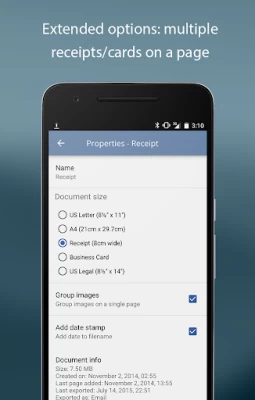
More About TurboScan™ Pro: PDF scanner
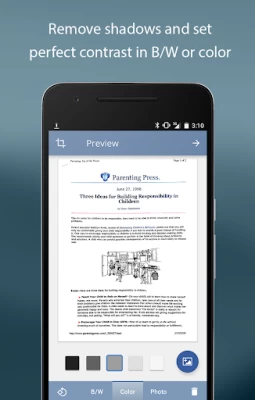
TurboScan boasts a powerful yet easy to use interface. Get instant one-tap brightness, rotation and color controls all on one screen!
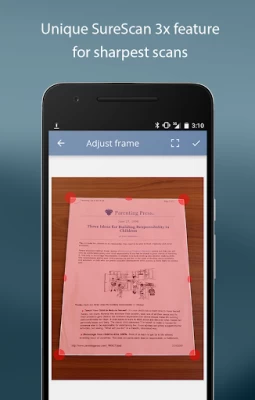
TurboScan also offers SureScan, our proprietary scanning mode for sharper scans (especially useful in low-light conditions.) SureScan requires taking three pictures of the same document with the phone camera.
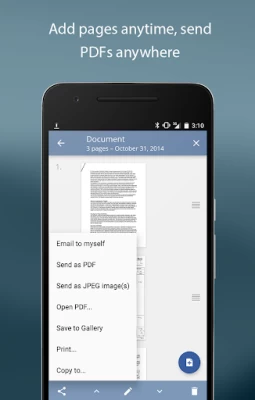
TurboScan's handy "Email to myself" feature lets you send documents to a predefined address, or even upload them to online storage sites like Evernote, with a single tap.
All processing happens on your phone, and the confidentiality of your data is never compromised (no Internet connection needed.)
TURBOSCAN FEATURES:
• Automatic document edge detection and perspective correction
• SureScan mode for very sharp scans
• Ultra-fast processing (under 3 seconds per page)
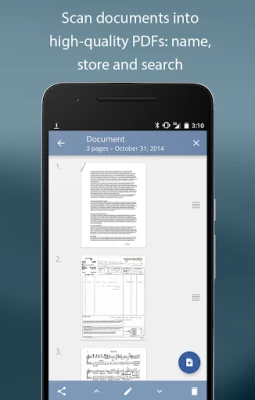
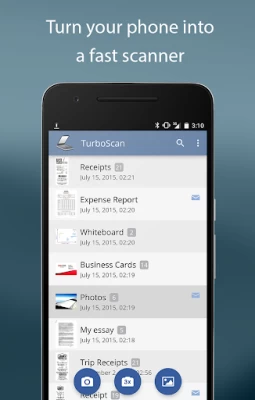
• Document naming, storage inside the app and search
• Multipage editing: add, reorder, and delete pages
• Copy pages between stored scans
• “Email to myself” feature for quick emails
• Email document as PDF, JPEG or PNG, or save to camera roll
• Arrange multiple receipts or business cards on a PDF page
• Open PDFs or JPEGs in other apps like the free Dropbox app (or Evernote, GoogleDrive, OneDrive app, etc) to send to clouds, or fax apps
• Printing via Cloud Print or other print apps
• Instant one-tap brightness, rotation, and color controls
• Compact attachments with adjustable size
TIPS ON SCANNING
• Make sure your document is flat and well lit.
• For best edge detection, include some margin around your document while shooting.
• Use flash in low light conditions, but avoid glare from it with glossy documents.
• If your flash over-saturates images or makes them blurry, please change the flash option in app Settings.
We're constantly improving TurboScan, and we value our customers' opinions and feedback. If you want to send us your feedback or have a problem with our software, please contact us at android@turboscanapp.com before submitting a comment to the store.
Latest Version
July 10, 2024
Piksoft Inc.
Finance
Android
300,738
$4.99
com.piksoft.turboscan
Report a Problem
User Reviews

Vedant Chavan
5 years ago
One of the best Scanning apps. You can scan photos, cards, texts, write-ups, assignments ( which I just it more for ). It's worth it. No watermarks is the best feature I got on this app. It lets you edit the margins of the scanned document. Well it does it automatically too, but the final choice is the user's. It lets you choose between 5 contrast options and also the colours option. It's the best in its kind and lite too.

Adv. Santhan V. Nair
4 years ago
When using 3x mode in scanning, after two clicks, 3rd click get stuck. I am using samsung A70. I reinstalled the app, but the issue persists. In single shot mode app auto focuses the image, but when taking the shot, the image gets blurred. Piksoft replied after a while and they could sort out thr issue. Now its working perfect. Thanks a ton...again 5 stars..

Kit Johnson
1 year ago
I'm so pleased to see this app is available on Android. I loved it on iOS, and it seems just as well designed here on Android. I've been struggling with bloaty subscription-based scan apps on Android for years...it's so nice to be able to remove them and replace with a cleanly-designed, reasonably-priced scan app. Yay for nice everyday tools.

Alexander Moreno
2 years ago
Works great for scanning receipts and other various documents. It's also fairly easy to email multiple scans at one time. The document scans look sharp and clear. You also have the ability to have the app take three scans of a document to generate the best scan. I use the app primarily for scanning receipts and it works great!

Sanya Reyes-Chapman
2 years ago
Love this app. Have used for about 5years. You get clear scans with easy-to-fix options. This app allows easy scanning of differently sized documents. I can't always distinguish between the original and the scanned image. It has saved time and money. Love it! ❤️❤️❤️.

A Google user
6 years ago
Have been using this app for several years now. Very flexible, easy to use, I do my expenses reporting but also all documents that I need to electronically file. Very effective interface with Google Drive, and ability to email the document scanned from my various email acccounts (gmail, outlook). Great stuff.

Miko You
1 year ago
This is my favotite scsnning app. I have this app since 2021. It has autoscan and manual scan. It allows you to crop the new scan, create folders, and organize the scanned documents into one or multipage documents in the files, so if you want to add more documemts to the existing multipage document, you just have to open the file and select that document to add new scans directly. No need to move documents after scanning new documents. Also, the customer support is great. -Catherine Y.

Nate B
2 years ago
Great product! It's easy to use and has lots of features. It captures well in all lighting, handles distortion, lots of output formats, cropping, and adjustments. Basically, a photo editor but better. I use it for pictures, receipts, general screen shots, sharing in different formats etc. and it works so well.

Gábor Bánóczi
5 years ago
I have tried different apps for scanning and this is the one that I consistently find the easiest to use. The file sizes it generates are small yet they are very sharp. I wish it had some internal organizational feature like folders and tags. And a different view to help locate documents.
A Google user
7 years ago
Great app for scanning papers and other images. I can create PDF files or jpg from scans, I find very easy that I can delete or add pages to the file anytime. As well very easy to share specific pages from files or files. A message to the developer that can be considerate as a request. It would be very helpful to be able to sort and organize files in folders within the app. I find using scroll or search bar not always convenient. Thank you Regards
A Google user
6 years ago
Simple & Awesome. Update: I don't know how many years I've been using this now but it's still awesome. the quality is outstanding. I'm a real estate broker and use this app often to scan signed contracts onsite and email them directly to the agent (well, when my clients can't esign for some reason). It's literally help my clients win offers in a tight seller's market.
A Google user
5 years ago
Love it! I use this app to take pix of my kid's progress and grade reports, of business cards, flyers, and items I need to email. I use it to clip things to Evernote, and to take pix of my Bullet Journal spreads! I record my handwritten journal entries as PDFs, and I have used it to scan and send official documents. Excellent multi-page functionality. Love it! I highly recommend it to everyone who needs to scan documents on the go! Update: This app is indispensable!
A Google user
6 years ago
I used this app on my iPhone for years. I recently changed to an Android phone (Samsung S10). I first tried Microsoft Lens, which is easy to use but renders white paper (i.e., most doc's you are going to scan) as grey. I decided to go back to TurboScan. It is super easy to use. The work flow is very logical / intuitional. Renders great looking, high contrast doc's, and white paper comes out pure white! This is a great program that does what it purports to do and does it well.

Matt Black
4 years ago
I bought TurboScan years ago after testing a bunch of scanning apps and use it irregularly enough that I swear each time I forget - like, having seen & used so many all-in-one apps I think, "Why the hell did I buy this app that only scans stuff?" Then I open it up and instantly feel validated in my purchase. It exemplifies apps that do exactly what you need them to do. Quality scans, variety of export/transfer options, clean intuitive interface... It's perfect. Wish all my apps were like this.
A Google user
6 years ago
This is a great app! I like it a lot and use it a lot for my job as a truck driver to scan BOL docs. Haven't found a way to scan totally separate documents (not including separate pages of the same document) back to back without closing the app and reopening it, but that's no big deal. Maybe there's a way. When it comes to getting a clear image of any given page, sometimes the image is fuzzy. I discovered by closing the camera shutter and reopening it this solves that problem every time...

Michael Lamkin
2 years ago
Great app. Great for music copies on the gig. Also great for other things. I keep separate folders nested in my TurboScan folder and occasionally drag and drop different docs to the appropriate folder manually. Update 10/13/23 Still indispensable but don't have as much time to drag files to folders. Would be really nice to have an automatic system! Hope developer considers it.

Karen Kietzke
2 years ago
It doesn't focus properly. Depth of field is terrible - part of the page is in focus and part of it isn't. The new camera driver doesn't work either - it just washes everything out. A different scanning app and the scanning function of the built-in camera app both work fine, so it's definitely an issue with TurboScan. I'm giving it 3 stars because you can still use the image manipulation functionality on images from your gallery.

Diginess Unknown
2 years ago
Pretty good. The pages generated are very high quality. It doesn't have as delay between pages as the last (free) app I tested, and no ads. The only possible negatives I can see are a slightly fiddly interface in generating the PDF file and at the point right after you take the pic, if it doesn't detect that you might want to change the captured area, you don't get that option and won't get it again for that image, so that part definitely needs further work. Still a quality scanner.

Will Hampton
1 year ago
Turbo scan is the single most important application on my iPhone or my Android phone. In both cases, I use it for everything from taking pictures to just remember something to making backups of legal documents. I've a nearly complete history of my range scores to developments in my saltwater fish tanks. The ability to rapidly email digital copies of documents cannot be overstated! Best app ever.

Fidel Ramos
1 year ago
I bought Turboscan in February 2022 and was using it happily together with Syncthing to automatically synchronize all my scans to my computer. This broke in an update long time ago as Turboscan now always saves the scans to its private folder. Extracting the scans is now a painful manual process for me. The developer should support this case, it cannot be that hard, just add a setting for the user to choose where to put the scanned files.









