

UKG Ready
June 13, 2024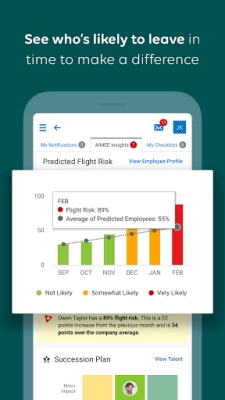
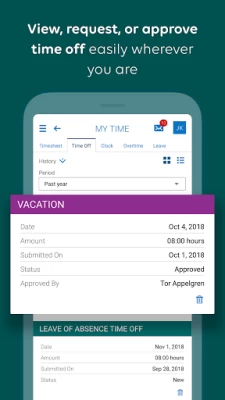
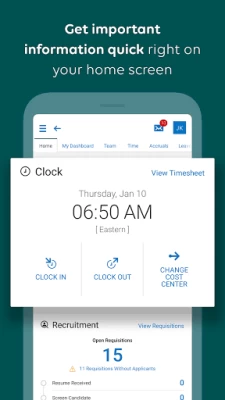
More About UKG Ready
If you’re a manager, we’ve got you covered too. Adjust your team’s schedule to fill gaps, work on performance reviews, handle approvals, or even uncover trends like who’s likely to leave or how your team is feeling about their work so you can make a difference for them and your business.
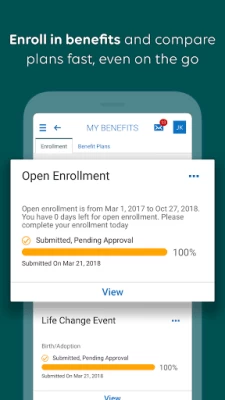
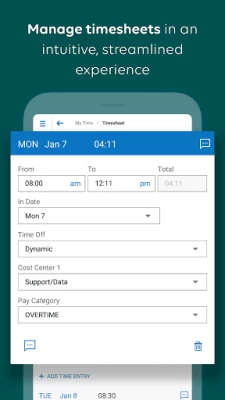
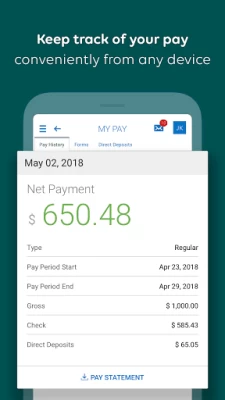
It’s all possible on the go with the Ready mobile app. Connect with us today from your device to get started.
Need help with the app? Check out our resource page: https://community.kronos.com/s/wfr-mobile
Notes:
• To use the UKG Ready mobile app, your organization must enable access and provide you with your 7-digit company shortname.
• Your organization determines which features you can access. Contact your manager or company administrator with any questions about logging in, what features are available to you, or connection issues.
Latest Version
1.92.11
June 13, 2024
Kronos Incorporated
Finance
Android
1,830,363
Free
com.kronos.workforceready
Report a Problem
User Reviews

Toni
4 years ago
Cumbersome. A lot of options and menus that seem to lead the user in circles or are nonfunctional. Had to install 2 separate apps. Can't save login or password, so have to type it in every time. Can't view change requests. Missed clockouts result in staying clocked in until the next time you go to work and then clock out and right back in. And UKG help won't speak to users, only the employer. A lot of room for improvement.

Drew Kosonen
4 years ago
Been using this for about 6 months now, and I hate it. I'm always working in places with limited service, and always fighting with the app to get it to connect. I end up wasting 5 minutes every time I clock in or out because the app says it's not online while my phone has service. Absolutely infuriating. It shouldn't need to be online every second of the day. It should be able to record punches and then sync them later whenever it is online.

James Hinson
2 years ago
Absolute trash app. I understand having a security system going, but I HAVE to change my password every 3 months? That's Absolute garbage. Who is creative enough to make a new password 4 times a year and not forget it? I've been locked out of my account several times for forgetting password because I have to make a new one so often. I shouldn't have to change my password unless I have security issues. It shouldn't be a hassle to access MY information. Ridiculous. Consider other apps!

Elizabeth Rainwater
2 years ago
When it works it's not bad. Always asks for 2 factor authentication even when you tell it not to. Which only works with text not email. Which is especially annoying as I'm trying to access the all to change my email. Disabled it through my job. Received an email verifying that it has been disabled, but is still asking for it. Just hope this all is more secure than it is accessible.

Mari Schroedinger
5 years ago
Update: Whatever happened on the last update completely destroyed the UI. I no longer have a clock in screen when I log in. My dashboard is completely blank. I have to go into the main menu to find the clock screen. I waste a good 5 mins trying to clock in or out everyday. Not the cleanest or most user-friendly interface, but generally seems to do what it's supposed to.

Carl Hollowood
1 year ago
This app will not work at my plant on my phone. I have the s23 Ultra. I have full bars at work and it will not go pass the green screen. Once I get home with less bars and not on wifi it works. A coworker of mine had less bars and was running the app while at work with no issues. For me it won't do a thing. Why does it work for one and not the other? You would figure with more bars better signal it would work better then a phone with less signal. Very common issue from other reviews.

JUAN CARLOS
1 year ago
It never works unless it's on wifi. The whole point of having the app is to avoid going into the office to clock in, right? But no. Every single day i try to open the app. It wont load. I have to go to the office to connect to the wifi for it to work. And its not like my phone signal is weak. I can stream movies all day long on HD. Play music. Play games. All apps work with regular data. But to clock in or out. I need to connect to wifi... it's stupid.

Robert Walsh
3 years ago
I have been using this app for almost a year with no issues. I recently changed phones and downloaded the app again. Nothing but issues now with the app not loading. I have to restart my phone twice a day. Once to clock in and one to clock out. This had been going on for over a month now. Please come up with a fix. Once I'm logged into the app, it works very well with no issues.

Greg Beran
2 years ago
Constantly have problems with the app not loading past the splash screen. Doesn't seem to work at all since my phone updated to Android 13 either. I don't think they designed a mobile app, they just took a website and are trying to make it run on a phone. The message that comes up when logging out that tells you to close your browser windows should be enough evidence of that. Then if you do log out and try to come back later, it just keeps coming up with the message that it's logging you out..

Niomi Green
3 years ago
The app rarely loads, I run an S22 and have 40mbps minimum and it loads quickly on the website, but on the app it gets stuck on the main screen with the arrow. It's loaded a couple of times so I know it works, but 95% of the time the app won't load whatsoever. I've force stopped and restarted, restarted phone, etc. Again, I know it works because it has before but more often than not it just freezes and does nothing. The main takeaway here: Stick with the website. It's reliable and very quick.

R
2 years ago
This app is a downward spiral and does everything in it's power to actually work correctly. Everything started off great, but as the weeks and months went on it gets worse. Would intermittently not connect to the server, now will not connect unless on wifi. Have verified this from different individuals with different phones and OS. They roll out updates once a century so don't hold your breath. This is the only review I've written on an app due to the fact of how terrible it is.

Barb Fudali
4 years ago
I really like the biometric log in. The system connects well with the internet, which makes for quick and easy access. It would be helpful to stay connected throughout an entire shift, instead of having to log back in with every client or class. I also find the system cumbersome, if I have to edit, because the change is not visible to me, upon completion, making it hard to know if I've accomplished the task.

Lakeview Methodist
5 years ago
Handy to have a time clock on my phone as I work between separate entities on the same campus. I can transfer my time from one account to another on the fly. Visually its clean and fairly appealing. Pretty friendly to navigate through. There are still aspects of the program I prefer navigate on a PC. Main issues with the app are every time I log in (including the first) it displays a message about frozen punches. Also, when connection is iffy the app may read a punch when the system doesn't.

Michaela Hager
4 years ago
On the plus side, it's very convenient to be able to clock in and out on my phone. It's fairly intuitive to use. On the negative side, it's often insanely slow to load, it freezes regularly and I have to restart it, and the dang thing incessantly asks me to rate the app every single time I clock in or out, with no option to not be asked again. It's deeply annoying, which is why I'm leaving this exasperated review. I just want to clock in or out without getting pestered.

Kayla Burchfield
2 years ago
More times then few, and way more often then I would like, the app freezes on my screen completely white and I have to uninstall the app and re-download it and start the login process of verification and sending codes starts over again. It is very frustrating when you are simply just trying to clock in on time and have to completely restart the whole app. And I have tried just restarting my phone when this happens and clicking back on the app, but it will still remain frozen until deleted.

Ted Loenser
4 years ago
I do not enjoy this app. It's not very intuitive, it has problems when switching from wifi to cell signal, and it seems like the times I've needed it to work the most are the times it gets stuck on the loading screen. If everything is running smoothly, the app is great. If you make a mistake or it gets stuck on the loading screen, it's a pain to make corrections. There's a lot of room for improvement!

Annah Brunson
1 year ago
App never works when I try to open it with my S21 5G network. tried turning on the LTE network, still nothing. Others say it works with wifi, I don't have wifi at home to try it & that's the only place I use the app. All it does is sit on the loading screen until it goes black. The last 2 times to get the app to open I've had to Uninstall the App. Turn my phone off, NOT RESTART, actually turn it off. turn my phone back on, & redownload the app. Idk why that works, but it's very Inconvenient!

That Guy
1 year ago
I quit using it after some update or something! Was supposed to send me a email with a Totp code! Well it's been close to a year and still waiting for it! Tried getting it fixed at work today and all they can do is change my password and didn't know anything about a code after that! So attempted it and same problem need that stupid code I never got and of course there's no contact or support for this junk app! If I could give zero stars I most certainly would pick that option!

Sue Bartlett
1 year ago
This app requires a verification code EVERY time I try to log in. It seems to be a problem with Android phones. Coworkers who have iPhones don't have this issue. I am VERY UNHAPPY with UKG/Kronos. An Update to the review: the glitch in the system seems to be fixed. Android phones are now syncing appropriately to be able to login without having to get a verification code every time. Thank you for fixing the problem.

Brianzilla2004
1 year ago
I absolutely despise this pathetic app. Half the time it lets me log in using mobile data, but the other half it stays on the splash screen unless I connect to WiFi. I must've spent a few extra hours in total time just trying to connect to a weak WiFi signal to clock out. I just now wanted to check my schedule and it won't let me log in, so I need to wait hours until I get home. I've never experienced anything like this with any other app. It's a mystifyingly terrible app. Fix it!









