
VMware Horizon Client
July 05, 2024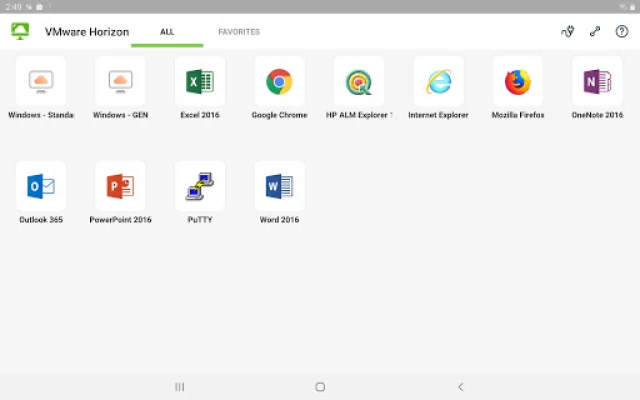
More About VMware Horizon Client
This app uses the Device Administrator permission.
FEATURES:
ENHANCED USER EXPERIENCE
The VMware Blast Extreme protocol used with Horizon 7 is designed and optimized for mobile users. Blast Extreme leverages H.264 hardware decoding to deliver the best remote experience while reducing power consumption.
LEAVE THE DESKTOP BEHIND WITH HOSTED APPLICATIONS
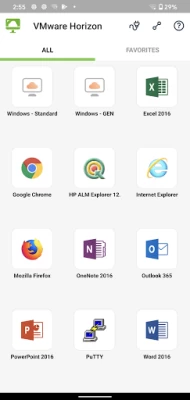
VMware Horizon 6 and later supports hosted applications in addition to virtual desktops. With hosted applications, leave the desktop behind and run applications like local Android apps.
BEST OF BOTH WORLDS
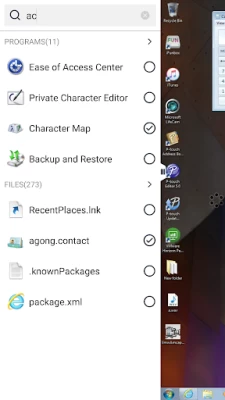
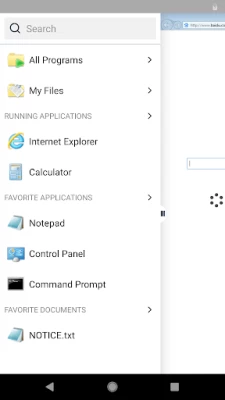
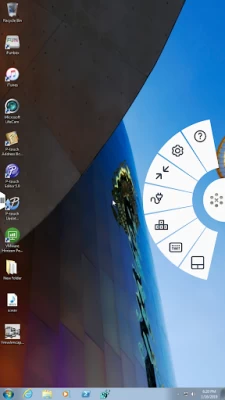
Unity Touch bridges the gap between your touch screen and your Windows applications. With Unity Touch, you can easily browse, search, and open Windows applications & files, choose favorite applications and files, and switch between running applications all without the Start Menu or Task Bar.
UNMATCHED PERFORMANCE
The adaptive capabilities of the Blast Extreme and PCoIP display protocol make your virtual desktop fast and responsive regardless of whether you are connecting over your corporate WiFi network or over cellular connection at a local café.
SECURE FROM ANY LOCATION
Whether you’re at your desk or away from the office, you’re always secure with VMware Horizon. Leverage smart card authentication with the Biometric Associates baiMobile smart card readers. Use the newly integrated RSA soft token for simpler access.
NOTE REGARDING APPLICATION PERMISSIONS: When you install the VMware Horizon Client, you will be prompted to allow the app to read phone status and identity. These permissions are due to the integrated RSA SDK and the RSA soft token feature. For security purposes, the RSA SDK requires access to the phone state, device's network state and Wi-Fi state in order to verify the device's identity.
For more information, refer to RSA FAQ: http://www.rsa.com/android/help120.htm
EULA
http://www.vmware.com/download/eula/
Latest Version
8.12.0
July 05, 2024
VMware, Inc.
Finance
Android
1,859,788
Free
com.vmware.view.client.android
Report a Problem
User Reviews

ST Sztan
4 years ago
Auto scaling works great - please note that Windows might take a couple of minutes to adjust window sizes. However, e-ink screen underperforms expectations, static image is shown after typing before new mouse click event - meanwhile e-ink is capable of displaying videos.

kx “Xhoana Koca”
3 years ago
Recently I am unable to log in to the vdi when I use my phone data. It takes to long to load and the screen is just white. The vdi opens normally when I use Wifi. I also tested it by using mobile Hotspot from my other phone and the vdi opened up. So i think the issue is that it only works when the phone is on wifi.

free spirit
3 years ago
It was awful. I need to use distant Chrome browser just to check some info, and I cannot log into an account on the website just because your app doen't let any keyboard appear! The image doesn't fit the screen, also, which is extremely annoying. The pixels look like an old Mario game under the water... That's so bad. Won't recommend to anyone. I'm highly disappointed, as I've used your desktop app and it was fine, but THIS :(((

A Google user
6 years ago
It was working fine and now everything is so zoomed in I can't maneuver around the desktop without difficulty. it also changed the settings on my work computer and icons appear large and Windows sizes and taskbar are distorted.
A Google user
6 years ago
Mobile upgrades for Apple and Android will no longer connect to virtual desktops, displaying "Remote Session Disconnected" immediately upon connection. Sometimes, another error comes up, stating, "The display protocol for this desktop is currently not available. Please contact your system administrator. Please check it and try again."
A Google user
6 years ago
Crashes on start. Appears to define a class for touchwiz which wont work on a non samsung rom. Please rewite to not require touchwiz. I determined this looks at the build.prop for make / model info so a line of code to confirm if rom is touchwiz enabled and a fall back to not requiring it instead of crashing would be nice.
A Google user
5 years ago
There is an issue with using the keyboard input when Samsung Pass is turned on. There is no way to get around it and keyboard input is blocked. This happens 100% of the time in Samsung DeX mode and must be fixed. Camera is held to original orientation vs. using the correct camera rotation release API for DeX.

Nolan Platt
5 years ago
I am consistently having the VDI freeze and boot me out saying the Network timed out. It really is a MAJOR compliance issue with my company if my ability to save notes and other data is compromised like that. It's better than not being able to work at all but it is wicked frustrating. Some of us stand to lose very large bonuses and other financial incentives over stuff like this. Needs a fix IMMEDIATELY.
A Google user
6 years ago
The new update .10 version has improved security for TLSv1.0 but after this i am not able to establish connection, it works if older version is used. We have updated TLS version in our environment. Yes i can connect via web page, the issue is with application only. Is it required to open a case at VMware can't this be fixed via this, i am horizon admin at my organisation.

Roumen Ivanov
5 years ago
There are 3 months and NO reply. I see other user having the same problem... Hello, I have Samsung A70. After upgrading to Android 10. Your App stopped working. Message displayed is: 'Unable to connect to server. Operation in progress. Try again.' I try to uninstall and re install your latest Version. This did not work. Any ideas please. It stopping me to work☹.Not haappy!

Benjamin Barr
5 years ago
So close... I have the duo... And besides taking forever to load up compared to my old phone, it works amazingly well. All of the touch features work and the pen is smooth, it doesn't recognize the buttons or that a pen is close to the screen which would take this to the next level but it's better than their windows app. If you put the desktop in tablet mode windows snap to the break in the screens, I wish the app would recognize the screens as two screens so desktop mode was more usable.
A Google user
5 years ago
This app works great and is hands down the best way to remote into VDI from any device, even mobile phones. You must have your server network, firewall and VMware connection servers setup properly to get full use of this app. Tip: PCoIP will give you the best overall feel and performance. VMware Blast is great but does not give you the "like a desktop" feel. It meant more for the convenience of the HTML5 browser interface. You can use RDP but that's at your own risk.
A Google user
5 years ago
Works well on Samsung S10. Can get 4096x2160 (cinematic 4k) in presentation mode, not Dex. The full screen touch pad in presentation mode is locked to portrait so external Bluetooth mouse is locked to phone screen portrait width of 1440 (and 3040 height). Landscape touchpad will allow for 3040x1440 mouse real estate. Please consider adding this feature. Everything else is works just like on big screen desktop.
A Google user
6 years ago
Once again VMware have buggered up the APP. Previous version was OK, Don't update to this version 4.10.0, Running on my Samsung S7, screen resolution has decided to be tiny, the login parts of the App are huge. Options for Mouse pad etc. don't fit on screen, mouse pointer can't be seen. Samsung keyboard stays on top, have to hit back button. All in all they have stuffed it AGAIN. I don't know who does there real world testing, obviously someone who doesn't live in the real world !!!

Parag Kulkarni
1 year ago
Echo on teams, when we use Teams the other person hears an echo, basically hear their own voice. Does not happen on iPhone.

James Racanati
1 year ago
Why are notifications blocked and unable to be enabled? I used to get the notifications on my watch and now it doesn't work anymore. Please fix!!!
A Google user
5 years ago
This is a client for VMware Horizon solution. It requires VMware Horizon to work. 90%+ of configuration happens on the back end. When configured correctly it's a lovely app, and I especially like the ability to turn my screen into a touchpad. Most 1-2 star reviews are from people that don't understand what it really is, have incorrectly configured back-ends or don't unserstand that they need to solve their issues with their corporate IT and not just post "I can't login - please fix!!!!" on Google Play.
A Google user
6 years ago
The current version of this app cannot perform DNS resolution. If you enter the hostname of your VM server, it will tell you it cannot connect. If you enter the IP address of the same server, it will work fine. The current version of this app also requires permission to make phone calls, for seemingly no reason. If you deny it, it crashes. If you allow it, it works fine. As long as you keep these two baffling bugs in mind, you'll have no problem accessing a VM with this app; but I can't imagine how it got published in this state.
A Google user
6 years ago
--Final Update-- After stop using it for almost a month, I decided to give it another try since I forgot to bring my work laptop. Surprisingly, it stopped trying to launch Chrome and worked like I expected it too. Not sure what changed and don't recall seeing any updates. Give it total of 4 stars. --Second Update-- After using this app for a while now, I found some annoying points about it. First is the fact that both Horizon and Workspace One app keeps trying to launch through Chrome. Even after logging in through the browser, when I try to connect to my VDI, it keeps trying to launch chrome itself. It makes me wonder what the point of installing both of these apps. Removing 1 star due to poor implementation. --UPDATE-- Managed to get it working almost 2 week later. After trying it out I found myself pleased with the result. With such a small display, it is definitely not great to work on. However, perfect for emergency situations. Also, this app plus Samsung Dex is a great combination. --First Post-- Doesn't work. Getting error code 503 when trying to connect. It works fine when opening through browser so most likely the problem is related to app.

Nicholas Kokkinakis
2 years ago
I figured this thing would run like a turd on my old phone, but it actually works really well. It's not the smoothest app of all time, but it does work almost as well as it does on a PC. I'm able to load up my company's VDI and check and work on various things, mostly text-based, when I'm out and about if someone has a question. Haven't tried it with anything remotely graphics intensive, get it?, but it does work quite well









