

Workforce Tools
August 12, 2024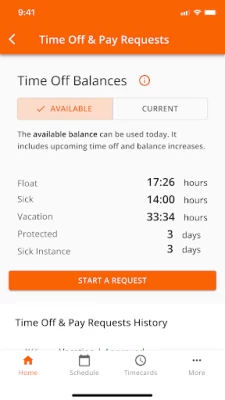
More About Workforce Tools
Latest Version
August 12, 2024
The Home Depot, Inc.
Finance
Android
658,909
Free
com.homedepot.thdworkforce
Report a Problem
User Reviews

Wanda Simmons
4 years ago
All of a sudden I wasn't able to get into the app...deleted and reinstalled the app and still not able to get past the large orange apron on the sign in page. I can barely get into the terms of use...please enable the sign in button. My password hasn't changed ot is it due to be updated so I don't understand why the app has stopped. UPDATR 7/9/21 A new version of the app is now available in Playstore and once downloaded it works just like the old version!! Thanks Developers

Samantha Ford
3 years ago
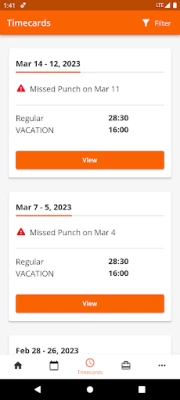
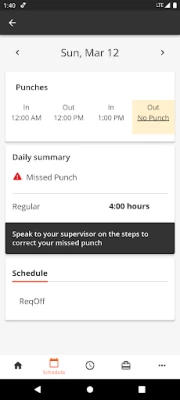
Crashes regularly logs me out randomly and half the click able tabs just redirect me to a page that is not even related to what I'm trying to get to. I haven't been able to load the app in 2 days. This makes it very hard to clock in an out and impossible to check my schedule for any changes. I also haven't been able to get to my pay information for a fee weeks. Very buggy needs alot to fix.

AMZ CONSULTORES - IURI AMAZONAS
4 years ago
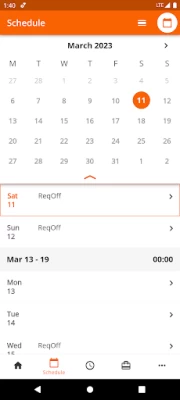
Worst possible. Firstly, I can't use fingerprint unlocking function anymore. Secondly, it isn't connecting even through the user id and password. Finally, the screen showing the schedule doesn't show the it monthly anymore. The pay stub access is the only good in the new version. What's the point of doing something that is worst than the previous?

Kasumi Yae
3 years ago
If I could give a zero star to this app I would in a heartbeat. I can't even log in, it keeps taking me back to the first page when u enter the app for the first time. Because I'm sure my User ID, password and store location are right. I've tried uninstalling and reinstalling but still doesn't work. Please fix this issue, a lot of workers have been complaining about the issue of login so fix it. I'm a new employee of Home Depot and this is very frustrating.

A L
1 year ago
Working intermittently since few weeks ago. Kept getting access denied error. I had to clear the cache, reboot phone, Uninstall, reboot, waited 2 days later, reinstalled app then it worked. And now it only works when it wants to. It used to work fine until a few weeks ago. And no matter what, I dont have access to my payslips! Haven't had access to payslips on and off for over a month and then it completely changed to no access to payslips. I have to go through another app to view payslips. 😭

Taezya Ciar
3 years ago
This is a really easy set up and a good alternative to logging into MyApron. I only have one problem with it and that is I have to keep logging into it everyday. It says it only logs you out if you change your password, but that isn't true or isn't true foe everyone. I have to log into it everyday. It NEVER saves my login like it says. Other than that it's a convenient place to find everything I need.

Bradley Capko
4 years ago
Won't let me sign in after the 4/2/21 update. Now it's wasting my time and the new look isn't as good as the old version. Why do we need an internet connection to log in?? WiFi doesn't work in the parking lot or awY from the store if you're at lunch. If it's not broke, why fix it? I have made numerous comments regarding notifications on this app!! I, for one, DO NOT want audible notifications, settings would be great.

Victoria Suozzo
2 years ago
Great when it used to work, ever since a recent update in December or January the app doesn't recognize that I have internet connection on my phone - the only app to tell me I have 0 internet connection even after turning airplane on and off. Can't do anything because I can't even get the websites to work anymore either, so checking my sick and vacation time is literally impossible. Google Pixel 6 if that's relevant.

Dee Clifton
1 year ago
Recently, the app hasn't been connecting for me. It always says access denied. Yet others at work can use it to clock in and out just fine. I can't find out what days and times I am scheduled for work! Several weeks on, it's STILL not working for me at all!! I have tried to work with tech support, but they don't seem to know how to fix this. This started in October. The app doesn't even take my info at all. It just denies me. If I could rate it at zero stars, I would.

Tyler Brownell (mjr.tman0617)
3 years ago
It constantly logs me out and forces me to sign in again. I understand this as a security feature, but sometimes it'll keep me logged in for a week or more while other times I log in several times a day. If internet connection is spotty at all (like at my work) it might take a dozen log in attempts before it goes. In the app itself, any use of the phone's back arrow exits the app. This makes navigating the menus very annoying.

A Google user
6 years ago
This app only works when it feels like it. It won't recognize my fingerprint to log in and just sits there. When logging in with my credentials it wll let me in, but takes forever. No push notifications at all and viewing anything but your schedule is like pulling teeth. It's easier to just take a picture of my scedule and pull it up at will...takes litterally 2 seconds. This app is complete garbage, like most newly implemented Home Depot programs.
A Google user
6 years ago
More convenient for viewing schedule and time detail than MYTHDHR. It would be a 4-star app if users could print from the app. If HD really wanted to make it great (5 stars), they could add a button for "calling out" via text up to 4 hours before the missed shift or late arrival (after the fashion of the Subfinder system used by teachers). Only associates calling out with less than 4 hours' notice should have to wait on the phone to talk to an MOD. This feature would be a boon to clopeners.

Maureen Maguire
2 years ago
UPDATE: 1.3.23 I have deleted and reinstalled this app so many times that I've lost count . I've powered off my phone and restated it. I still get the spinning orange wheel. I thought they were supposed to be working on this problem. *** I've been unable to log into the updated app. I get a quick orange window, then a white background with the orange wheel spinning. I've rebooted my phone several times. I've uninstalled and reinstalled the app several times, too. What's going wrong?

Rachael Gotterson
4 years ago
App doesn't stay signed in anymore, have to sign in literally every time I open the app. App sometimes has an issue with updating when someone clocked out/in making it hard to check during lunch. App sometimes doesn't load schedule and/or the other screens, making it impossible to pull out the scan code for clocking in. Have to take photo of my barcode and use that, because it's more effective than the App.

Chad Lamb
4 years ago
Initial experience was ok. The app was adequate. As it's been updated (and constantly down while it's being worked on), it's failing on a regular basis. Can't really do anything, today. I just get a person skiing downhill (presumably out of control and about to hit a tree). Not really worth having. Just screenshot your QR ID and uninstall.

Peter Kelleher
4 years ago
Since 6/1 I can log in but all I can see is my next shift. Otherwise it's the spinning orange wheel of death. Nothing else will load. Too many people rely on this app for it not to work. 7/26/21. Again, after this latest update, I can't get into my schedule or my time cards. It's very frustrating that after every update there are issues. The app just keeps getting worse. For something that's supposed to make things easier it just doesn't live up to it.

Phillip Bonnes
4 years ago
The majority of my experience with this app has been mediocre, now it is awful. Most of the time the app struggled to perform its most basic features. Checking my schedule was a coin flip between actually seeing my schedule or the app crashing. The links to do the health check would often crash the app as well. Lately the app doesn't even keep me signed in. I have to login every time I open it. Beyond annoying and beyond useless.
A Google user
6 years ago
I have been using this app since I started my job at Home Depot. I really enjoy the easy userface, however I would like to see: A quicker and easier loading time between logging in, and seeing my schedule The fingerprint sensor working on the first try (It does not, and not very well either) An option to print my schedule right from the app Once I see some improvement, I will rate higher.

A Arnold
1 year ago
This app functuons most of the time, but even then you have to close the app or reload the screen to get it to work. Everytime I try to put a shift up for grabs the page says there's been an error and to try again in 5 seconds. Other tabs in the app are dysfunctional sporadically. I've had to re-download it 4x in the 3 months I've worked here. Definitely frustrating. 95% of your recent reviews are 1 star and the rest are 2 stars.

James Thomas
1 year ago
It functions but tends to fall short in usage. I am not prompted to save/update my password on log in, and it will log out the session randomly enough to be a hassle to use for clocking in or out. Also, there is no method to export your schedule to another app, such as google Calendar, so I have to manually enter my worktimes.









